
AdminToolkit
AdminToolkit — Project Administration Tool
AdminToolkit is a specialized plugin created for comprehensive management and administration of your project. Its functionality is aimed at optimizing routine tasks and providing administrators with convenient tools for monitoring the system.
Important note: The plugin is currently in active development (alpha/beta testing). This means that some functions may work unstable, and we are actively working to improve its stability.
Your feedback is the engine of development! We not only welcome bug reports, but also welcome your suggestions for new functionality. If you have an idea that could make administration even more efficient, share it! We will consider all options and try to implement the best of them in future plugin updates.
Please report any bugs you find or send your suggestions for improvement. Together we can create the perfect tool.
Functional:
- Check for cheats. ☑
- Separate chat for Administration. ☑
- Separate chat for Checking. ☐
- /at reload command to reload the config. ☐
- /at invisibl on | off Enables and disables full Administrator detection. ☐
- /at rd on | off command working day for Administration. ☐
- Add LiteBans support. ☐
- When the Administrator starts the working day, he cannot use the inventory (setting in the config) ☐
- Report system. ☐
We are constantly working on expanding the functionality. New features are added based on both our internal vision and your valuable suggestions. Your ideas help us make the plugin exactly the way you need it.
How to use the plugin:
- /at check onAnyDesk | onDiscord - Commands to start checking via AnyDesk | Discord
- /at check off - End check without any messages
- /at check no - End of check with subsequent blocking of the player (for now only forever)
- /at check yes - Ends the check and sends a message to the player about its successful completion
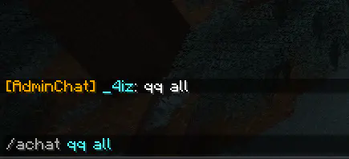
- /achat - Chat for administration
- Edition: Minecraft Java
- File type: .jar
- Minecraft versions listed: 1.21, 1.21.1, 1.21.2
- How to install: Install the matching mod loader (Forge, Fabric or NeoForge) for your Minecraft version. → Download the .jar. → Put it in the .minecraft/mods folder and launch that loader profile.
- Where to get it: Opens on Modrinth — not every file is mirrored on our own servers.
Install steps are the general flow for this file type — How to install Minecraft Java mods & modpacks walks through it step by step.
- Ships as AdminToolkit-1.0.2.jar — drop this file into the mods folder
- Download size: 18 KB
- Download link checked 20 Aug 2026 — working
These come from our own check of the pack file, not from the source page.