

🧹 PickupFilter
PickupFilter is an extensive item filter pickup solution featuring customisable profiles and GUIs.


Profiles?
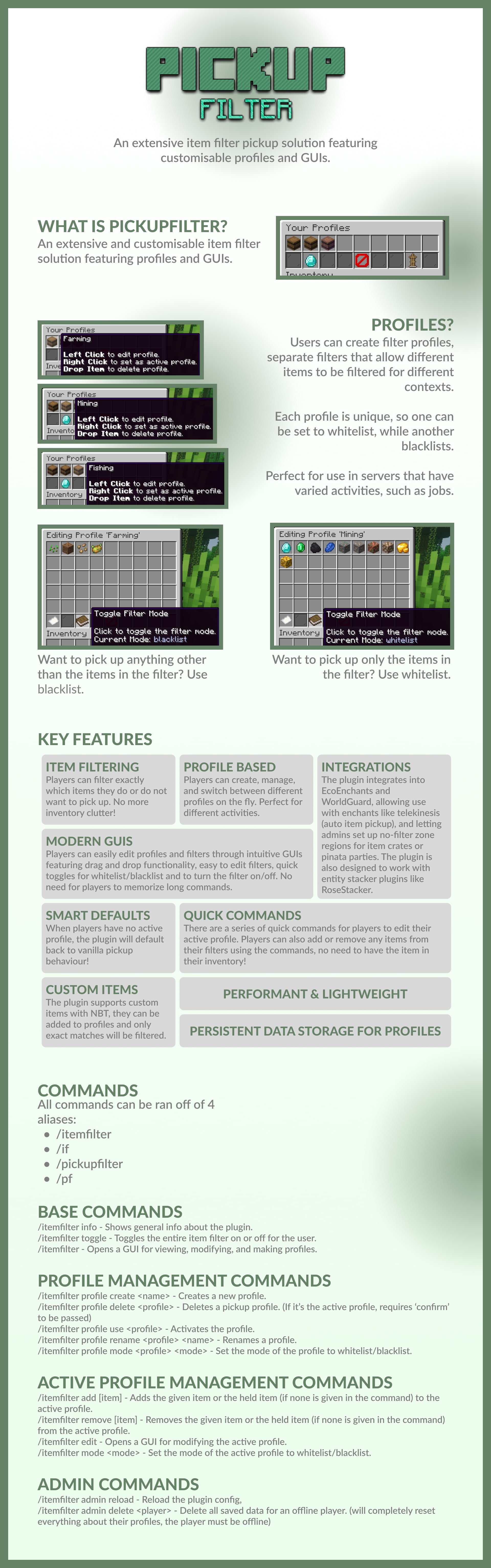
- Users can create profiles, which are separate filters that allow different items to be filtered for different contexts.
- Each profile is unique, having their own filtered items, and own filter state (whitelist/blacklist).
- Perfect for use in servers with varied activities, such as jobs.
Key Features
- Item Filtering: Players can filter exactly which items they do or do not want to pick up. No more inventory clutter!
- Profile Based: Players can create, manage, and switch between profiles on the fly using commands or the GUI. Perfect for varied activities like jobs.
- Integrations: Integrations into plugins like EcoEnchants and WorldGuard are present, allowing enchants like telekinesis (auto item-pickup) to function with the item filter, and letting admins set up no-filter zone regions for item crates or pinata parties to ensure no items are lost. The plugin is also designed to work with entity stacker plugins like RoseStacker.
- Modern GUIs: Players can easily edit profiles and filters through intuitive GUIs featuring drag and drop functionality, shift click functionality, easy to edit filters, quick toggles for blacklist/whitelist and to toggle the filter on/off. No need for players to memorise long commands.
- Customisable: All GUIs can be customised to re-arrange items, hide or show buttons, change item names, lore, materials, there's even server resourcepack support with custom model data! View the config file here to see what kind of things you have control over!
- Smart Defaults: When players have no active proifle, the plugin will default back to vanilla pickup behaviour.
- Quick Commands: There are a series of quick commands for players to edit their active profile. Players can also add or remove any vanilla items from their filters using the commands, no need to have the item in their inventory!
- Custom Items: Support for items with custom NBT is present, they can be added to profiles and only exact matches will be filtered.
- Performant & Lightweight
- Persistent Data Storage using JSON files for each user. These can be deleted via admin commands!
⚙️ Integrations
Required Dependencies
WorldGuard
WorldGuard is a required dependency. The flag for WorldGuard regions is pickup-filter, and by default it is allowed everywhere.
To entirely disable the item filter in regions, set the flag to deny.
It may be useful to completely disable the item filter in regions such as crates, pinata parties, drop parties, etc to prevent any unwanted behaviour.
Other Support
EcoEnchants
Support has been added to allow enchants like telekinesis (auto item-pickup) to take the item filter into account.
RoseStacker
RoseStacker support exists to ensure filtered items are stacked appropriately when dropped on the ground.
⌨️ Commands & Permissions
Command Aliases:
/itemfilter
/if
/pickupfilter
/pf
Main Commands
| Command | Description | Permission |
|---|---|---|
/itemfilter info |
Shows general info about the plugin. | No permission |
/itemfilter toggle |
Toggles the entire item filter on and off for the user. | pickupfilter.toggle |
/itemfilter |
Opens a GUI for viewing all profiles, which can be clicked to edit them. | pickupfilter.profiles |
Profile Management
| Command | Description | Permission |
|---|---|---|
/itemfilter profile create <name> |
Creates a new pickup profile. (max number of profiles up to config settings.maxAllowedProfiles) | pickupfilter.profile.create, pickupfilter.profile.create.max.<i> |
/itemfilter profile delete <profile> [confirmation] |
Deletes a pickup profile. (Requires "confirm" if it's the active one.) | pickupfilter.profile.delete |
/itemfilter profile use <profile> |
Activates the given profile. | pickupfilter.profile.use |
/itemfilter profile rename <profile> <name> |
Renames a profile. | pickupfilter.profile.rename |
/itemfilter profile mode <profile> <mode> |
Sets the mode of the profile to whitelist or blacklist. | pickupfilter.profile.mode |
Quick Active Profile Management
| Command | Description | Permission |
|---|---|---|
/itemfilter add [item] |
Adds the held item (or specified item) to the active profile. | pickupfilter.add |
/itemfilter remove [item] |
Removes the held item (or specified item) from the active profile. | pickupfilter.remove |
/itemfilter edit |
Opens a GUI for modifying the active profile. | pickupfilter.edit |
/itemfilter mode <mode> |
Sets the current profile to whitelist or blacklist mode. | pickupfilter.mode |
Admin Commands
| Command | Description | Permission |
|---|---|---|
/itemfilter admin reload |
Reloads the plugin config. | pickupfilter.admin.reload |
/itemfilter admin delete <player> |
Deletes all saved pickup & profile data for an offline player. (player & console runnable) | pickupfilter.admin.delete |
Smart Autocompletion
All commands feauture smart autocompletion for information like profile names, whitelist/blacklist mode, and vanilla items for adding/removing to or from profiles.
📜 Config
View the default config here.
View Information Graphic (includes screenshots of the GUIs)
❓ Support
Have any questions? Join the support Discord below and create a support ticket:

Alternatively, you can join the support Discord using the following invite link: https://discord.gg/88j6jF5WYK
- Edition: Minecraft Java
- File type: .jar
- Minecraft versions listed: 1.21, 1.21.1, 1.21.2
- How to install: Install the matching mod loader (Forge, Fabric or NeoForge) for your Minecraft version. → Download the .jar. → Put it in the .minecraft/mods folder and launch that loader profile.
- Where to get it: Opens on Modrinth — not every file is mirrored on our own servers.
Install steps are the general flow for this file type — How to install Minecraft Java mods & modpacks walks through it step by step.
- Ships as PickupFilter-1.1.3.jar — drop this file into the mods folder
- Download size: 924 KB
- Download link checked 20 Aug 2026 — working
These come from our own check of the pack file, not from the source page.