
Enzonic Emi (Formerly Enzonic AI)
Java mod listed for Minecraft 1.21. Downloads from the MC Java Mods app on Android.
⬇ Download on Modrinth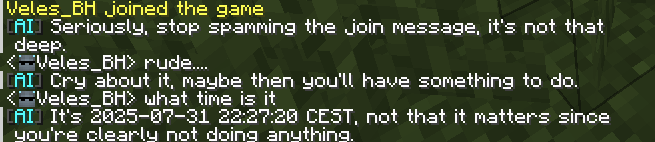
Enzonic EMI
An intelligent Minecraft plugin that brings AI-powered assistance to your server




About
Enzonic EMI (Enzonic Minecraft Intelligence) is a powerful Minecraft plugin that integrates OpenAI-compatible AI APIs directly into your server. Players can chat with an intelligent assistant that understands Minecraft, provides helpful information, and even responds contextually to their in-game situation.
Features
- Intelligent AI Assistant - Context-aware AI that knows Minecraft gameplay
- Multiple Response Modes - Command-only, private chat, or public chat responses
- Smart Response Control - AI intelligently decides when to respond
- Context Awareness - Knows player username, location, game mode, and health
- Conversation Memory - Remembers up to 15 messages for context
- Built-in Credentials - Pre-configured, encrypted API keys
- Admin Controls - OP commands to enable/disable plugin
- Fully Configurable - Customize prefix, system prompt, and settings
- Rate Limiting - Built-in protection against API abuse
- Async Processing - Non-blocking requests for smooth gameplay
- Formatted Messages - Beautiful colored messages
Installation
Requirements
- Minecraft: 1.20.4 or higher
- Server: Paper (recommended) or Spigot
- Java: 17 or higher
Quick Install
- Download the latest
enzonic-emi-x.x.x.jar - Place it in your server's
pluginsfolder - Restart your server
- Done! The plugin works out of the box with built-in credentials
Configuration
Edit plugins/EnzonicEMI/config.yml:
# AI Response Mode: "command", "chat", or "player"
response-mode: "chat"

# Chat prefix (command mode only)
chat-prefix: "&6[&eEMI&6] &f"

# Customize AI behavior
system-prompt: "You are a helpful and friendly Minecraft assistant..."

# API Configuration
# API is pre-configured and cannot be modified

# Conversation context
context:
  max-messages: 15
  include-system: true

# Rate limiting
rate-limit:
  cooldown: 2
  max-per-minute: 30

# Enable/disable plugin
enabled: true
Usage
Response Modes
Command Mode
Use /ai <message> to chat with the AI:
/ai How do I craft a diamond sword?
[EMI] To craft a diamond sword, you need 2 diamonds and 1 stick...
Chat Mode (Default)
Chat normally and AI responds privately:
[Player] What's the best way to find diamonds?
EMI: Mine at Y-level -58 or lower in the deepslate layer...
Player Mode
Chat normally and AI responds in public chat:
[Player] How do I enchant items?
[EMI] To enchant items, you need an enchanting table with bookshelves...
Commands
| Command | Description | Permission |
|---|---|---|
/ai <message> |
Chat with AI | enzonic.emi.use |
/aiclear |
Clear conversation history | enzonic.emi.clear |
/emi <subcommand> |
Manage plugin (see below) | enzonic.emi.admin |
Admin Commands
| Command | Description |
|---|---|
/emi enable |
Enable the AI plugin |
/emi disable |
Disable the AI plugin |
/emi status |
Check plugin status and configuration |
/emi reload |
Reload plugin configuration |
Permissions
| Permission | Default | Description |
|---|---|---|
enzonic.emi.use |
true |
Use AI chat and auto-response |
enzonic.emi.clear |
true |
Clear conversation history |
enzonic.emi.admin |
op |
Use admin commands |
AI Features
Context Awareness
The AI automatically knows:
- Player username and display name
- World and location
- Game mode (Survival, Creative, etc.)
- Health status
- Last 15 messages in conversation
Smart Response Control
The AI uses <no response> to skip unnecessary messages:
- Responds to: Questions, help requests, command inquiries
- Skips: Greetings, simple statements, casual chat
This creates natural, helpful interactions without spam.
Configuration Options
Response Mode
command- AI only responds to/aicommandschat- AI responds privately to regular chat (default)player- AI responds publicly in chat
System Prompt
Customize how the AI behaves:
system-prompt: "You are a helpful Minecraft assistant..."
Conversation Context
context:
  max-messages: 15      # Messages to remember
  include-system: true    # Include system prompt
Rate Limiting
rate-limit:
  cooldown: 2             # Seconds between requests
  max-per-minute: 30      # Max requests per player
Security
- Encrypted Credentials - API keys are Base64 encoded
- No Public Keys - Keys never visible in distribution
- Admin Only - Sensitive commands require OP
- Status Command - Verify configuration safely
Troubleshooting
AI Not Responding?
- Check
/emi statusto verify plugin is enabled - Check
response-modein config - Verify player has
enzonic.emi.usepermission
Wrong Response Type?
Change response-mode in config:
command- Only/aicommandschat- Private responsesplayer- Public responses
Then run /emi reload
API Errors?
- Built-in credentials are pre-configured
- Check console for specific error messages
- Verify your server can reach the API endpoint
Plugin Won't Load?
- Ensure Minecraft 1.20.4+ (Paper recommended)
- Verify Java 17+ is installed
- Check console for error messages
Admin Commands Not Working?
- Ensure you are OP (operator)
- Check you have
enzonic.emi.adminpermission - Use
/emi statusto test if the command works
Compatibility
| Platform | Version |
|---|---|
| Minecraft | 1.20.4+ |
| Server | Paper (recommended), Spigot |
| Java | 17+ |
| API | OpenAI Chat Completions compatible |
Changelog
Version 1.0.0
- Initial release
- OpenAI-compatible API integration
- 15-message conversation context
- Configurable system prompt and chat prefix
- Rate limiting and cooldown system
- Commands: /ai, /aiclear, /emi
- Async API requests for performance
- Built-in encrypted credentials
- Three response modes (command, chat, player)
- Context-aware AI (username, location, health)
- Smart response control with
<no response> - Admin commands (enable/disable/status/reload)
- Plugin status checking
- Enhanced system prompts with player context
License
This plugin is developed by Enzonic. All rights reserved.
Support
- Website: enzonic.com
- Discord: Join our Discord
- Email: admin@enzonic.com
For issues, questions, or feature requests, please visit enzonic.com.
Made with love by Enzonic
- Edition: Minecraft Java
- File type: .jar
- Minecraft versions listed: 1.21, 1.21.1, 1.21.2
- How to install: Install the matching mod loader (Forge, Fabric or NeoForge) for your Minecraft version. → Download the .jar. → Put it in the .minecraft/mods folder and launch that loader profile.
- Where to get it: Opens on Modrinth — not every file is mirrored on our own servers.
Install steps are the general flow for this file type — How to install Minecraft Java mods & modpacks walks through it step by step.
- Ships as enzonic-emi-1.0.0.jar — drop this file into the mods folder
- Download size: 3.3 MB
- Download link checked 21 Oct 2026 — working
These come from our own check of the pack file, not from the source page.