
layout


Layout is a modern, modular library designed to simplify the creation and management of interactive inventories in Minecraft using the Bukkit API. It provides a fluid syntax and complete control over your menu's behavior, allowing you to build GUIs quickly and efficiently.

If you need help, join the discord server.
Key Features
Sized and Fixed Inventories
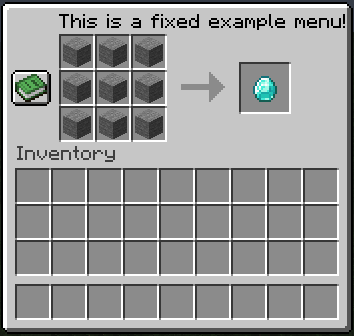
Create inventories of variable size (like chests) or fixed size (like crafting tables and anvils), adapting to your project's needs.
Full Customization
Control every aspect of your menus:
- Interactive Items: Define items with custom click logic for click events (left, right, middle).
- Inventory Behaviors: Assign actions for events like opening, closing, or general clicks within the inventory.
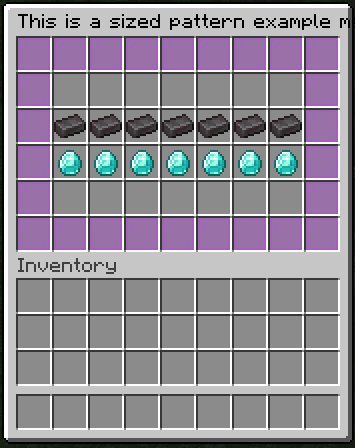
- Flexible Patterns: Design complex menus using character-based patterns to visually organize your items.
Modular Design
The library is divided into modules that facilitate organization and scalability:
layout: Contains the core logic for inventory construction and management.item: Handles the creation and manipulation of items used in inventories.plugin: Includes code examples that demonstrate the library's practical use. This module is ideal for learning the syntax and seeing how different concepts are applied.
Developer Benefits
- Rapid Development: Drastically simplifies the menu creation process, allowing you to focus on your plugin's functionality.
- Clean Code: The fluid syntax results in more readable and maintainable code.
- Great Potential: Supports multiple inventory types and behaviors, making it a robust solution for a wide range of plugins.
Example usage
Click here for more usage examples and documentation.
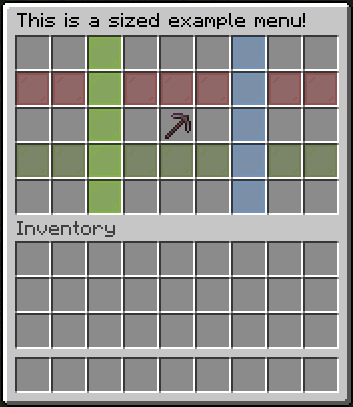
final LayoutSizedInventory layoutSizedInventory = Layout.sized()
        .title(Component.text("This is a sized example menu!", NamedTextColor.BLACK))
        .size(5)

        // Add a clickable item with multiple click handlers
        .item(22, ClickableItemLayout.builder()
                .material(Material.NETHERITE_PICKAXE)
                .displayName(Component.text("Netherite Pickaxe", NamedTextColor.GREEN))
                .lore(
                        Component.text("Line 1", NamedTextColor.GREEN),
                        Component.text("Line 2", NamedTextColor.LIGHT_PURPLE)
                )
                .onLeftClick(clickContext -> clickContext.player().sendMessage("Left click!"))
                .onRightClick(clickContext -> clickContext.player().sendMessage("Right click!"))
                .onMiddleClick(clickContext -> clickContext.player().sendMessage("Middle click!"))
                .build()
        )

        // Fill specific rows and columns with items
        .row(1, ItemLayout.display(Material.RED_STAINED_GLASS_PANE))
        .row(3, ItemLayout.display(Material.GREEN_STAINED_GLASS_PANE))
        .column(2, ItemLayout.display(Material.LIME_STAINED_GLASS_PANE).buil)
        .column(6, ItemLayout.display(Material.LIGHT_BLUE_STAINED_GLASS_PANE))

        // Define inventory behavior
        .behavior(layoutBehaviorBuilder -> layoutBehaviorBuilder
                .cancelAllClicks(false)
                .cancelLayoutClicks(true)
                .allowPlayerInventoryClicks(true)
                .ignoreEmptySlots(true)
                .onClick(context -> context.player().sendMessage("Clicked on inventory!"))
                .onOpen(openContext -> openContext.player().sendMessage("Inventory opened!"))
                .onClose(closeContext -> closeContext.player().sendMessage("Inventory closed!"))
        )

        .build();

layoutSizedInventory.open(player);
- Edition: Minecraft Java
- File type: .jar
- Minecraft versions listed: 1.19, 1.19.1, 1.19.2
- How to install: Install the matching mod loader (Forge, Fabric or NeoForge) for your Minecraft version. → Download the .jar. → Put it in the .minecraft/mods folder and launch that loader profile.
- Where to get it: Opens on Modrinth — not every file is mirrored on our own servers.
Install steps are the general flow for this file type — How to install Minecraft Java mods & modpacks walks through it step by step.
- Ships as layout-plugin-2.0.0.jar — drop this file into the mods folder
- Download size: 50 KB
- Download link checked 20 Aug 2026 — working
These come from our own check of the pack file, not from the source page.