
QRMap
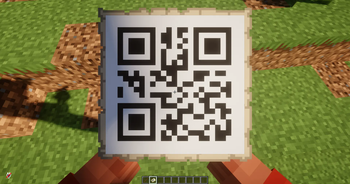
QRMap is a Minecraft plugin for Paper/Spigot that allows players to generate QR codes and display them on in-game maps. It features a user-friendly GUI, pagination, and persistent storage using a simple database system.
Features
- Generate QR codes directly in Minecraft.
- Display QR code maps in a paginated GUI.
- Take QR maps (left-click) or delete them (right-click) in GUI.
- QR maps are stored by unique IDs to prevent naming issues.
- API support to give QR maps to players programmatically.
- Permissions system to control who can generate QR maps.
Commands
/qrmap
- Opens the QRMap GUI if used without arguments.
/qrmap <text>generates a new QR map with the specified text/URL and adds it to your inventory.
Permissions:
qrmap.use– required to open GUI or generate maps.
GUI Usage
- Left-click (🖱️ LMB): Take the map (requires OP).
- Right-click (🖱️ RMB): Delete the map.
- Arrows: Navigate between pages.
API Usage
You can give QR maps to players programmatically:
QRMapAPI.giveQRMap(player, "https://example.com", "Example Map");
This will generate a new map, save it in the database, and give it to the player.
Installation
- Place
QRMap.jarin yourpluginsfolder. - Start the server.
- Ensure the plugin created its data folder (
plugins/QRMap) and database.
Database
QRMap uses a simple file-based database (or you can switch to SQLite/MySQL) to store map data by unique IDs.
Each map stores:
- ID
- QR text (URL or custom text)
- Display name
Compatibility
- Minecraft 1.21+ (Paper/Spigot)
License
MIT License. Free to use and modify.
Quick facts
- Edition: Minecraft Java
- File type: .jar
- Minecraft versions listed: 1.21, 1.21.1, 1.21.2
- How to install: Install the matching mod loader (Forge, Fabric or NeoForge) for your Minecraft version. → Download the .jar. → Put it in the .minecraft/mods folder and launch that loader profile.
- Where to get it: Opens on Modrinth — not every file is mirrored on our own servers.
Install steps are the general flow for this file type — How to install Minecraft Java mods & modpacks walks through it step by step.
Verified by MCModsHub
- Ships as QRMap1.0.jar — drop this file into the mods folder
- Download size: 1.3 MB
- Download link checked 21 Aug 2026 — working
These come from our own check of the pack file, not from the source page.