
ModsJava
LAN Welcome Message
Java mod listed for Minecraft 1.18–1.21. Downloads from the MC Java Mods app on Android.
⬇ Download on Modrinth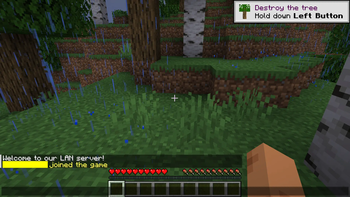
LAN Welcome Message
A simple PaperMC plugin that sends a custom MiniMessage-formatted welcome message to players when they join the server, but only if they are connecting from a LAN (Local Area Network).
This plugin was created to share a web browser map that is only available on LAN, ensuring that only players who can access it will receive the link.
Features
- Sends a personalized welcome message to LAN players.
- Supports advanced text formatting and interactivity using Adventure's MiniMessage.
- Configurable message in the
config.yml.
Requirements
- Minecraft server running PaperMC.
- Java 17 or later.
- Adventure library (already included in PaperMC).
Installation
- Download the latest release of the plugin from the Versions page.
- Place the
LanJoinMessage-1.x.x.jarfile into your server'splugins/directory. - Start the server to generate the
config.ymlfile. - Edit the
config.ymlfile to customize your welcome message. Use MiniMessage formatting for colors, hover text, and more.
Configuration
The plugin generates a config.yml file on first run. You can define the LAN-only welcome message here:
# MiniMessage-formatted welcome message for LAN players.
lan-message: "<green>Welcome to the <bold>LAN Server</bold>! <hover:show_text:'Enjoy your stay!'><click:open_url:'https://example.com'>[Click here]</click></hover>"
Quick facts
- Edition: Minecraft Java
- File type: .jar
- Minecraft versions listed: 1.18.2, 1.19, 1.19.1
- How to install: Install the matching mod loader (Forge, Fabric or NeoForge) for your Minecraft version. → Download the .jar. → Put it in the .minecraft/mods folder and launch that loader profile.
- Where to get it: Opens on Modrinth — not every file is mirrored on our own servers.
Install steps are the general flow for this file type — How to install Minecraft Java mods & modpacks walks through it step by step.
File checked by MCModsHub
- Ships as LanJoinMessage-1.1.0.jar — drop this file into the mods folder
- Download size: 3 KB
- Download link checked 22 Oct 2026 — working
These come from our own check of the pack file, not from the source page.