
简体中文 | English
PostSpawner



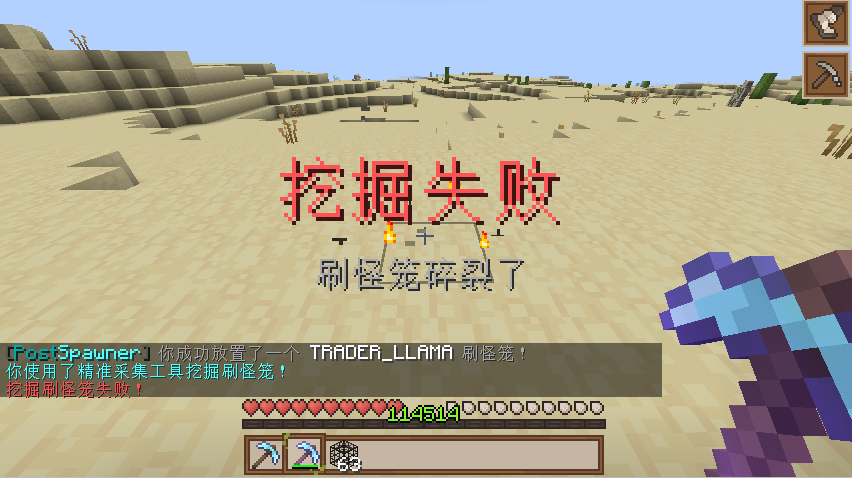
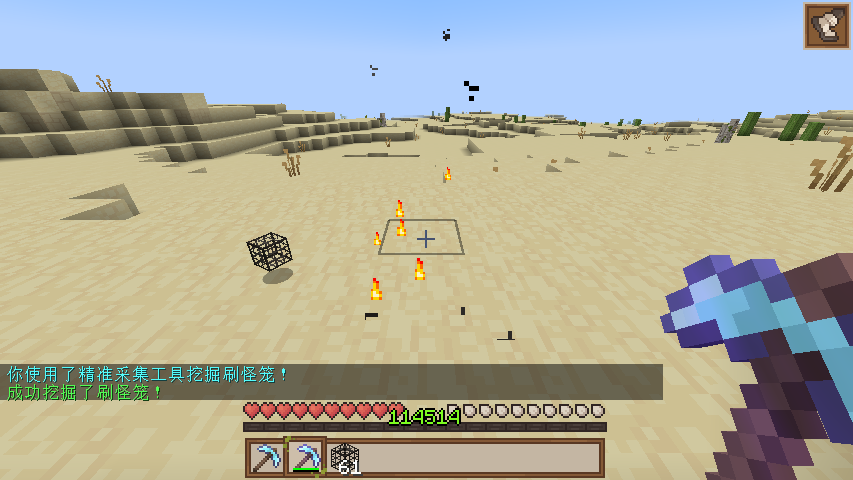
PostSpawner is a lightweight Minecraft plugin for managing monster spawners, providing control over spawner mining and placement.
📚 Features
- ✅ Spawner Management: Supports silk touch and normal tool mining of spawners
- ✅ Multi-language Support: Built-in Chinese and English language files, easily extendable
- ✅ Rich Action System: Supports various actions like command execution, item drops, sound effects, etc.
- ✅ Hook System: Compatible with PlaceholderAPI, ItemsAdder, MythicMobs, NeigeItems, Oraxen and more
- ✅ Flexible Configuration: Fully customizable config and message system
- ✅ Update Check: Optional update checking feature
💻 Installation
- Download the latest PostSpawner.jar
- Place the plugin in your server's plugins folder
- Start/Restart the server
- Edit plugins/PostSpawner/config.yml for customization
- Use
/ps reloadto reload plugin configuration
🔧 Commands
| Command | Description | Permission |
|---|---|---|
/ps reload |
Reload plugin config and language files | postspawner.command.reload |
/ps version |
Show version information | postspawner.command.version |
/ps help |
Show help information | postspawner.command.help |
/ps update |
Check for updates | postspawner.command.update |
🔒 Permissions
| Permission | Description | Default |
|---|---|---|
postspawner.use.place |
Place spawners | All players |
postspawner.use.break |
Break spawners | All players |
postspawner.command.reload |
Reload command | OP |
postspawner.command.version |
Version command | All players |
postspawner.command.help |
Help command | All players |
postspawner.command.update |
Update command | OP |
postspawner.admin |
Includes all permissions | OP |
🛠️ Actions
PostSpawner provides a rich action system. Use the following action formats in config:
Format: [] for required parameters, () for optional parameters
| Action Syntax | Description | Example |
|---|---|---|
[command] [command] |
Make player execute command | [command] spawn |
[op] [command] |
Temporarily give player OP to execute command | [op] gamemode creative |
[console] [command] |
Execute command from console | [console] broadcast Someone mined a spawner! |
[sound] [sound] (volume) (pitch) |
Play sound for player | [sound] BLOCK_ANVIL_LAND 1.0 1.5 |
[message] [text] |
Send message to player | [message] &aYou successfully mined a spawner! |
[title] [title] (subtitle) |
Show title to player | [title] &aMining Success &7Got a spawner |
[drop_monster_spawner] |
Drop the broken spawner | [drop_monster_spawner] |
[drop] [itemID] (amount) |
Drop item at location | [drop] DIAMOND 5 |
[give] [itemID] (amount) |
Give item to player | [give] DIAMOND_SWORD 1 |
[buff] [potion] (duration) (level) |
Give player potion effect | [buff] SPEED 30 2 |
[money] [action] [amount] |
Control player economy | [money] give 100, [money] take 200, [money] set 50 |
[points] [action] [amount] |
Control player points | [points] give 100, [points] take 200, [points] set 50 |
Note: Breaking spawners in creative mode won't trigger any actions.
📦 Item Library Support
When using [drop] and [give] actions, the following item libraries are supported:
| Library | Format | Example |
|---|---|---|
| Minecraft | minecraft:itemID [amount] |
minecraft:diamond_sword, diamond:5 |
| ItemsAdder | itemsadder:itemID [amount] |
itemsadder:ruby_sword |
| MMOItems | mmoitems:type:ID [amount] |
mmoitems:SWORD:EXCALIBUR |
| NeigeItems | neigeitems:itemID [amount] |
neigeitems:test_item |
| Oraxen | oraxen:itemID [amount] |
oraxen:amethyst_helmet |
| MythicMobs | mythicmobs:itemID [amount] |
mythicmobs:special_bow |
| SX-Item | sxitem:itemID [arg1:arg2...] [amount] |
sxitem:magic_wand:arg1:arg2 |
| Zaphkiel | zaphkiel:itemID [amount] |
zaphkiel:legendary_axe |
| CraftEngine | craftengine:itemID [amount] |
craftengine:magic_staff |
| AzureFlow | azureflow:itemID [amount] |
azureflow:wizard_robe |
Simplified formats:
- Default source is minecraft (can be omitted), e.g.
diamond:5equalsminecraft:diamond:5 - If amount is 1, can be omitted, e.g.
itemsadder:ruby_swordequalsitemsadder:ruby_sword 1
📊 Variables
You can use these built-in variables in actions:
%player%- Player name%block_x%- Block X coordinate%block_y%- Block Y coordinate%block_z%- Block Z coordinate%block_world%- Block world%entity_type%- Entity type
Additionally, if PlaceholderAPI is installed, you can use PlaceholderAPI variables.
📫 Contact
<-点击加入
 <-Click to join
<- Home Page
📜 License
This plugin is licensed under GNU General Public License v2.0.
- Edition: Minecraft Java
- File type: .jar
- Minecraft versions listed: 1.13, 1.13.1, 1.13.2
- How to install: Install the matching mod loader (Forge, Fabric or NeoForge) for your Minecraft version. → Download the .jar. → Put it in the .minecraft/mods folder and launch that loader profile.
- Where to get it: Opens on Modrinth — not every file is mirrored on our own servers.
Install steps are the general flow for this file type — How to install Minecraft Java mods & modpacks walks through it step by step.
- Ships as PostSpawner-1.4.jar — drop this file into the mods folder
- Download size: 2.9 MB
- Download link checked 11 Sept 2026 — working
These come from our own check of the pack file, not from the source page.