
🌻 PlacementPlugin 🌻
An intuitive building tool for Paper/Spigot 1.20+ that lets you place blocks creatively through a configurable GUI and a special “Placeler” wand – no WorldEdit required.
✨ Features
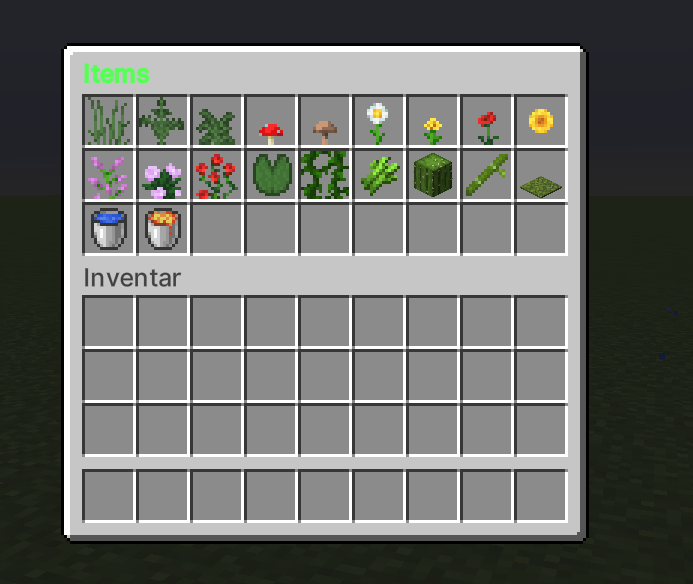
- GUI Selection —
/farmplaceopens an inventory GUI with configurable blocks, plants, and water‑/lava‑source items. - Placeler Wand
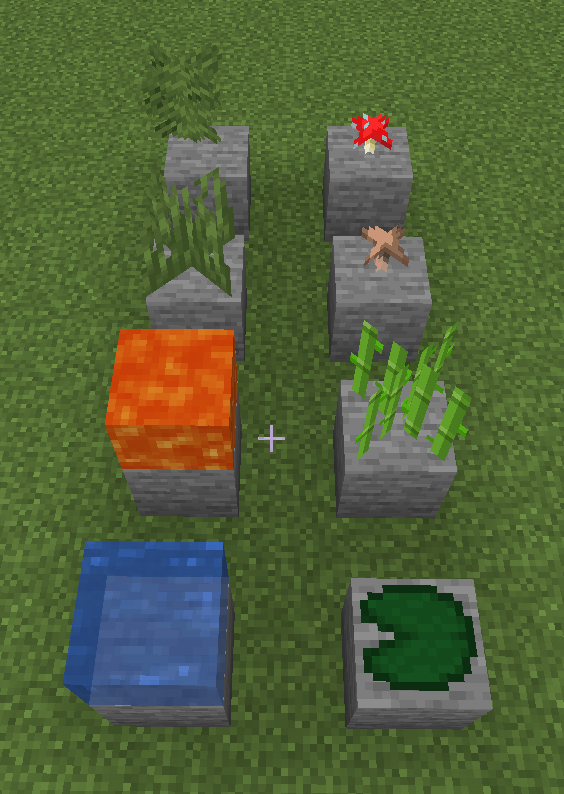
- Right‑click: places blocks with
physics=false; water/lava stay static. - Left‑click: re‑opens the GUI.
- Right‑click: places blocks with
- Radius Mode —
/pradius <1‑20>- 1 = single block
- >1 = square area of
(2r + 1) × (2r + 1)blocks.
- Undo & Redo —
/plundo&/plredoroll back or restore multiple steps (stack‑based). - Color‑coded Items & Flexible Config — GUI titles and item labels accept Minecraft color codes (
&aGrass). All materials, GUI size, defaults, and permissions live inconfig.yml.
🛠 Installation
- Drop the JAR into your
pluginsfolder. - Restart the server or run:
/reload confirm - Adjust
plugins/PlacementPlugin/config.ymlas needed and restart again.
💻 Commands
| Command | Description |
|---|---|
/farmplace |
Open the build GUI |
/pc |
Clear the current Placeler wand |
/pradius <n> |
Set placement radius (1 – 20) |
/plundo |
Undo last placement |
/plredo |
Redo last undo |
🔐 Permissions
| Node | Purpose |
|---|---|
farmplace.use |
Open GUI |
farmplace.clear |
Clear wand |
farmplace.radius |
Change radius |
farmplace.undo |
Run undo |
farmplace.redo |
Run redo |
⚙ Configuration Snippet
# plugins/PlacementPlugin/config.yml

farm-items:
  TALL_GRASS: "&2Tall Grass"
  FERN: "&2Ferns"
  LARGE_FERN: "&2Large Ferns"
  RED_MUSHROOM: "&cRed &4Mushrooms"
  BROWN_MUSHROOM: "&6Brown &cMushrooms"
  OXEYE_DAISY: "&fOxeye Daisy"
  DANDELION: "&eDandelion"
  POPPY: "&cPoppy"
  SUNFLOWER: "&eSunflower"
  LILAC: "&dLilac"
  PEONY: "&dPeony"
  ROSE_BUSH: "&cRose Bush"
  LILY_PAD: "&2Lily Pad"
  VINE: "&2Vines"
  SUGAR_CANE: "&aSugar Cane"
  CACTUS: "&2Cactus"
  BAMBOO: "&aBamboo"
  MOSS_CARPET: "&2Moss Carpet"
  WATER: "&bWater"
  LAVA: "&cLava"

# Add more items by increasing gui-size. Maximum: 54  Minimum: 9
gui-size: 27
gui-title: "&a&lItems"

default-radius: 1
max-radius: 20
Need help? • Open an issue • Join our Discord (https://discord.gg/XBZfsANgCP)
Quick facts
- Edition: Minecraft Java
- File type: .jar
- Minecraft versions listed: 1.20, 1.20.1, 1.20.2
- How to install: Install the matching mod loader (Forge, Fabric or NeoForge) for your Minecraft version. → Download the .jar. → Put it in the .minecraft/mods folder and launch that loader profile.
- Where to get it: Opens on Modrinth — not every file is mirrored on our own servers.
Install steps are the general flow for this file type — How to install Minecraft Java mods & modpacks walks through it step by step.
Verified by MCModsHub
- Ships as placementplugin-1.0-SNAPSHOT.jar — drop this file into the mods folder
- Download size: 30 KB
- Download link checked 21 Aug 2026 — working
These come from our own check of the pack file, not from the source page.