
LagSpike Guardian
Java mod listed for Minecraft 1.20. Downloads from the MC Java Mods app on Android.
⬇ Download on Modrinth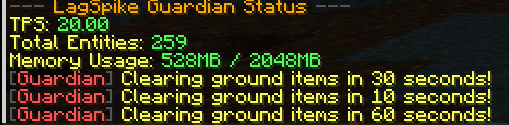

LagSpike Guardian
Your All-in-One Solution for Server Stability
As a developer and server enthusiast, I know the biggest challenge for any server owner is lag. It can come from anywhere—a forgotten mob farm, a massive item spill, or a broken redstone machine. I created LagSpike Guardian to be a smarter, all-in-one solution. Instead of just blindly clearing entities, this plugin actively monitors your server's health and provides you with the tools to both automatically prevent lag and diagnose it yourself. It's powerful, lightweight, and designed to give you peace of mind.
⭐ Features
- ✅ Automatic TPS Monitoring: Intelligently clears entities only when your server's TPS drops below a configured threshold, preventing lag without disrupting gameplay.
- ✅ Scheduled Item Sweeper: Proactively cleans up dropped items on a timer, with configurable warnings and a protected-item list so valuable gear is never deleted.
- ✅ Smart Redstone Limiter: Detects and temporarily disables hyperactive redstone clocks that cause server lag, with whitelisted worlds to protect player builds.
- ✅ Powerful Diagnostic Tools: Use
/lagspike topchunksto instantly find the 5 laggiest chunks on your server, helping you pinpoint the exact source of entity-based lag. - ✅ Full Admin Control: Manually clear items or mobs on demand, and reload the entire plugin configuration without a server restart using
/lagspike reload. - ✅ 100% Configurable: Every message, color, timer, and setting can be changed in the
config.yml. - ✅ User-Friendly Commands: All commands feature full tab-completion for ease of use.
📙 Commands & Permissions
| Command | Permission | Description |
|---|---|---|
/lagspike status |
(none) | Shows the server's current TPS, entities, and memory. |
/lagspike reload |
lagspike.admin |
Reloads the entire plugin configuration. |
/lagspike clear <items|mobs> |
lagspike.clear |
Manually clears all items or configured mobs. |
/lagspike topchunks |
lagspike.diagnostics |
Shows the top 5 chunks with the most entities. |
(All permissions default to OP)
⚙️ Default Configuration
This plugin is fully customizable. See how much control you have by viewing the default config.yml below.
# LagSpike Guardian Configuration
tps-threshold: 18.5

entity-clearing:
  mobs-to-clear:
    - ZOMBIE
    - SKELETON
    - SPIDER
    - CREEPER
    - PHANTOM
    - CHICKEN
    - COW

item-clearing:
  enabled: true
  clear-interval-minutes: 15
  warning-times-seconds:
    - 60
    - 30
    - 10
  dont-clear-items:
    - DIAMOND
    - DIAMOND_BLOCK
    - NETHERITE_INGOT
    - NETHERITE_BLOCK
    - BEACON
    - ELYTRA

redstone-limiter:
  enabled: true
  pulse-threshold-per-second: 15
  disabled-worlds:
    - "skyblock_world"
    - "creative"
  disable-duration-seconds: 30

messages:
  prefix: "&8[&cGuardian&8] "
  no-permission: "&cYou do not have permission to use this command."
  reload-success: "&aLagSpike Guardian configuration reloaded!"
  unknown-command: "&cUnknown sub-command. Use /lagspike status, reload, clear, or topchunks."

  status-header: "&8--- &6LagSpike Guardian Status &8---"
  status-tps: "&eTPS: &a%tps%"
  status-entities: "&eTotal Entities: &a%amount%"
  status-memory: "&eMemory Usage: &a%used%MB / %max%MB"

  entity-clear-broadcast: "&eCleared %amount% entities to improve server health."

  item-clear-warning: "&eClearing ground items in %time% seconds!"
  item-clear-broadcast: "&aCleared %amount% ground items."

  topchunks-header: "&8--- &6Top 5 Laggiest Chunks &8---"
  topchunks-format: "&e%rank%. &bWorld&f: %world% &bX&f: %x% &bZ&f: %z% &8- &a%amount% entities"
  topchunks-calculating: "&eCalculating, please wait..."

  manual-clear-items: "&aSuccessfully cleared %amount% items."
  manual-clear-mobs: "&aSuccessfully cleared %amount% mobs."
- Edition: Minecraft Java
- File type: .jar
- Minecraft versions listed: 1.20, 1.20.1, 1.20.2
- How to install: Install the matching mod loader (Forge, Fabric or NeoForge) for your Minecraft version. → Download the .jar. → Put it in the .minecraft/mods folder and launch that loader profile.
- Where to get it: Opens on Modrinth — not every file is mirrored on our own servers.
Install steps are the general flow for this file type — How to install Minecraft Java mods & modpacks walks through it step by step.
- Ships as LagSpikeGuardian-1.0.0-SNAPSHOT.jar — drop this file into the mods folder
- Download size: 18 KB
- Download link checked 1 Oct 2026 — working
These come from our own check of the pack file, not from the source page.