
ModsJava
LightChatWelcomer
Java mod listed for Minecraft 1.11–1.21. Downloads from the MC Java Mods app on Android.
⬇ Download on Modrinth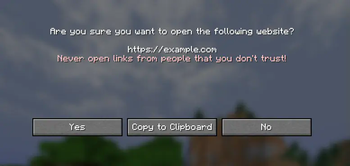
Light Chat Welcomer
Simple Spigot/Bukkit plugin to display custom join messages
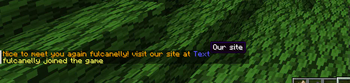
you can specify colorful message on first or latter joins for player in config
Configuration Example
# plugins/LightChatWelcomer/config.yml
first-join-message: "&red&Welcome to the server! %player%, look to [&blue&Hello](https://example.com Click here)"

welcome-back-message: "&yellow&Welcome back to the server! You were last seen on %lastseen%"
Variables
%player%variable to get user name%lastseen%to get formatted date of user last login (only avaliable inwelcome-back-message)
Colors
You can specify text color in few ways:
&6Text # gold color
or by color name
&gold&Text
- Full color list: https://minecraft.fandom.com/wiki/Formatting_codes
Links
You can add clickable links like:
[Text](blue https://example.com Hover message)
or run commands on text click
[To get help - click here](/help)
- For advanced formatting take a look at https://github.com/Phoenix616/MineDown
Quick facts
- Edition: Minecraft Java
- File type: .jar
- Minecraft versions listed: 1.11, 1.11.1, 1.11.2
- How to install: Install the matching mod loader (Forge, Fabric or NeoForge) for your Minecraft version. → Download the .jar. → Put it in the .minecraft/mods folder and launch that loader profile.
- Where to get it: Opens on Modrinth — not every file is mirrored on our own servers.
Install steps are the general flow for this file type — How to install Minecraft Java mods & modpacks walks through it step by step.
File checked by MCModsHub
- Ships as LightChatWelcomer-1.2.1.jar — drop this file into the mods folder
- Download size: 48 KB
- Download link checked 22 Oct 2026 — working
These come from our own check of the pack file, not from the source page.