






🔤 Lethal Language – Speak Wisely, or Pay the Price!
Add a deadly twist to your server’s chat rules with Lethal Language, the ultimate wordplay survival plugin. This innovative plugin enforces silence in the most brutal way possible: say the wrong word, or even a single forbidden letter, and you’re instantly eliminated. It’s linguistic roulette—one slip of the tongue and boom, you're out.
Note follow this plugin for updates on new releases!
💀 Core Features:
Custom Forbidden Words & Letters Server admins can configure specific words or individual letters that are off-limits. Whether it's random gibberish or strategic sabotage, your rules shape the danger.
Instant Death Mechanic Break the rule, lose your life. The moment a player types a forbidden entry into chat, they’re wiped out—no warnings, no second chances. It’s ruthless and hilarious.
Dynamic Gameplay Enhancer Great for mini-games, hardcore servers, or chaotic roleplay. Add tension to trivia games, create deception-based challenges, or just keep your players guessing what’s safe to say.
Lightweight & Fast Designed to be efficient and non-intrusive, Lethal Language runs smoothly with minimal impact on server performance.
Simple Setup Easy-to-edit config file mean you can start crafting your deadly dictionary in seconds.
💬 Commands:
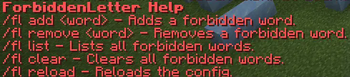
/forbiddenletter add (letter/word)
/forbiddenletter remove (letter/word)
/forbiddenletter list (to see all forbidden letters/words)
/forbiddenletter clear (to clear all letters/words)
/forbiddenletter reload (reloads configuration file)
/fl (add,remove,list,clear,reload)
/forbidletter (add,remove,list,clear,reload)
🛡️ Permissions:
There is one main permission needed for the plugin (besides OP)
forbiddenletter.admin
🎮 Use Case Ideas:
A letter changes daily—players must adapt or face the consequences.
Troll your friends by banning common letters like “e”.
Use it to create high-stakes party games or linguistic survival events.
Use it to create fun Events!
- Edition: Minecraft Java
- File type: .jar
- Minecraft versions listed: 1.21.1, 1.21.7
- How to install: Install the matching mod loader (Forge, Fabric or NeoForge) for your Minecraft version. → Download the .jar. → Put it in the .minecraft/mods folder and launch that loader profile.
- Where to get it: Opens on Modrinth — not every file is mirrored on our own servers.
Install steps are the general flow for this file type — How to install Minecraft Java mods & modpacks walks through it step by step.
- Ships as Lethal Language.jar — drop this file into the mods folder
- Download size: 10 KB
- Download link checked 22 Aug 2026 — working
These come from our own check of the pack file, not from the source page.