
🪵 StickMenu
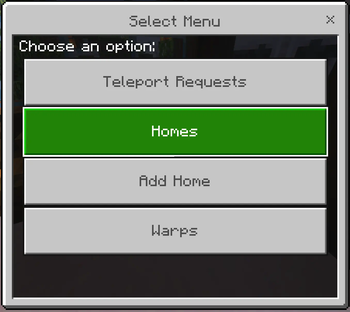
Stick Menu is a lightweight plugin that lets Bedrock players open the ATP UIs from one place It works by extending the built-in Bedrock forms from the Advanced Teleport plugin — making menus more accessible to console and mobile players
🧩 What It Does
🖱️ Right-click with a stick → opens a UI 🎮 Only works for Bedrock players (Java players won’t see anything) 🔗 Integrates with Advanced Teleport for UI handling and teleportation
☑️ Features
🏠 Teleport to saved homes 🔁 Warp to predefined warps (editable warps in plans) ⬇️ Add new homes 🧑🤝🧑 TPA to online players
✅ Requirements
- Spigot 1.20+ (Paper or Purpur recommended)
- Advanced Teleport plugin
- GeyserMC + Floodgate (for Bedrock support)
🛠️ Setup
- Drop StickMenu.jar into your /plugins/ folder
- Make sure Advanced Teleport is installed and working
- Restart your server
🌎 Warps
Warp support is provided via predefined choices, you must name your warps in ATP the same as shown.
Portal = portal | Spawn = spawn | Shops = shops | Games = games | Xp Farm = xp
- Edition: Minecraft Java
- File type: .jar
- Minecraft versions listed: 1.20, 1.20.1, 1.20.2
- How to install: Install the matching mod loader (Forge, Fabric or NeoForge) for your Minecraft version. → Download the .jar. → Put it in the .minecraft/mods folder and launch that loader profile.
- Where to get it: Opens on Modrinth — not every file is mirrored on our own servers.
Install steps are the general flow for this file type — How to install Minecraft Java mods & modpacks walks through it step by step.
- Ships as StickMenu-1.1.jar — drop this file into the mods folder
- Download size: 5 KB
- Download link checked 23 Aug 2026 — working
These come from our own check of the pack file, not from the source page.