
A Paper/Bukkit plugin that detects active command blocks
Version Support: Paper/Bukkit 1.21.x
Command Format:
/bhcb <on|off|reload|lang>
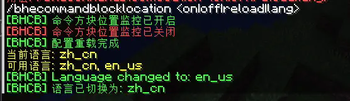
When monitoring is enabled, you'll see the command and location of executed command blocks in the console Example:
[BHCB] 世界=world 坐标=[-285,75,102] 命令=tps
config.yml Format
language: zh_cn

messages:
  zh_cn:
    no_permission: '&c你没有权限使用此命令!'
    plugin_enabled: 命令方块位置监控插件已启用
    permission_info: '使用权限节点: %permission%'
    usage: '&c用法: /bhecommandblocklocation <on|off|reload|lang>'
    enabled: '&a[BHCB] 命令方块位置监控已开启'
    disabled: '&c[BHCB] 命令方块位置监控已关闭'
    invalid_arg: '&c无效参数! 使用: /bhecommandblocklocation <on|off|reload|lang>'
    reloaded: '&a[BHCB] 配置重载完成'
    unknown_language: '&c未知的语言: %language%'
    language_changed: '&a[BHCB] 语言已切换为: %language%'

  en_us:
    no_permission: '&cYou don''t have permission to use this command!'
    plugin_enabled: Command block location monitor plugin enabled
    permission_info: 'Using permission node: %permission%'
    usage: '&cUsage: /bhecommandblocklocation <on|off|reload|lang>'
    enabled: '&a[BHCB] Command block location monitoring enabled'
    disabled: '&c[BHCB] Command block location monitoring disabled'
    invalid_arg: '&cInvalid argument! Use: /bhecommandblocklocation <on|off|reload|lang>'
    reloaded: '&a[BHCB] Configuration reloaded'
    unknown_language: '&cUnknown language: %language%'
    language_changed: '&a[BHCB] Language changed to: %language%'

settings:
  auto_enable: false
  log_format: '[BHCB] 世界=%s 坐标=[%d,%d,%d] 命令=%s'
For more information, please view project's Github page
Quick facts
- Edition: Minecraft Java
- File type: .jar
- Minecraft versions listed: 1.21, 1.21.1, 1.21.2
- How to install: Install the matching mod loader (Forge, Fabric or NeoForge) for your Minecraft version. → Download the .jar. → Put it in the .minecraft/mods folder and launch that loader profile.
- Where to get it: Opens on Modrinth — not every file is mirrored on our own servers.
Install steps are the general flow for this file type — How to install Minecraft Java mods & modpacks walks through it step by step.
Verified by MCModsHub
- Ships as bhcb-1.2.0-beta.jar — drop this file into the mods folder
- Download size: 7 KB
- Download link checked 23 Aug 2026 — working
These come from our own check of the pack file, not from the source page.