


🌦️ EmoWeather
EmoWeather is a Minecraft plugin that synchronizes the server's weather with the collective mood of its players.
Each player can vote for how they feel, and every X minutes, the server changes the weather to reflect the most voted mood.
💻 Source: https://github.com/theo-huret/EmoWeather
🎮 Features
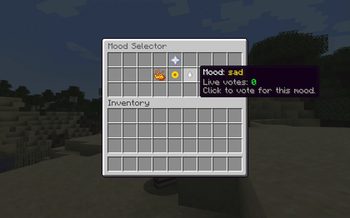
- GUI for mood selection:
/moodgui - Vote via command:
/mood <mood> - View enabled moods:
/moodlist - Automatically updates weather based on collective mood
- Moods and settings fully configurable
- Player moods are saved in
moods.yml - Disables Minecraft's natural weather cycle for full control
🌤️ Mood Effects
| Mood | Weather Effect |
|---|---|
| happy | ☀️ Clear weather |
| sad | 🌧️ Rain |
| angry | ⛈️ Thunderstorm |
⚙️ Configuration (config.yml)
interval: 36000  # Weather cycle in ticks (1 sec = 20 ticks, 30 min = 36000)

moods:
  happy: true
  sad: true
  angry: true
🧾 Commands
| Command | Description |
|---|---|
/mood <mood> |
Set your current mood |
/moodgui |
Open the mood selection interface |
/moodlist |
List all enabled moods |
📦 Installation
- Download the compiled
.jarfile. - Place it inside your server’s
plugins/folder. - Start or restart the server.
- Edit
plugins/EmoWeather/config.ymlto configure moods and interval.
🛠️ Development Structure
com.emoweather
├── command           # /mood, /moodgui, /moodlist commands
├── config            # Config handling
├── gui               # Mood GUI & listener
├── model             # Mood enum
├── service           # MoodService: vote logic
├── task              # MoodScheduler: periodic weather updates
📌 Requirements
- Java 17+
- Spigot or Paper 1.21+
- No external dependencies required
💡 Roadmap Ideas
- Display current mood via bossbar or actionbar
- Mood history and vote stats
- Particle & sound effects per mood
- Discord or webhook integration
- Dynamic mood creation via config
👤 Author
Created by Théo Huret
Feel free to contribute or suggest improvements!
Quick facts
- Edition: Minecraft Java
- File type: .jar
- Minecraft version listed: 1.21
- How to install: Install the matching mod loader (Forge, Fabric or NeoForge) for your Minecraft version. → Download the .jar. → Put it in the .minecraft/mods folder and launch that loader profile.
- Where to get it: Opens on Modrinth — not every file is mirrored on our own servers.
Install steps are the general flow for this file type — How to install Minecraft Java mods & modpacks walks through it step by step.
Verified by MCModsHub
- Ships as EmoWeather-1.0.jar — drop this file into the mods folder
- Download size: 21 KB
- Download link checked 13 Sept 2026 — working
These come from our own check of the pack file, not from the source page.