ModsJava
Custom Message Blocker
The mod included in this project is a little mod I've been working on that adds the ability to not show certain chat messages. They can be messages which…
⬇ Download on Modrinth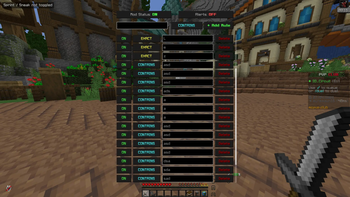
Custom Message Blocker
Tired of certain words or phrases cluttering your chat? Custom Message Blocker lets you automatically hide certain chat messages containing (or exactly matching) phrases you don't want to see.
Features
- Custom filter rules — Add as many blocked phrases as you want
- Two modes:
CONTAINS— blocks any message that includes your phrase anywhereEXACT— blocks only messages where your phrase is the actual message sent
- On/off switch — disable the entire mod if you wish.
- Optional alerts — get a subtle action bar notification when a message is blocked, so you know filtering is working
- In-game config GUI — manage all your rules visually, no config file editing required
- Keybind & command support — open settings with
\(rebindable) or/blockerconfig - 100% client-side — works on any server
How to Use
- Press
\(default keybind) or run/blockerconfigto open the GUI - Type a phrase you want blocked and choose
CONTAINSorEXACTmode - Click + Add Rule
- Done!
Requirements
- Minecraft 1.21+
- Fabric Loader 0.15.0+
- Fabric API
- Java 21+
Quick facts
- Edition: Minecraft Java
- File type: .jar
- Minecraft versions listed: 1.21, 1.21.1, 1.21.2
- How to install: Install the matching mod loader (Forge, Fabric or NeoForge) for your Minecraft version. → Download the .jar. → Put it in the .minecraft/mods folder and launch that loader profile.
- Where to get it: Opens on Modrinth — not every file is mirrored on our own servers.
Install steps are the general flow for this file type — How to install Minecraft Java mods & modpacks walks through it step by step.
Verified by MCModsHub
- Ships as custommessageblocker-1.0.0.jar — drop this file into the mods folder
- Download size: 29 KB
- Download link checked 14 Sept 2026 — working
These come from our own check of the pack file, not from the source page.