
English
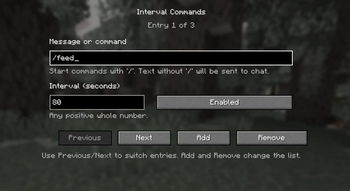
This mod allows you to automatically send chat messages and commands at custom intervals.
You can add any number of entries, set a separate interval for each one, and manage everything through a simple in-game config screen.
Features
- Automatic sending of chat messages and commands
- Unlimited number of entries
- Separate interval for each entry
- Simple in-game configuration
- English and Russian localization
How it works
- Text starting with
/is sent as a command - Text without
/is sent as a normal chat message
Notes
- Works in singleplayer and on multiplayer servers
- Press
Kto open the config screen
Русский
Этот мод позволяет автоматически отправлять сообщения и команды в чат через заданные интервалы времени.
Вы можете добавить любое количество записей, задать отдельный интервал для каждой из них и управлять всем через простое меню настройки прямо в игре.
Возможности
- Автоматическая отправка сообщений и команд в чат
- Неограниченное количество записей
- Отдельный интервал для каждой записи
- Простая настройка прямо в игре
- Поддержка английского и русского языков
Как это работает
- Текст, начинающийся с
/, отправляется как команда - Текст без
/отправляется как обычное сообщение в чат
Примечания
- Работает в одиночной игре и на серверах
- Клавиша
Kоткрывает меню настройки
Quick facts
- Edition: Minecraft Java
- File type: .jar
- Minecraft version listed: 26.2
- How to install: Install the matching mod loader (Forge, Fabric or NeoForge) for your Minecraft version. → Download the .jar. → Put it in the .minecraft/mods folder and launch that loader profile.
- Where to get it: Opens on Modrinth — not every file is mirrored on our own servers.
Install steps are the general flow for this file type — How to install Minecraft Java mods & modpacks walks through it step by step.
Verified by MCModsHub
- Ships as interval-commands-26.2-1.0.0.jar — drop this file into the mods folder
- Download size: 18 KB
- Download link checked 14 Sept 2026 — working
These come from our own check of the pack file, not from the source page.