
AntiJunk (Item Filter)
Stop picking up unwanted items like dirt or cobblestone! A highly customizable and user-friendly in-game GUI item filter. / Oyun içi arayüz sayesinde…
⬇ Download on Modrinth
AntiJunk (Item Filter)
Tired of your inventory filling up with dirt, cobblestone, or other junk items while mining? AntiJunk is a highly customizable, user-friendly item filter mod that prevents you from picking up items you don't want!
🌟 Features (Özellikler)
- In-Game GUI: Press
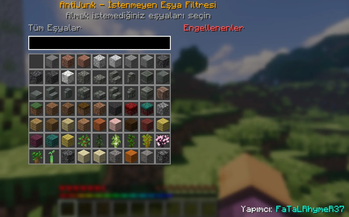
J(by default) to open the interactive filter menu! - Easy Filtering: Simply search for the item you don't want and click it to add it to your blocked list.
- Side Panel: Easily view and manage all your currently blocked items in the dedicated side panel.
- Multi-Language: Automatically supports English and Turkish based on your game language.
- Server & Client: Works flawlessly in both singleplayer and multiplayer servers (Mod must be installed on the server as well).
🇹🇷 Türkçe Açıklama
Maden yaparken envanterinizin toprak, kırıktaş veya gereksiz eşyalarla dolmasından sıkıldınız mı? AntiJunk, istemediğiniz eşyaları yerden almanızı tamamen engelleyen, kullanımı son derece kolay bir filtre modudur!
🌟 Nasıl Kullanılır?
- Oyundayken
Jtuşuna basarak filtreleme menüsünü açabilirsiniz. - Açılan ekrandaki arama çubuğundan istemediğiniz eşyayı bulun ve üzerine tıklayın. Eşya anında engellenenler listesine eklenecektir.
- Menünün sağ tarafındaki özel panelden o an engelli olan tüm eşyalarınızı görebilir ve üzerine tıklayarak engeli kolayca kaldırabilirsiniz.
- Hem tek oyunculuda hem de sunucularda (sunucuya da kurulması şartıyla) sorunsuz çalışır.
Developer: FaTaLRhymeR37
- Edition: Minecraft Java
- File type: .jar
- Minecraft versions listed: 1.21.1, 1.21.2, 1.21.3
- How to install: Install the matching mod loader (Forge, Fabric or NeoForge) for your Minecraft version. → Download the .jar. → Put it in the .minecraft/mods folder and launch that loader profile.
- Where to get it: Opens on Modrinth — not every file is mirrored on our own servers.
Install steps are the general flow for this file type — How to install Minecraft Java mods & modpacks walks through it step by step.
- Ships as antijunk-1.0.0.jar — drop this file into the mods folder
- Download size: 629 KB
- Download link checked 14 Sept 2026 — working
These come from our own check of the pack file, not from the source page.