
HiRes
Java mod listed for Minecraft 26.x. Downloads from the MC Java Mods app on Android.
Hi-Res is a client-side Fabric mod for Minecraft 26.2 that lets players capture and save high-resolution screenshots. By dynamically scaling the rendering…
⬇ Download on Modrinth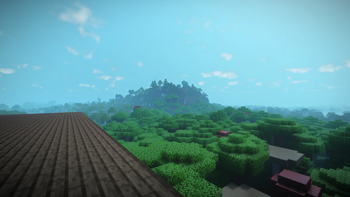
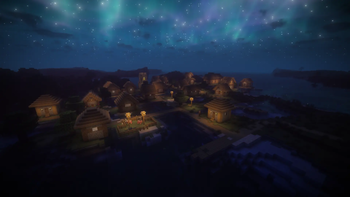
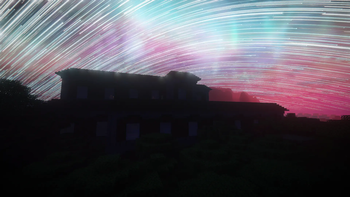
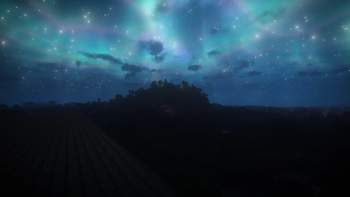
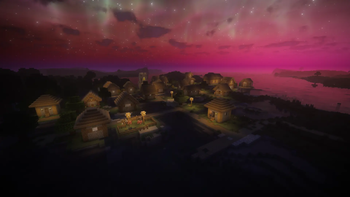
Hi-Res Minecraft Mod
Short Summary
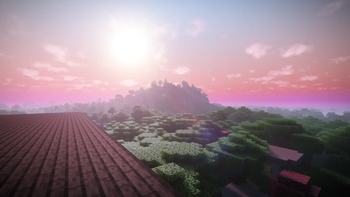
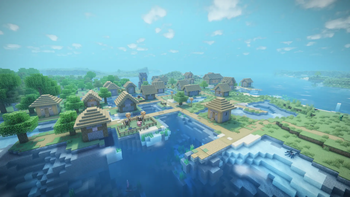
Hi-Res is a client-side Fabric mod for Minecraft 26.2 that lets players capture and save high-resolution screenshots. By dynamically scaling the rendering framebuffer during the capture frame, Hi-Res enables capturing crisp, print-quality images up to 8x the native display resolution (e.g., generating 8K or 16K images from a standard 1080p viewport). Fully integrated into the Reese's Sodium Options sidebar, Hi-Res features automatic HUD and hand hiding, asynchronous screenshot processing to keep the render thread responsive, and configurable in-game toast and chat notifications. An anti-crash Auto-Tune system probes each capture and automatically scales the resolution to a safe GPU time budget so heavy shaders at high multipliers don't trip the driver watchdog. It also offers a powerful Star Trails astrophotography capture mode with resolution-aware smooth sky rotation, progressive stacking, interactive progress HUDs, and safe rendering cancellation.
[!WARNING] Experimental Features: Features such as Star Trails Mode, HDR Exposure Bracketing, and Z-Depth Map Export are experimental. Because they interface directly with Minecraft's level rendering pipeline, environmental attribute probes, and active graphics/shader engines (like Iris and Sodium), they may not function perfectly or look as intended under every graphics configuration or shaderpack combination.
Detailed Description
Dynamic Framebuffer Scaling
Unlike standard screenshot captures which simply grab the active window's pixel buffer, Hi-Res intercepts the rendering pipeline:
- Custom Scale Multiplier: Dynamically resizes the game's internal framebuffers by a scale factor of
2xto8xfor the capture frame. - Ultra-High Resolution Output:
1080pnative monitor at4xmultiplier -> 7680 x 4320 (8K).1440pnative monitor at4xmultiplier -> 10240 x 5760 (10K).4Knative monitor at4xmultiplier -> 15360 x 8640 (16K).
Capture Controls
To ensure screenshots look clean and professional, Hi-Res automates canvas preparation:
- Hide HUD & Hand: Automatically hides the Minecraft heads-up display (including the hotbar, crosshairs, chat, and active effects) and the player's held hand during the capture tick. Once the screenshot is written, your HUD and hand are instantly restored to their original visibility states.
Async Saving Pipeline
Taking massive screenshots at 4x or 8x scaling involves processing millions of pixels. To prevent your game from freezing, stuttering, or crashing:
- Background Execution Thread: The frame is read back into a Pixel Buffer Object on the render thread, then the heavy work — pixel processing and PNG encoding (via LWJGL's
STBImageWrite) — is offloaded to a dedicated background executor thread. The game returns to native-resolution rendering while the file is written in the background.
Notifications
Choose how you want to be notified of a successful save:
- Toast Notifications: Renders a sleek in-game toast notification at the top-right corner of your screen showing "Screenshot Saved" along with the file name.
- Chat Feed Messages: Prints a verification system message directly into the chat window containing the exact filename of the saved screenshot.
Astrophotography Modes
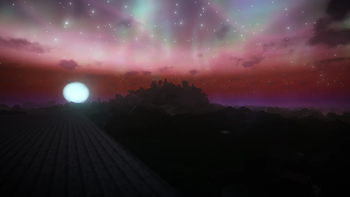
Hi-Res implements a sophisticated Star Trails capturing and blending pipeline:
- Frame Stacking: Accumulates a sequence of frames in memory, progressively rotating the celestial bodies (sun, moon, stars) and blending them using a channel-wise maximum "Lighten" blend filter.
- Camera and Keyboard Lock: Locks camera look direction and player movement during capture to ensure perfectly sharp landscapes.
- Progress HUD & ETA: Shows a centered in-game progress HUD. It tracks frames (
X / Y frames) and computes a rolling ETA (time remaining) using an Exponential Moving Average (EMA) of frame render times. - Escape to Cancel: Allows users to press ESC during capture to safely cancel the render. Cancellation instantly frees memory resources, restores native resolution, and safely returns player control without crashes or game hangs.
- Astrophotography Capture Modes:
- Shader & Vanilla Compatibility: Works seamlessly with both vanilla (non-shader) skybox rendering and shaderpacks (e.g., Iris). Since the mod hooks directly into Minecraft's environment attribute probe, celestial rotation is correctly applied to both the vanilla rendering pipeline and custom shader uniforms.
[!TIP] Disclaimer: While Star Trails mode is fully functional in vanilla (non-shader) environments, it is highly recommended to use Shaders. Vanilla Minecraft renders stars as small, sharp square pixels which can look blocky or disconnected when trailed, whereas Shaders render stars with anti-aliased glowing points, halos, and twinkling effects that merge into smooth, professional, organic trails.
- Standard Star Trails: The per-frame sky rotation is derived from your capture resolution and FOV (the Nyquist limit) so a star's glow overlaps frame-to-frame and the trails render smooth rather than beaded. The frame count slider then sets the trail length (arc = frames × step).
- Capture Until Morning: Simulates a natural dusk-to-dawn progression (from 13000 to 23000 ticks). It automatically calculates the optimal frame count using the Nyquist limit to ensure continuous, gap-free trails under any combination of FOV and resolution, capped at a maximum of
12,000frames.
- Shader & Vanilla Compatibility: Works seamlessly with both vanilla (non-shader) skybox rendering and shaderpacks (e.g., Iris). Since the mod hooks directly into Minecraft's environment attribute probe, celestial rotation is correctly applied to both the vanilla rendering pipeline and custom shader uniforms.
HDR Bracketing
For capture environments with extreme contrasts, Hi-Res automates bracketing captures:
- Exposure Sequence: Captures three distinct frames (EV-1, EV0, EV+1) sequentially. Exposure modification is done by adjusting the client's options gamma.
- Radiometric Calibration: Scales incoming pixel colors based on their relative exposure scale factors (2.0x for EV-1, 1.0x for EV0, 0.5x for EV+1) to reconstruct true linear space radiance values.
- ACES Filmic Tone Mapping: Blends the calibrated pixel values and maps them back to the standard display range using the ACES Filmic operator, ensuring preserved highlights and detailed shadows.
- World State Alignment: Day time, cloud offsets, entities, and particles are frozen at the start of capture to prevent double exposure and alignment ghosting.
Z-Depth Map Export
- Synchronized Capture: Generates a synchronized depth map (
depth_[timestamp].png) alongside the color capture. - Mathematically Rigorous Linearization: Checks the camera projection's clear depth value to automatically distinguish and support both Forward-Z and Reversed-Z depth buffers. Linearizes raw non-linear depth values mapping the near-plane to white (255) and the far horizon to black (0).
- Dynamic FBO Scanning: Probes framebuffers during rendering using LWJGL GL attachment queries to find the correct active world FBO with matching dimensions, filtering out intermediate post-processing targets.
Performance & Concurrency
Hi-Res is built to keep render-thread cost low, though it is not entirely free of it — each captured frame still waits on the previous frame's GPU fence and copies a full frame out of mapped memory on the render thread. The expensive work (pixel processing, blending, PNG encoding) runs off-thread.
- Persistent Coherent Dual PBO Pipeline: Operates a ring-buffer of two persistently mapped Pixel Buffer Objects (PBOs) via
glBufferStorageandglMapBufferRange, reading frames back withglReadPixels. A GPU sync fence (glFenceSync/glClientWaitSync) ensures the CPU only reads mapped memory after the GPU has finished. The double buffer lets the GPU read back frame N while frame N-1 is processed; the per-frame fence wait and copy still occur on the render thread. - Direct Native Memory Blending: In Star Trails mode the blending engine uses LWJGL
org.lwjgl.system.MemoryUtilto read/write the native pixel buffers by raw address (memGetByte/memPutByte/memCopy) inside a thread-chunked parallel worker system, avoiding per-pixel JVM bounds checks — substantially faster than a naiveIntBufferloop. An 8-bit sRGB↔linear lookup table replaces per-pixelMath.pow()in the hot path. - Buffer Recycling & Off-Heap Safety: Full-frame staging/output buffers are recycled through a pool to avoid a native malloc/free every frame, and all off-heap buffers are freed on the serialized background executor to avoid use-after-free
EXCEPTION_ACCESS_VIOLATIONcrashes on the render thread. - Context-Gated Resolution Scaling:
WindowMixin'sgetWidth/getHeightoverrides are gated byRenderContextTracker.shouldScale(), which is true only while the capture context is active and the call is on the main render thread — keeping the scaled dimensions confined to the capture's own render loop. - Client-Thread Config Capture: The relevant config values are read on the client thread before background tasks are submitted, preventing inconsistent file paths or blending modes if config is changed mid-capture.
Auto-Tune
Rendering the full (often path-traced) scene at a high resolution multiplier can make a single frame exceed the operating system's GPU watchdog (TDR) timeout and reset the driver. Auto-Tune (on by default) prevents this:
- Resolution Probe: Measures the first frames of a capture and, if a frame exceeds a configurable per-frame time budget, automatically scales the capture resolution down to fit before any frame is saved.
- Render Distance Cap: Optionally lowers render distance to 16 chunks during the capture (restored afterward) to cut per-frame GPU cost.
- Safety Abort: If a frame still approaches the watchdog limit, the capture is aborted cleanly with a chat message instead of crashing the driver.
- Smart Settle: For Star Trails, the number of settle frames between steps is chosen from measured shader heaviness. It applies to standard, HDR and Star Trails captures.
Reese's Sodium Options Integration
Hi-Res integrates directly into the Sodium video options sidebar (requires Reese's Sodium Options). The Hi-Res entry is organized into three pages:
General
- Resolution:
- Use Custom Resolution: Capture at an exact pixel size instead of multiplying the window size.
- Resolution Multiplier: Scaling factor (
2xto8x). - Custom Width / Height: Exact target dimensions (100 to 16,384 px) when custom resolution is active.
- Capture:
- Shader Settle Frames: Frames to render before the shot (
0–60), letting heavy shaders, TAA and ray-tracing denoisers settle. - Hide HUD & Hand: Hide the HUD and held item during capture.
- Override Capture FOV + Capture FOV (
30–110°): Use a fixed field of view for the shot. - Freeze Entities & Particles: Pause entities and particles during the capture to avoid motion blur.
- Restore World Time: Restore the world clock after a time-based or Star Trails capture.
- Shader Settle Frames: Frames to render before the shot (
- Output:
- Save in Hi-Res Subfolder: Save into
screenshots/Hi-Res/. - Filename Prefix: Filename starting word (
hires,screenshot,capture, orrender). - Configure Capture Key: Open Controls to rebind the capture key.
- Save in Hi-Res Subfolder: Save into
- Notifications: Show Toast Notification, Show Chat Message, Play Completion Sound.
Performance & Safety
- Auto-Tune (Anti-Crash):
- Auto-Tune Capture: Master anti-crash switch (default on) — probes and downscales to a GPU time budget; applies to all capture modes.
- Frame Time Budget: Target time per frame (
500–1900ms); lower is safer and lower resolution. - Auto-Lower Render Distance: Temporarily cap render distance to 16 chunks during capture.
- Advanced Passes:
- Export Z-Depth Map: Save a linearized 8-bit grayscale depth map next to the shot.
- HDR Exposure Bracketing: Capture and merge EV-1 / EV0 / EV+1 into one tone-mapped image (mutually exclusive with Star Trails).
Astrophotography
- Star Trails Mode: Capture and stack a rotating sky into star trails (channel-wise maximum "Lighten" blend).
- Capture Until Morning: Trail the whole night (dusk to dawn) automatically.
- Trail Length (Frames): Number of frames to stack (
10–20,000); sets trail length. - Interval Settle Frames: Extra settle frames between trail steps (
1–30); Auto-Tune sets this for you when on. - Enforce Clear Weather: Force clear skies during the capture.
Required Dependencies
To run the Hi-Res mod, you must have the following dependencies installed in your Minecraft client:
- Fabric Loader (>= 0.19.3): The underlying mod loading environment.
- Fabric API: Required for keyboard event listening (keybinding registry) and client tick scheduling.
- Sodium: Required for high-performance rendering integration and options structure support.
- Reese's Sodium Options: Required to enable the custom sidebar configuration tab inside Sodium's video options screen.
Installation & Configuration
- Place the compiled
hires-*.jarinto your.minecraft/modsdirectory. - Install dependencies: Fabric Loader, Fabric API, Sodium, and Reese's Sodium Options.
- Launch Minecraft, open the Options menu, navigate to Video Settings, and select the Hi-Res category in the sidebar to configure the settings.
- Press F4 in-game (default hotkey, fully rebindable in Controls) to take a high-res screenshot.
- All screenshots are saved to the standard
.minecraft/screenshotsfolder under the naming formathires_YYYY-MM-DD_HH.mm.ss.png(orstar_trail_YYYY-MM-DD_HH.mm.ss.pngfor star trails). - Press ESC during a star trails capture sequence if you want to abort the render.
Technical Specifications
- Mod Loader: Fabric
- Minecraft Version: 26.2
- Environment: Client-Side Only
- License: MIT
- Edition: Minecraft Java
- File type: .jar
- Minecraft version listed: 26.2
- How to install: Install the matching mod loader (Forge, Fabric or NeoForge) for your Minecraft version. → Download the .jar. → Put it in the .minecraft/mods folder and launch that loader profile.
- Where to get it: Opens on Modrinth — not every file is mirrored on our own servers.
Install steps are the general flow for this file type — How to install Minecraft Java mods & modpacks walks through it step by step.
- Ships as hires-1.0.0.jar — drop this file into the mods folder
- Download size: 99 KB
- Download link checked 23 Oct 2026 — working
These come from our own check of the pack file, not from the source page.