
Advanced Shadows
Java mod listed for Minecraft 1.21. Downloads from the MC Java Mods app on Android.
⬇ Download on Modrinth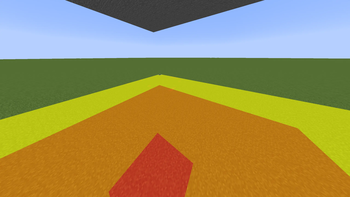
AdvancedShadows
See shadows. Find skybases.
AdvancedShadows is a lightweight clientside mod that overlays colored carpets on the ground showing sky light levels — like a light level overlay, but for skylight. Perfect for hunting down skybase locations on survival or PvP servers.
How it works
Press F7 to toggle the overlay. Colored quads appear on all walkable surfaces around you:
- 🔴 Red — completely hidden from the sky (skylight 0)
- 🟠 Orange — heavily shadowed (skylight 1–7)
- 🟡 Yellow — partially shadowed (skylight 8–14)
- No overlay — full sky exposure
The overlay also renders on tree leaves and water surfaces, so you can walk through a forest canopy or across a lake and immediately see which areas are shadowed enough to hide a skybase.
Features
- Toggle with F7 (rebindable in Controls)
- Solid blocks + leaves + water surface support
- Overworld only (Nether/End auto-disabled)
- Configurable render radius (1–256) and vertical range (1–64) via commands
- Pure clientside — no mod needed on the server
Commands
| Command | Description |
|---|---|
/advancedshadows radius <1-256> |
Set horizontal render radius |
/advancedshadows yradius <1-64> |
Set vertical render range |
/advancedshadows status |
Show current settings |
Settings are saved automatically and persist across sessions.
Installation
Requires Fabric Loader + Fabric API for Minecraft 1.21.11.
- Download the
.jar - Place it in
.minecraft/mods/ - Launch → press F7
Compatibility
Works alongside Sodium, Iris, and other rendering mods. Multiplayer-safe (clientside only).
- Edition: Minecraft Java
- File type: .jar
- Minecraft version listed: 1.21.11
- How to install: Install the matching mod loader (Forge, Fabric or NeoForge) for your Minecraft version. → Download the .jar. → Put it in the .minecraft/mods folder and launch that loader profile.
- Where to get it: Opens on Modrinth — not every file is mirrored on our own servers.
Install steps are the general flow for this file type — How to install Minecraft Java mods & modpacks walks through it step by step.
- Ships as advancedshadows-2.1.4.jar — drop this file into the mods folder
- Download size: 1.9 MB
- Download link checked 4 Oct 2026 — working
These come from our own check of the pack file, not from the source page.