
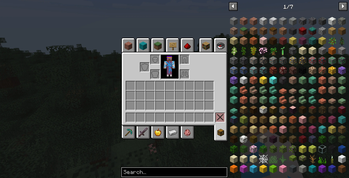
It hides selected REI interface elements, such as overlay buttons and hint popups, so the inventory screen looks cleaner and more polished. The hidden elements are not removed permanently: they can be temporarily restored at any time with a configurable keybind in the game’s Controls settings.
By default, the interface buttons are hidden and no key is assigned. If you want to bring the hidden buttons back temporarily, open the Controls menu and assign a keybind for REI Clean Overlay.
This is especially useful for modpacks where REI is already configured by the pack author and players do not need quick access to every REI overlay button during normal gameplay.
Notes
By default, the selected REI interface buttons are hidden and the restore keybind is not assigned.
 This mod does not change recipes, item entries, or REI functionality itself. It only adjusts selected interface elements in the REI overlay.
Requirements
- Edition: Minecraft Java
- File type: .jar
- Minecraft version listed: 1.20.1
- How to install: Install the matching mod loader (Forge, Fabric or NeoForge) for your Minecraft version. → Download the .jar. → Put it in the .minecraft/mods folder and launch that loader profile.
- Where to get it: Opens on Modrinth — not every file is mirrored on our own servers.
Install steps are the general flow for this file type — How to install Minecraft Java mods & modpacks walks through it step by step.
- Ships as rei_clean_overlay-1.0.jar — drop this file into the mods folder
- Download size: 133 KB
- Download link checked 14 Sept 2026 — working
These come from our own check of the pack file, not from the source page.