
ZEN's Better Health Bar
Vanilla-friendly NeoForge mod adding clean, customizable health bars to targeted entities, improving readability without changing gameplay.
⬇ Download on Modrinth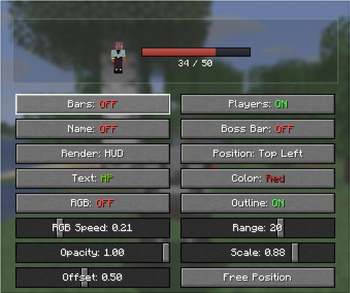
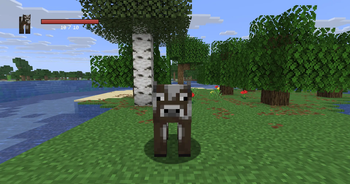
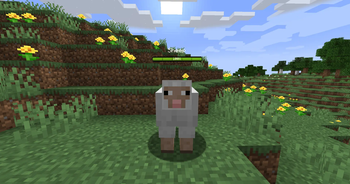
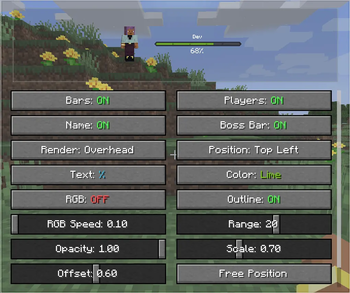
❤️ Zen's Better Health Bars
Vanilla-friendly health bars for the entities you target.
Zen's Better Health Bars is a NeoForge mod for Minecraft that adds clean, configurable health bars to combat and exploration without changing vanilla gameplay.
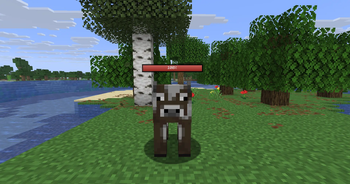
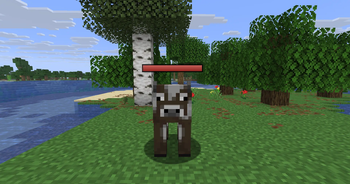
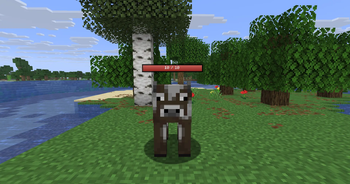
Track the health of mobs and players more clearly with smooth animated bars shown in the HUD, above entities, or both.
🔥 At a Glance
Configurable health bars for targeted entities HUD, overhead, or combined rendering HP, percent, or bar-only display Optional entity names Preset colors and animated RGB mode Outline, opacity, scale, range, and offset settings Free-position editor with live preview Optional vanilla boss bar hiding Client-side config saved automatically Designed to stay clean, readable, and vanilla-friendly
🧠 How It Works
When you look at a living entity, the mod tracks your current target and displays its health in a cleaner and more readable way.
You can choose whether the bar appears in the HUD, above the entity, or both, then customize the style to match your preferred vanilla+ interface.
Everything is visual only: the mod does not change health values, combat rules, or entity behavior.
⚔️ Core Features
📌 Targeted Health Bars
Shows the health of the entity you are currently looking at, keeping information focused and unobtrusive.
🖥️ Flexible Display Modes
Choose between:
HUD only Above-head only Both at the same time
📊 Multiple Text Styles
Display health as:
None HP values Percent
🎨 Visual Customization
Fine-tune the look with:
Color presets Animated RGB mode Outline toggle Opacity control Global scale Distance limit Head offset
🧍 Optional Names
Show or hide the entity name depending on the style you want.
📍 Free Position Editor
Move the HUD bar wherever you want with a live preview and save your preferred layout.
🐉 Boss Bar Option
Optionally hide the vanilla boss bar for a cleaner screen.
💾 Persistent Configuration
Player settings are saved automatically, so your configuration stays ready even after restarting the game.
⚙️ Configuration
The mod is built to be easy to customize without losing its vanilla feel.
You can adjust:
Render mode HUD position Display text mode Bar color RGB speed Opacity Scale Distance Head offset Outline Player visibility Boss bar behavior
🎯 Why Use It
Perfect if you want:
Cleaner combat readability A lightweight vanilla+ UI improvement Better mob tracking without changing gameplay A customizable health bar mod for NeoForge A client-side solution that stays simple and polished
🧠 Keywords
minecraft health bar mod, targeted health bar minecraft, entity health bar mod, neoforge health bar mod, minecraft hud health bar, overhead health bars minecraft, vanilla plus ui mod, minecraft boss bar alternative, minecraft combat ui mod, minecraft neoforge mod
- Edition: Minecraft Java
- File type: .jar
- Minecraft version listed: 26.2
- How to install: Install the matching mod loader (Forge, Fabric or NeoForge) for your Minecraft version. → Download the .jar. → Put it in the .minecraft/mods folder and launch that loader profile.
- Where to get it: Opens on Modrinth — not every file is mirrored on our own servers.
Install steps are the general flow for this file type — How to install Minecraft Java mods & modpacks walks through it step by step.
- Ships as zenbetterhealthbars-1.1.0-26.2.jar — drop this file into the mods folder
- Download size: 78 KB
- Download link checked 24 Aug 2026 — working
These come from our own check of the pack file, not from the source page.