
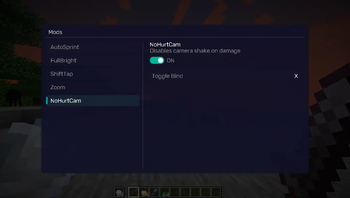
REQUIREMENTS NightVisuals GUI
EN:
NightVisuals NoHurtCam is a visual utility modification that disables the screen shaking effect when the player takes damage, allowing for better aiming stability and clearer vision during intense PvP combat.
Core Features
- Disable Hurt Camera: Completely removes the visual camera tilt and shake caused by taking damage or falling.
- Toggle On/Off: Easily enable or disable the feature through the NightVisuals in-game GUI menu.
- Client-Side Only: Works entirely on the client side by overriding the visual overlay rendering pass — completely safe for multiplayer servers.
- Zero Performance Impact: Modifies only a rendering method flag without adding extra calculations, maintaining maximum FPS.
Configuration
NoHurtCam toggles via the NightVisuals GUI (default key: RShift). No separate config files required.
Installation
- Install Fabric Loader and Fabric API.
- Install NightVisuals GUI (required dependency).
- Place the downloaded NoHurtCam mod
.jarfile into yourmodsfolder. - Launch the game.
RU:
NightVisuals NoHurtCam — это визуальная утилитарная модификация, которая отключает тряску экрана при получении урона, помогая сохранять стабильность прицела и чёткость обзора во время динамичных PvP-сражений.
Основной функционал
- Отключение наклона камеры: Полностью убирает визуальное покачивание и дёргание экрана при получении ударов или урона от падения.
- Включение/Выключение: Удобное управление функцией через внутриигровое меню NightVisuals GUI.
- Исключительно клиентская часть: Работает полностью на стороне клиента, переопределяя только этап рендеринга камеры — абсолютно безопасно для игры на любых серверах.
- Нулевое влияние на FPS: Модифицирует готовый флаг метода отрисовки без добавления лишних вычислений, сохраняя максимальную производительность.
Настройка
NoHurtCam переключается через NightVisuals GUI (клавиша по умолчанию: RShift). Дополнительных конфигов нет.
Установка
- Установите Fabric Loader и Fabric API.
- Установите NightVisuals GUI (обязательная зависимость).
- Поместите скачанный файл мода NoHurtCam в папку
mods. - Запустите игру.
- Edition: Minecraft Java
- File type: .jar
- Minecraft version listed: 1.21.4
- How to install: Install the matching mod loader (Forge, Fabric or NeoForge) for your Minecraft version. → Download the .jar. → Put it in the .minecraft/mods folder and launch that loader profile.
- Where to get it: Opens on Modrinth — not every file is mirrored on our own servers.
Install steps are the general flow for this file type — How to install Minecraft Java mods & modpacks walks through it step by step.
- Ships as nightvisuals-nohurtcam-1.0.0.jar — drop this file into the mods folder
- Download size: 7 KB
- Download link checked 24 Aug 2026 — working
These come from our own check of the pack file, not from the source page.