HomeJavaModsClean and Clear Glass
Clean and Clear Glass
ModsJava

Clean and Clear Glass

by lidwinae · on Modrinth

Client-side mod for Minecraft Java Edition that makes vanilla glass blocks and glass panes cleaner while keeping matching glass variants visually…

⬇ Download on Modrinth
Clean and Clear Glass — screenshot 1Clean and Clear Glass — screenshot 2Clean and Clear Glass — screenshot 3Clean and Clear Glass — screenshot 4Clean and Clear Glass — screenshot 5Clean and Clear Glass — screenshot 6Clean and Clear Glass — screenshot 7Clean and Clear Glass — screenshot 8

Showcase video coming soon. It will be placed at the top of this page after upload. You can also follow my YouTube channel.

Fabric and NeoForge Releases Are Available

Fabric: Minecraft 1.16.5, 1.20.1, 1.21.1, 1.21.11, 26.1.x, and 26.2.

NeoForge: Minecraft 1.21.1, 1.21.11, 26.1, 26.1.1, 26.1.2, and 26.2.

Always download the file that exactly matches both your Minecraft version and mod loader. NeoForge 26.1, 26.1.1, and 26.1.2 use separate version-specific files.

Clean & Clear Glass (C&CG)

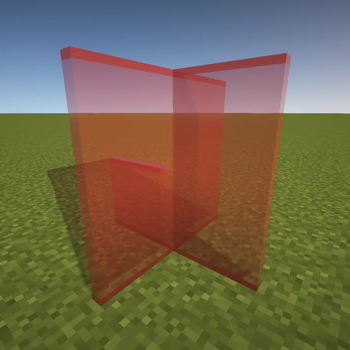
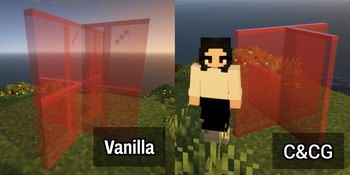
Clean & Clear Glass is a client-side visual mod that makes vanilla glass blocks and glass panes look cleaner, clearer, and visually connected.

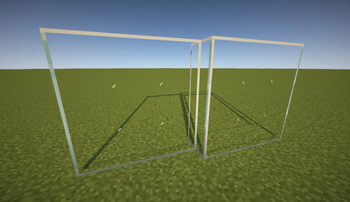
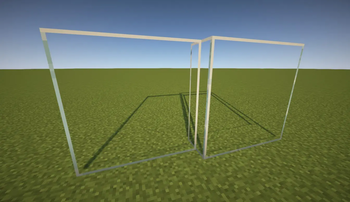
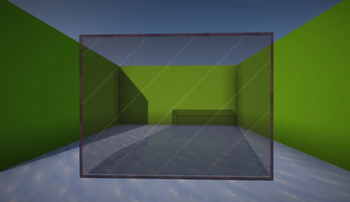
The mod keeps the original vanilla blocks and items while changing how they are rendered on the client. Connected internal borders are hidden while clean outer borders remain visible, creating clearer windows, glass walls, and large glass structures without adding blocks or changing gameplay.


Version & Loader Support

Minecraft Version Fabric NeoForge
26.1+ Available Available
1.21.11 Available Available
1.21.1 Available Available
1.20.1 Available N/A
1.16.5 Available N/A

26.1+ groups the current 26-series releases to keep this table compact. Always select the file for your exact Minecraft version and loader. NeoForge 26.1, 26.1.1, and 26.1.2 use separate files.

These are standalone mod editions, not resource-pack editions.


Features


Regular Glass Styles

Regular glass blocks and panes appearance follow the selected style.

Clear Regular Glass (Default) Subtle Regular Glass
Keeps the glass center clear for the cleanest and most open appearance. Adds a subtle 2 pixels center detail while keeping the same clean outer border.
Clear Regular Glass (Default) Subtle Regular Glass

Tinted Glass Styles

Tinted glass provides three visual styles on Minecraft versions that include tinted glass. Its block and item appearance follow the selected style.

Subtle Tinted Glass (Default) Visible Tinted Glass Clear Tinted Glass
Uses a subtle white marks design that keeps tinted glass recognizable without making the surface too busy. Uses stronger visible white marks so tinted glass is easier to recognize in larger structures. Removes the white marks for the cleanest view, but may look closer to black stained glass.
Subtle Tinted Glass (Default) Visible Tinted Glass Clear Tinted Glass

Settings

Open the Clean & Clear Glass settings screen with:

Alt + G

The key can be changed from:

Options > Controls > Key Binds

Fabric users can also open the settings through Mod Menu when it is installed.

Available settings include:

Clear is the default Regular Glass style. Subtle is the default Tinted Glass style.

Applying a setting automatically reloads the required resources so the selected appearance updates in-game. The exact settings layout may vary slightly between Minecraft versions.

Clean & Clear Glass Settings


Compatibility

Clean & Clear Glass implements its connected rendering directly. It does not depend on a separate connected-texture mod.

Legacy Sodium Support

The Fabric editions for Minecraft 1.16.5 and 1.20.1 include dedicated compatibility rendering for their older Sodium versions:

This allows connected glass to work with Fabric API and Sodium without requiring Indium, Continuity, or another CTM implementation.

Other Sodium versions on these legacy Minecraft releases are not guaranteed to be compatible. Shader-pack behavior may also vary by Minecraft version, Sodium version, and shader pack.


Installation

Fabric NeoForge
  1. Install Fabric Loader for your Minecraft version.
  2. Download and install Fabric API.
  3. Download the matching Clean & Clear Glass Fabric file.
  4. Place Clean & Clear Glass and Fabric API inside your mods folder.
  5. Launch Minecraft using the Fabric profile.
  1. Install NeoForge for your exact Minecraft version.
  2. Download the matching Clean & Clear Glass NeoForge file.
  3. Place Clean & Clear Glass inside your mods folder.
  4. Launch Minecraft using the NeoForge profile.

Files are loader-specific: do not install a Fabric file into NeoForge or a NeoForge file into Fabric. Clean & Clear Glass only needs to be installed on the client.


Resource Pack Alternatives

If you prefer vanilla Minecraft without Fabric, NeoForge, OptiFine, or another mod, try my Glass Without Border resource pack. It works as a standard vanilla resource pack and removes visible borders from glass.

For older or unsupported Minecraft versions, the original Clean & Clear Glass resource pack is also available. Its connected-glass features require OptiFine.

For the supported versions listed above, use the standalone mod from this page instead.


Notes

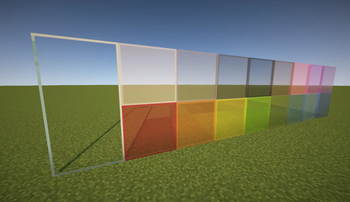
Clean & Clear Glass changes the client-side rendering of vanilla glass blocks, glass panes, stained glass, Tinted Glass, and their relevant item models. It does not add custom blocks, crafting recipes, or gameplay changes.

The goal is simple: make vanilla glass cleaner, clearer, connected, and more pleasant to use in builds while preserving the original Minecraft experience.

Verified by MCModsHub

These come from our own check of the pack file, not from the source page.

Explore more