
Dimension Level Weather
Java mod listed for Minecraft 26.x. Downloads from the MC Java Mods app on Android.
Control weather/time parameters across dimensions. Want working rain/thunder in the end/nether? This mod allows that now.
⬇ Download on Modrinth
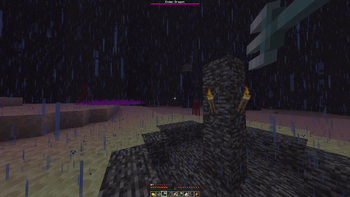
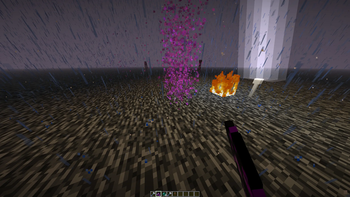
Dimension Level Weather adds independent weather and time control to every dimension. You can set rain, thunder, or clear skies in the Nether, the End, or any custom dimension without changing other dimensions.
What it does
Minecraft provides weather only in the Overworld. This mod gives every dimension its own weather state, its own time, and its own environmental rules.
Rain and thunder work fully in the Nether and the End. Because all weather interactions in vanilla Minecraft use the standard rain and thunder checks, they all work correctly in any dimension this mod affects.
Features
Weather
- Set the weather state per dimension: clear, rain, or thunder.
- Rain particles render correctly in dimensions without sky light, such as the Nether.
- Rain extinguishes fire in any dimension.
- Rain waters crops and fills cauldrons in any dimension.
- Cold biomes receive snow instead of rain when the biome temperature supports it.
- Endermen take damage from rain in any dimension.
- Thunder enables the Channeling enchantment in any dimension.
- Riptide works during rain or thunder in any dimension.
Time
- Set the time of day per dimension.
- Freeze or unfreeze time independently per dimension.
Environment
- Set whether fire burns indefinitely on infiniburn blocks, per dimension.
- Set whether lava flows at Nether speed, per dimension.
- Set whether water evaporates, per dimension.
General
- All settings persist across server restarts.
- No client mod is required. The mod works on dedicated servers.
- The vanilla /weather command still works. All subcommands (rain, thunder, clear) affect the Overworld only.
Commands
All commands require operator or gamemaster permission level.
dimweather
| Command | Description |
|---|---|
dimweather set <dim> clear|rain|thunder |
Set the weather state in a specific dimension. |
dimweather set all clear|rain|thunder |
Set the weather state in all loaded dimensions. |
dimweather clear|rain|thunder |
Set the weather state in all loaded dimensions. Shorthand for set all. |
dimweather query [dim] |
Show the weather state and all rules. Omit the dimension to show all dimensions. |
dimweather advance <dim> true|false |
Set whether weather cycles naturally in a specific dimension. |
dimweather advance all true|false |
Set whether weather cycles naturally in all loaded dimensions. |
dimweather infiniburn <dim> true|false |
Set whether fire burns indefinitely on infiniburn blocks in a specific dimension. |
dimweather infiniburn all true|false |
Set the infiniburn rule in all loaded dimensions. |
dimweather fast_lava <dim> true|false |
Set whether lava flows at Nether speed in a specific dimension. |
dimweather fast_lava all true|false |
Set the fast lava rule in all loaded dimensions. |
dimweather water_evaporates <dim> true|false |
Set whether water evaporates in a specific dimension. |
dimweather water_evaporates all true|false |
Set the water evaporation rule in all loaded dimensions. |
dimweather reset <dim> [field] |
Reset one rule or all rules for a specific dimension to vanilla defaults. Omit the field to reset all rules. |
dimweather reset all |
Reset all rules in every loaded dimension to vanilla defaults. |
dimweather reset all advance_weather|advance_time|infiniburn|fast_lava|water_evaporates |
Reset one specific rule in every loaded dimension to vanilla defaults. |
dimtime
| Command | Description |
|---|---|
dimtime set <dim> day|noon|night|midnight|<time> |
Set the time of day in a specific dimension. Named values: day = 1000, noon = 6000, night = 13000, midnight = 18000. For <time>, use a number with an optional suffix: d (days), s (seconds), t (ticks), or no suffix (ticks). Example: 8d sets the time to 192000 ticks. |
dimtime set all day|noon|night|midnight|<time> |
Set the time of day in all loaded dimensions. Accepts the same format as the single-dimension form. |
dimtime advance <dim> true|false |
Set whether time progresses in a specific dimension. |
dimtime advance all true|false |
Set whether time progresses in all loaded dimensions. |
dimtime query [dim] |
Show the current time and rules. Omit the dimension to show all dimensions. |
dimtime reset <dim> |
Reset all time rules for a specific dimension to vanilla defaults. |
dimtime reset all |
Reset all time rules in every loaded dimension to vanilla defaults. |
Configuration
The mod creates a configuration file at config/dimension-level-weather.json on first launch. The file contains one entry per dimension. You can set the weather cycle settings and all environment rules for each dimension. Settings include thunder chance, rain duration, clear duration, advance_weather, advance_time, infiniburn, fast_lava, and water_evaporates. When you change a setting with a command, the config file updates immediately. The file includes default entries for the Overworld, the Nether, and the End. Add an entry for each custom dimension using its full resource location ID.
Requirements
- Minecraft 26.x
- Fabric Loader 0.19.3 or later
- Fabric API
- Edition: Minecraft Java
- File type: .jar
- Minecraft versions listed: 26.1, 26.1.1, 26.1.2
- How to install: Install the matching mod loader (Forge, Fabric or NeoForge) for your Minecraft version. → Download the .jar. → Put it in the .minecraft/mods folder and launch that loader profile.
- Where to get it: Opens on Modrinth — not every file is mirrored on our own servers.
Install steps are the general flow for this file type — How to install Minecraft Java mods & modpacks walks through it step by step.
- Ships as dimension-level-weather-1.1.0.jar — drop this file into the mods folder
- Download size: 66 KB
- Download link checked 25 Oct 2026 — working
These come from our own check of the pack file, not from the source page.