
Cartographer's Tint
Java mod listed for Minecraft 26.x. Downloads from the MC Java Mods app on Android.
⬇ Download on Modrinth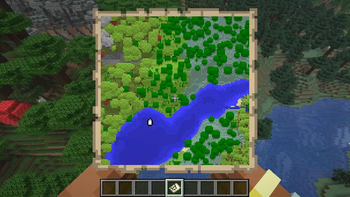
Cartographer’s Tint
Cartographer’s Tint makes Minecraft maps use biome-tinted colors for grass and foliage, so your maps look closer to the world they represent.
In vanilla Minecraft, many map colors are fixed. That means grass, leaves, and other naturally tinted blocks can look disconnected from the biome colors you actually see in-game. This mod adjusts those map colors so forests, plains, jungles, swamps, taigas, and other biomes feel more natural and readable on maps.
Features
- Biome-aware grass colors on maps
- Biome-aware foliage colors on maps
- More faithful colors for taigas, jungles, swamps, and other biomes
- Automatic vanilla palette approximation when used on its own
- Full RGB biome colors when used with Cartographer’s Canvas
Recommended: use with Cartographer’s Canvas
Cartographer’s Tint can be used on its own, in which case biome colors are approximated using the closest available colors from Minecraft’s vanilla map palette.
For the best results, it is recommended to install Cartographer’s Canvas alongside it.
Cartographer’s Canvas adds full RGB color support to Minecraft maps, allowing Cartographer’s Tint to display the actual biome-tinted grass and foliage colors instead of reducing them to the nearest vanilla palette color.
Using both mods together provides smoother color variation, more accurate biome representation, and maps that more closely match how the world appears in-game.
Why use it?
If you enjoy exploration, map walls, cartography, or simply want Minecraft maps to better match the world around you, Cartographer’s Tint gives maps a cleaner and more immersive appearance without changing gameplay.
Install it by itself for improved biome-aware map colors, or combine it with Cartographer’s Canvas for the full RGB experience.
- Edition: Minecraft Java
- File type: .jar
- Minecraft version listed: 26.2
- How to install: Install the matching mod loader (Forge, Fabric or NeoForge) for your Minecraft version. → Download the .jar. → Put it in the .minecraft/mods folder and launch that loader profile.
- Where to get it: Opens on Modrinth — not every file is mirrored on our own servers.
Install steps are the general flow for this file type — How to install Minecraft Java mods & modpacks walks through it step by step.
- Ships as cartographers_tint-neoforge-26.2-26.2.0.1.jar — drop this file into the mods folder
- Download size: 44 KB
- Download link checked 24 Oct 2026 — working
These come from our own check of the pack file, not from the source page.