
ModsJava
Mob Effects Modifier
A GUI-configurable mob effect system that lets you filter specific mobs, assign effects on spawn, or schedule timed effect updates.
⬇ Download on Modrinth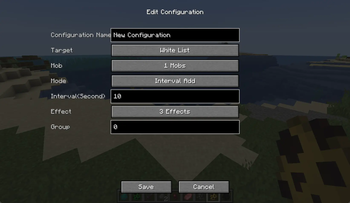
Mob Effects Modifier

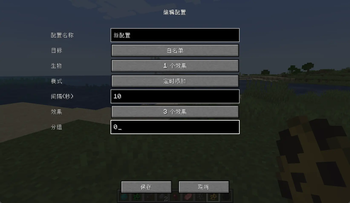
一个 Minecraft Forge 模组,允许你自定义生物的药水效果。可以让生物生成时自带效果,或者定时添加/移除效果,所有配置通过游戏内 GUI 完成,无需编辑配置文件。
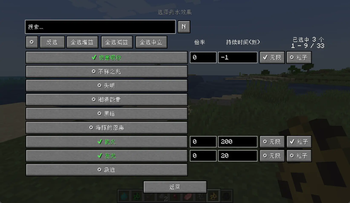
A Minecraft Forge mod that lets you customize mob potion effects. Give mobs effects on spawn or add/remove effects on a timer — all configured through an in-game GUI, no file editing required.
✨ 功能 | Features
- 个性化配置生物的效果 — 使用
/effectmenu开启生物效果配置菜单(需要管理员权限) - 生成自带效果 — 生物生成时自动获得你指定的药水效果
- 定时添加/移除 — 按自定义间隔给生物添加或移除效果
- 灵活目标选择 — 支持全部生物、白名单、黑名单三种模式
- 分组管理 — 配置项支持分组,使用
/effectmenu group <int> <bool>可以统一开启或者关闭某一组配置 - 游戏内 GUI 配置 — 搜索、选择、编辑全部在游戏内完成
- 每个配置独立文件 — 保存在
config/mob_effects_modifier/下,方便分享和版本管理 - 服务端权威 — 所有配置存储在服务端,多人游戏统一生效
- 热重载 —
/effectmenu reload重新加载配置,无需重启
- Custom Mob Effects — Open the config menu with
/effectmenu(requires admin permission) - Effects on Spawn — Mobs automatically gain your specified potion effects when they spawn
- Timed Add/Remove — Add or remove effects from mobs at custom intervals
- Flexible Targeting — Supports ALL mobs, WHITELIST, and BLACKLIST modes
- Group Management — Organize configs into groups; use
/effectmenu group <int> <bool>to enable/disable an entire group at once - In-Game GUI — Search, select, and edit everything without leaving the game
- Per-Config Files — Stored under
config/mob_effects_modifier/, easy to share and version-control - Server-Authoritative — All configs live on the server; everyone on a multiplayer server uses the same settings
- Hot Reload —
/effectmenu reloadreloads configs without restarting
📷 截图
📄 许可证
MIT © 2026
Quick facts
- Edition: Minecraft Java
- File type: .jar
- Minecraft version listed: 1.20.1
- How to install: Install the matching mod loader (Forge, Fabric or NeoForge) for your Minecraft version. → Download the .jar. → Put it in the .minecraft/mods folder and launch that loader profile.
- Where to get it: Opens on Modrinth — not every file is mirrored on our own servers.
Install steps are the general flow for this file type — How to install Minecraft Java mods & modpacks walks through it step by step.
Verified by MCModsHub
- Ships as mob_effects_modifier-2.0.0-forge-1.20.1.jar — drop this file into the mods folder
- Download size: 96 KB
- Download link checked 24 Aug 2026 — working
These come from our own check of the pack file, not from the source page.