HomeJavaModsCobblemon Dungeon
Cobblemon Dungeon
ModsJava

Cobblemon Dungeon

by diamonddogs6078 · on Modrinth

Create and edit custom Cobblemon dungeons directly in-game with areas, gates, trainer encounters, boss battles, Join NPCs, rewards, and JSON-based…

⬇ Download on Modrinth
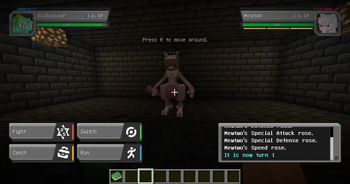
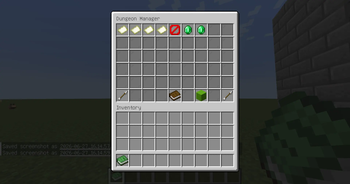
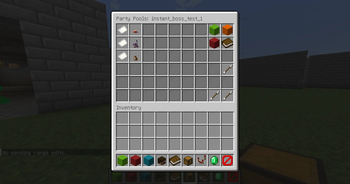
Cobblemon Dungeon — screenshot 1Cobblemon Dungeon — screenshot 2Cobblemon Dungeon — screenshot 3Cobblemon Dungeon — screenshot 4Cobblemon Dungeon — screenshot 5Cobblemon Dungeon — screenshot 6Cobblemon Dungeon — screenshot 7

Cobblemon Dungeon

Cobblemon Dungeon adds configurable dungeon-style content to Cobblemon.

Build and edit dungeons directly in-game using the dungeon editor, including dungeon areas, gates, progression conditions, trainer encounters, boss battles, Join NPCs, and clear rewards.

Dungeon data can also be adjusted with JSON files, allowing server owners and map creators to create custom adventure content without hardcoding everything into the mod.

The mod is designed for multiplayer use with shared dungeon spaces and individual player progression. Multiple players can enter the same dungeon at the same time, while battle progress, gate unlocks, rewards, and completion status are handled separately for each player.

Features

Dungeon Editor

Cobblemon Dungeon includes an in-game dungeon editor to make dungeon setup easier.

The editor is designed to help server owners configure dungeon areas, gates, bounds, dungeon flow, trainer slots, and other dungeon-related data without relying only on manual JSON editing.

This is useful when creating or adjusting dungeons directly inside the game world.

Debug Sample Dungeons

For testing and setup reference, Cobblemon Dungeon includes debug commands that can instantly generate sample dungeon structures.

These commands are useful for checking how the dungeon system works, testing battles, and using the generated dungeon as a reference when building your own content.

Debug commands:

/dungeon debug instanttest creates a basic test dungeon for checking normal dungeon progression.

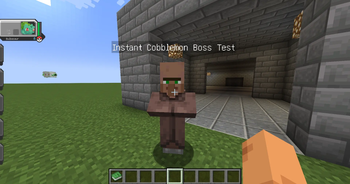
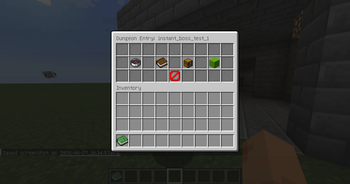
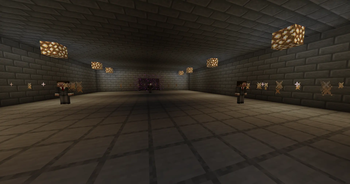
/dungeon debug instantbosstest creates a boss-focused test dungeon for checking boss battle features.

These debug dungeons are mainly intended for testing, development, and learning how the mod works.

Boss System

Cobblemon Dungeon supports two main types of boss encounters.

Trainer Boss

A trainer boss works like a normal Cobblemon trainer battle, but is used as a boss encounter inside the dungeon.

This is useful when you want a traditional trainer-style boss battle with a full Pokémon party.

Single Boss Pokémon

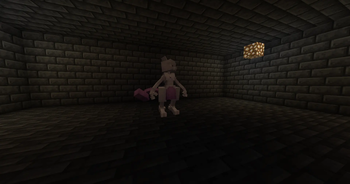
A single boss Pokémon encounter allows you to spawn one powerful Pokémon as the boss.

This type is useful for raid-style or RPG-style boss battles where players fight against one strong Pokémon instead of a full trainer party.

Boss Pokémon can be configured with special battle settings, such as:

This makes it possible to create stronger and more dramatic boss encounters than normal wild Pokémon battles.

Multiplayer Progression

Cobblemon Dungeon is designed for shared dungeon spaces with individual player progression.

Multiple players can enter the same dungeon, but battle progress, gate unlocks, rewards, and completion status are handled separately for each player.

This allows a server to provide dungeon content that can be reused by many players without forcing everyone to share the same progress state.

Server Owner Guide

This mod is mainly designed for server owners and map creators.

Players usually enter dungeons through Join NPCs, while administrators create and configure dungeon content using commands, the dungeon editor, and JSON files.

Basic setup flow:

  1. Create or prepare a dungeon definition.
  2. Set the dungeon entry and exit positions.
  3. Set the dungeon bounds.
  4. Create dungeon areas such as EXPLORE, MINIBOSS, and BOSS.
  5. Set each area's spawn point and bounds.
  6. Create gates between areas.
  7. Add gate conditions to control progression.
  8. Add trainer pool entries for normal, miniboss, and boss encounters.
  9. Configure trainer bosses or single boss Pokémon.
  10. Place trainer NPCs or exploration encounter slots.
  11. Spawn a Join NPC if players should enter through an NPC.
  12. Use /dungeon reload after editing dungeon data.

Configuration

Cobblemon Dungeon supports multiple setup methods:

You can configure:

Main Commands

Basic:

Dungeon setup:

Areas:

Gates:

Trainer pools:

NPCs:

Debug:

Reload:

Notes

Requirements

Please make sure the required dependencies are installed on the client and server when needed.

Quick facts

Install steps are the general flow for this file type — How to install Minecraft Java mods & modpacks walks through it step by step.

Verified by MCModsHub

These come from our own check of the pack file, not from the source page.

Explore more