
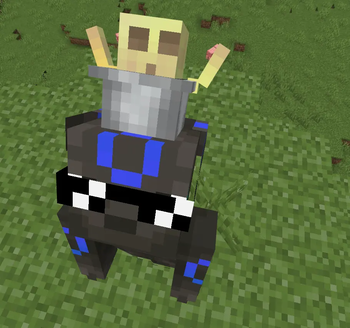
🪣 3D Sulfur CUBES+
Bring your Sulfur Cubes to life!
3D Sulfur CUBES+ transforms the default flat Sulfur Cube into a fully modeled 3D version, making it stand out while keeping the original Minecraft style. Whether you're exploring, collecting, or just showing it off, this pack gives the item a clean and immersive look.
✨ Features
- 🎲 High-quality 3D Sulfur Cube model
- 🎨 Vanilla-friendly design
- ⚡ Lightweight with no performance impact
- 📦 Works as a resource pack (no mods required)
- 🧩 Compatible with packs that don't replace the Sulfur Cube model
📸 Perfect For
- Survival gameplay
- PvP & SMP servers
- Screenshots and cinematics
- Content creators
- Players who love detailed 3D items
📥 Installation
- Download the resource pack.
- Place it in your Minecraft
resourcepacksfolder. - Enable it from Options → Resource Packs.
- Enjoy your new 3D Sulfur Cube!
❤️ Support
If you enjoy this pack, consider leaving a ⭐, sharing it with friends, or checking out my other texture packs.
Texture Pack: 3D Sulfur CUBES+
Style: Vanilla+ • 3D Item Model • Lightweight
Quick facts
- Edition: Minecraft Java
- File type: .zip (resource pack)
- Minecraft version listed: 26.2
- How to install: Download the .zip resource pack — do not unzip it. → Put it in .minecraft/resourcepacks. → Enable it in Options → Resource Packs.
- Where to get it: Opens on Modrinth — not every file is mirrored on our own servers.
Install steps are the general flow for this file type — How to install Minecraft Java resource packs walks through it step by step.
Verified by MCModsHub
- Downloads as 3d sulfur cubes plus.zip
- Download size: 1.8 MB
- Download link checked 14 Sept 2026 — working
These come from our own check of the pack file, not from the source page.