
Always-On Redstone Lamps
Java resource pack listed for Minecraft 1.6–24.x. Downloads from the MC Java Mods app on Android.
⬇ Download on Modrinth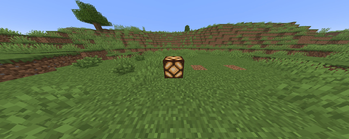
What it does
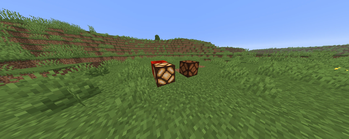
This is a pure texture swap — nothing more. It replaces the "unpowered" redstone lamp texture with a glowing, always-lit look, so every redstone lamp in your world appears turned on 24/7, even with zero redstone signal. No wiring, no redstone torches, no daylight sensors needed just to keep your lamps looking lit.
Features
- 🔶 Redstone lamps always look powered/lit
- 🪶 Single-texture edit — lightweight, no performance impact
- 🧱 Works with any build, any world, survival or creative
Installation
- Download the
.zipfile — do not unzip it. - Drop it into your resource packs folder:
- Windows:
%appdata%\.minecraft\resourcepacks - macOS:
~/Library/Application Support/minecraft/resourcepacks - Linux:
~/.minecraft/resourcepacks
- Windows:
- In-game: Options > Resource Packs, move it to Selected, click Done.
Compatibility
Works on any version from 1.13 onward (when Minecraft moved to folder-based resource packs). On versions before 1.21 you may see a harmless "made for a different version" warning — just click Yes and it will load and work identically.
Important note
This only changes the texture — it can't make unpowered lamps actually emit light, cast glow, or affect redstone logic in any way. That would require a datapack or mod, not a resource pack.
Uninstalling
Remove the pack from Selected (or delete it from the resourcepacks folder) to restore vanilla lamp behavior.
- Edition: Minecraft Java
- File type: .zip (resource pack)
- Minecraft versions listed: 1.6.1, 1.6.2, 1.6.4
- How to install: Download the .zip resource pack — do not unzip it. → Put it in .minecraft/resourcepacks. → Enable it in Options → Resource Packs.
- Where to get it: Opens on Modrinth — not every file is mirrored on our own servers.
Install steps are the general flow for this file type — How to install Minecraft Java resource packs walks through it step by step.
- Downloads as AlwaysOnRedstoneLamps.zip
- Download size: 3 KB
- Download link checked 25 Oct 2026 — working
These come from our own check of the pack file, not from the source page.