
Min4craft 4x4
I don't know my version or loader
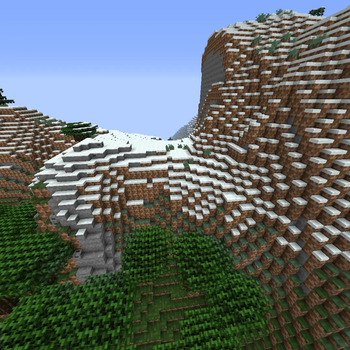
What to expect
What it does
Min4craft is a tiny simplified 4 pixel style resource pack that shrinks Minecraft’s textures down to a super minimal look. It keeps the game recognizable while giving it a bold, clean, low detail style.
Why you might want it
You might want to try Min4craft if you like low resoulution or just want Minecraft to look simple and lightweight It doesn’t change gameplay,
Other information
Pack is not fully finished there is still A few bugs
| Category | 16×16 Minecraft | 4×4 Min4craft |
|---|---|---|
| Detail | High detail, clear shapes | Extremely simplified, minimal shapes |
| Color Variation | Many shades per block | Very few shades, flat colors |
| Block Recognition | Easy to identify | Some blocks look similar due to low detail |
| Item Clarity | Items have defined outlines | Items may lose detail or hard to identify |
| Performance | Normal performance | Slightly lighter due to tiny textures |
| Style | Classic Minecraft look | Minimalistic, experimental |
This part was added to tell you what to expect and what changes, so you know what changes before using the pack.
Don't waste time
What wasn't changed Fire, Lava, Chest, Ender Chest, Entities
| Texture | Status |
|---|---|
| Fire | Not changed due to A error while changing texture |
| Lava | Not changed due to A error while changing texture |
| Chest | Didn't get changed even when edited texture |
| Ender Chest | Didn't get changed even when edited texture |
| Entities | Didn't change |
This part was made to show you what wasn't changed so you don't waste time fixing something that was never edited, so don't waste time checking if your the on wrong version.
- Edition: Minecraft Java
- File type: .zip (resource pack)
- Minecraft versions listed: 1.20, 1.20.1
- How to install: Download the .zip resource pack — do not unzip it. → Put it in .minecraft/resourcepacks. → Enable it in Options → Resource Packs.
- Where to get it: Opens on Modrinth — not every file is mirrored on our own servers.
Install steps are the general flow for this file type — How to install Minecraft Java resource packs walks through it step by step.
- Downloads as 4x4_1.20.1.zip
- Download size: 1.6 MB
- Download link checked 12 Sept 2026 — working
These come from our own check of the pack file, not from the source page.