
ResourcepacksJava
Physics Mod Pro Chinese Translate 物理模組完整簡繁中文翻譯
專為 Physics Mod Pro 設計的完整簡繁中文在地化翻譯資源包。Complete Chinese translation pack (Simplified & Traditional) for Physics Mod Pro.
⬇ Download on Modrinth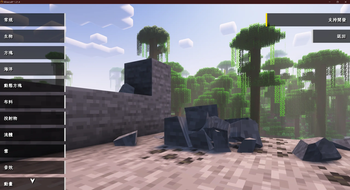
🌍 Physics Mod Pro 完整簡繁中文翻譯資源包
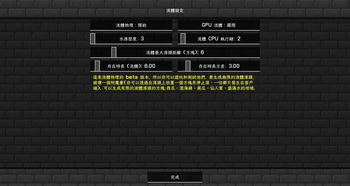
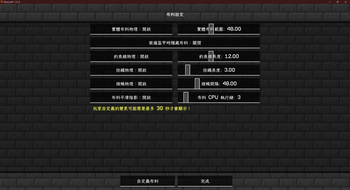
讓你的麥塊物理體驗更上一層樓,輕鬆調整各項進階物理參數! 這是一款專為 Physics Mod Pro(物理模組專業版) 設計的完整簡繁中文在地化翻譯資源包。完美解決遊戲內繁雜選單、專業版驗證、布料、液體、崩塌等各項進階物理參數的語言障礙。
✨ 特色亮點
- 🌐 雙語系完美支援: 完整收錄
zh_tw(繁體中文)與zh_cn(簡體中文),配合遊戲語言設定自動適應。 - 🛠️ 100% 完整覆蓋: 包含常規設定、物理崩塌、海洋/雪地/布料物理、自定義玩家/生物物理等。連深奧的相容性錯誤警告與 Pro 版驗證流程皆已全面中文化!
- 📏 超強相容性: 支援資源包格式 (Pack Format) 15 至 100,相容於多個 Minecraft 主流版本,避免出現「版本不相容」的警示。
- ✍️ 精確術語校對: 由 CDD 與 Yi Sang 聯手精細翻譯,融合台灣與大陸常用麥塊術語,語意自然流暢、貼合遊戲語境。
📦 安裝步驟
- 安裝模組: 請確保你已先行安裝 Physics Mod Pro 模組。
- 放入資源包:
- 啟動 Minecraft,打開
設定->資源包->開啟資源包資料夾。 - 將本資源包(檔案夾或
.zip壓縮檔)放入該資料夾中。
- 啟動 Minecraft,打開
- 啟用與排序: 在資源包列表中將本資源包移動至右側(已載入),並移至最頂端以確保翻譯優先覆蓋。
- 享受遊戲: 點擊「完成」載入,即可享受全中文的物理模組設定介面!
⚠️ 注意事項
- 本資源包僅為 語言翻譯包,不包含 Physics Mod Pro 模組本體。
- 如果遇到部分文字未翻譯,請確認本資源包是否處於資源包清單的最上層。
🤝 貢獻與致謝
- 翻譯作者: CDD, Yi Sang
- 模組原作者: Haubna (Physics Mod)
🌍 Physics Mod Pro Chinese Translation Pack (Simplified & Traditional)
Unlock the full physics configuration menu in Chinese! This translation resource pack provides full Traditional Chinese (
zh_tw) and Simplified Chinese (zh_cn) localizations for Physics Mod Pro. Say goodbye to language barriers when adjusting cloth, liquid, collapse, and ragdoll configurations.
✨ Key Features
- 🌐 Full Chinese Localization: Perfectly supports both
zh_tw(Taiwan/HK) andzh_cn(Mainland China). - 🛠️ 100% Coverage: Covers all GUI menus, config parameters, error tips, and even the Patreon Pro key verification process.
- 📏 Great Compatibility: Built with pack formats 15 to 100, ensuring maximum compatibility across various Minecraft versions.
- ✍️ Natural Translation: Carefully translated by CDD and Yi Sang using accurate Minecraft community terminology.
📦 Installation Guide
- Make sure you have installed the Physics Mod Pro mod.
- Put this resource pack folder (or
.zipfile) into yourresourcepacksdirectory. - Open Minecraft, go to Options -> Resource Packs, move this pack to the top of your active list.
- Click Done and enjoy!
🤝 Credits
- Translators: CDD, Yi Sang
- Mod Creator: Haubna (Physics Mod)
Quick facts
- Edition: Minecraft Java
- File type: .zip (resource pack)
- Minecraft versions listed: 1.20, 1.20.1, 23w31a
- How to install: Download the .zip resource pack — do not unzip it. → Put it in .minecraft/resourcepacks. → Enable it in Options → Resource Packs.
- Where to get it: Opens on Modrinth — not every file is mirrored on our own servers.
Install steps are the general flow for this file type — How to install Minecraft Java resource packs walks through it step by step.
Verified by MCModsHub
- Downloads as Physics Mod Pro 完整簡繁中文翻譯.zip
- Download size: 31 KB
- Download link checked 12 Sept 2026 — working
These come from our own check of the pack file, not from the source page.