
OZZA shader
OZZA is a high-quality Minecraft shader that enhances lighting, shadows, water, skies, and atmosphere while maintaining smooth performance.
⬇ Download on Modrinth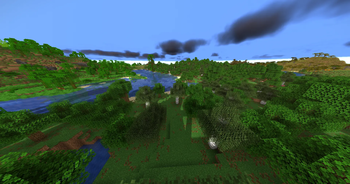
Meet OZZA Shader
When creating OZZA, we wanted to make Minecraft look absolutely gorgeous while still retaining playability. Every feature in OZZA was designed with improving visuals in mind, but never at the cost of taking away the charm that Minecraft is known for. From wandering in caves to building sky scrapers to watching the sunset, every moment will look incredible.
Lighting is where OZZA truly shines. From warm sun rises and vibrant sunsets, dynamic shadows, soft ambient occlusion light, and beautiful night lighting. The world will feel more alive than ever with sparkling water that reflects the moving sky, leaves that react to the wind, and subtle atmospheric effects that make each biome feel alive.
But we didn't just want OZZA to look good, we wanted it to run well too. OZZA is highly optimized to run well on modern machines while still providing top notch visuals. Compatible with Iris Shaders and Sodium, OZZA will run smoothly on nearly any machine so you can play your game with beautiful realistic graphics without losing too many frames.
We also didn't want players to be stuck with only our preset. OZZA allows full customization of lighting, bloom, color grading, shadows and much more. Feel like making your world look like a cinematic? Or maybe you want things to look more natural? With OZZA, you have all of the tools necessary to make your Minecraft world look exactly how you want it.
OZZA is more than just another shader. OZZA is an experience designed for players that want their Minecraft to look better than ever while maintaining the charm and gameplay they know and love. Awesome lighting, realistic particle effects, great performance, and high customization all come together to make OZZA.
- Edition: Minecraft Java
- File type: .zip (resource pack)
- Minecraft version listed: 1.21.11
- How to install: Download the .zip resource pack — do not unzip it. → Put it in .minecraft/resourcepacks. → Enable it in Options → Resource Packs.
- Where to get it: Opens on Modrinth — not every file is mirrored on our own servers.
Install steps are the general flow for this file type — see the MC Java Mods guides for the full walkthrough.
- Downloads as OZZA5.0-Beta.zip
- Download size: 15 KB
- Download link checked 12 Sept 2026 — working
These come from our own check of the pack file, not from the source page.