
ItemMailBox
A lightweight Paper 1.21.x plugin that lets players share items through an intuitive mailbox GUI - no chests, no clutter.
Features:
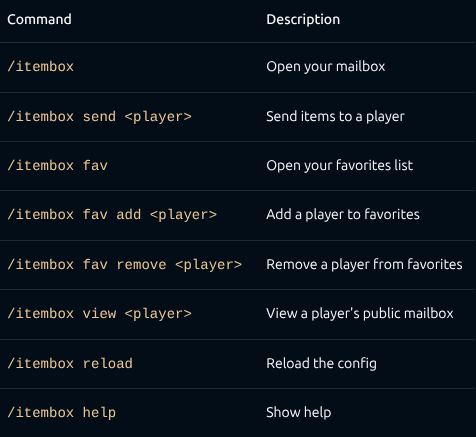
- /itembox — Open your personal inbox. Items sent by others appear here. Click to claim.
- /itembox send — Open a send GUI. Drop in items and hit send — they arrive in the recipient's mailbox, even if they're offline.
- Favorites - Add friends to your favorites list: /itembox fav add . Open the favorites GUI (/itembox fav) and click a head to send items instantly — no more typing names.
- Public mailboxes — Toggle your mailbox to public with a button in the GUI. Others can view it with /itembox view .
- Key requirement (optional) — Require a key item (configurable material) to send items. Great for server economies or gated features.
- Cooldown (optional) — Set a send cooldown in seconds to prevent spam.
- Fully configurable — All messages, titles, colors, and behavior are customizable in config.yml.
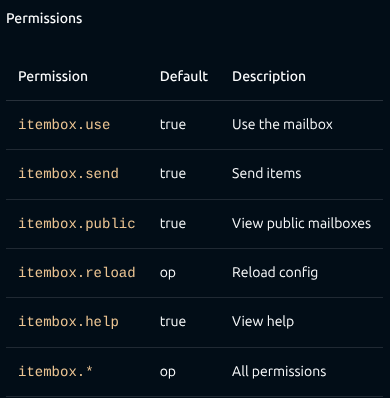
- Permissions — Granular permission nodes for every feature (itembox.use, itembox.send, itembox.reload, etc.). Offline support — Send items and add favorites even when the target player is offline (uses the server's usercache).
- GUI pagination — Browse mailboxes and favorites with next/previous page buttons.
- YAML storage — Lightweight per-player data files in the mailboxes/ folder.
Commands
Configuration
config.yml is generated on first run. Key options:
require-key: false
key-item: TRIPWIRE_HOOK
allow-public: true
send-cooldown: 0
All GUI titles and messages support & color codes.
Requirements
- Paper 1.21.x (or compatible fork)
- Java 21+
Installation
- Drop the JAR into your plugins/ folder.
- Restart the server.
- Configure config.yml to your liking.
- Done. No dependencies.
Quick facts
- Edition: Minecraft Java
- File type: .jar
- Minecraft versions listed: 1.21, 1.21.1, 1.21.2
- How to install: Install the matching mod loader (Forge, Fabric or NeoForge) for your Minecraft version. → Download the .jar. → Put it in the .minecraft/mods folder and launch that loader profile.
- Where to get it: Opens on Modrinth — not every file is mirrored on our own servers.
Install steps are the general flow for this file type — How to install Minecraft Java mods & modpacks walks through it step by step.
Verified by MCModsHub
- Ships as ItemMailBoxPlugin-1.0.0.jar — drop this file into the mods folder
- Download size: 36 KB
- Download link checked 24 Aug 2026 — working
These come from our own check of the pack file, not from the source page.