PotionLimits
Java mod listed for Minecraft 26.x. Downloads from the MC Java Mods app on Android.
⬇ Download on Modrinth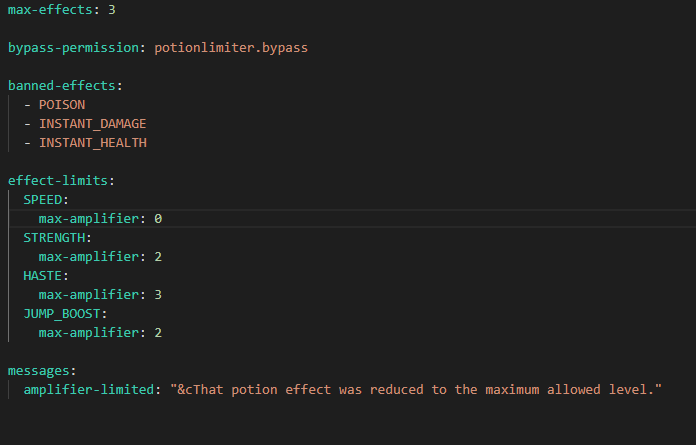
PotionLimiter
A lightweight, configurable Paper plugin that gives server owners complete control over potion effects.
PotionLimiter is designed for SMPs, PvP servers, and survival communities that want to balance gameplay by restricting overpowered potion effects without removing potions entirely.
Features
- Configure maximum amplifier levels for every potion effect
- Disable specific potion effects completely
- Automatically downgrade effects that exceed your configured limits
- Prevent players from keeping illegal potion effects
- Configurable messages
- Lightweight and optimized for performance
- Simple YAML configuration
- Built specifically for modern Paper servers
Why use PotionLimiter?
Potion effects can quickly become overpowered on competitive or long-term survival servers. PotionLimiter lets you keep potions in the game while ensuring they stay balanced.
Examples include:
- Limit Speed to Speed I
- Disable Strength entirely
- Prevent Haste above Haste II
- Block custom or unintended potion effects
- Create balanced progression for your server
Configuration
Everything is configurable through easy-to-edit YAML files.
You can:
- Set maximum levels for each potion effect
- Enable or disable individual effects
- Customize player messages
- Reload the configuration without restarting the server
Designed For
- SMPs
- Lifesteal servers
- PvP servers
- Economy servers
- Adventure servers
- Custom progression servers
Compatibility
- Paper
- Modern Minecraft versions (26.1.2)
Performance
PotionLimiter is designed to be lightweight with minimal performance impact, making it suitable for both small private servers and large public communities.
Support
If you encounter bugs or have feature suggestions, please open an issue on the project's repository.
Thank you for using PotionLimiter!
Project made with assistance of ChatGPT.
- Edition: Minecraft Java
- File type: .jar
- Minecraft version listed: 26.1.2
- How to install: Install the matching mod loader (Forge, Fabric or NeoForge) for your Minecraft version. → Download the .jar. → Put it in the .minecraft/mods folder and launch that loader profile.
- Where to get it: Opens on Modrinth — not every file is mirrored on our own servers.
Install steps are the general flow for this file type — How to install Minecraft Java mods & modpacks walks through it step by step.
- Ships as potionlimiter26.1.2b2-1.0-SNAPSHOT.jar — drop this file into the mods folder
- Download size: 9 KB
- Download link checked 25 Oct 2026 — working
These come from our own check of the pack file, not from the source page.