
UDFormats
Java mod listed for Minecraft 1.0–26.x. Downloads from the MC Java Mods app on Android.
⬇ Download on Modrinth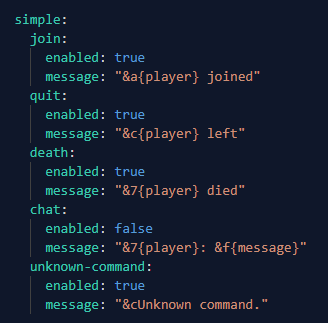
UnitedFormats
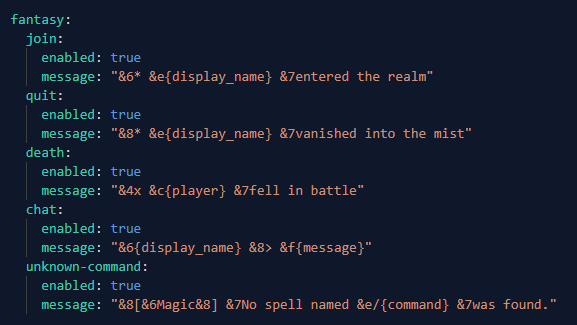
A Bukkit/Spigot/Paper/Purpur Minecraft plugin that replaces default player join, quit, death, chat, and unknown command messages with configurable presets.
Features
- Replace default join, quit, death, and unknown command messages.
- Optional custom chat format.
- Multiple presets in
config.yml. - Per-world message overrides.
blacklist-worldsoption to leave specific worlds untouched.- Reload configuration without restarting the server.
- Preview the active preset in-game.
- Compiles to Java 8 bytecode for broad Minecraft server compatibility.
- Uses the Bukkit/Spigot API, so it also supports Purpur.
Compatibility
UnitedFormats is designed for Bukkit-compatible server software such as Spigot, Paper, and Purpur. It avoids Paper-only APIs and does not set a fixed api-version, which helps it load on older servers too.
No plugin can honestly guarantee support for every Minecraft version forever, because server APIs and Java requirements change, but this project targets the widest practical compatibility range.
Commands
/unitedformats reloadreloadsconfig.yml./unitedformats presetslists configured presets./unitedformats preset <name>changes the active preset and saves it./unitedformats previewshows example messages from the active preset.
Aliases: /uf, /formats
Permission: unitedformats.admin
Placeholders
{player}player username.{display_name}player display name.{world}current world name.{x},{y},{z}block coordinates.{message}chat message, only for chat.{killer}killer name for death messages, orunknown.{command}unknown command text without the first/.
Per-World Messages
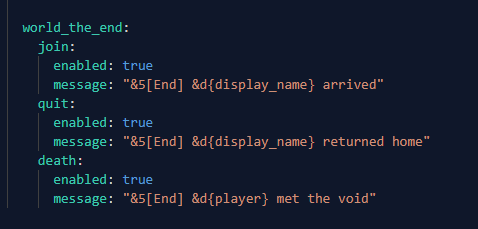
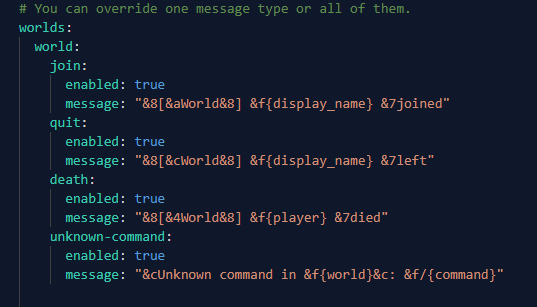
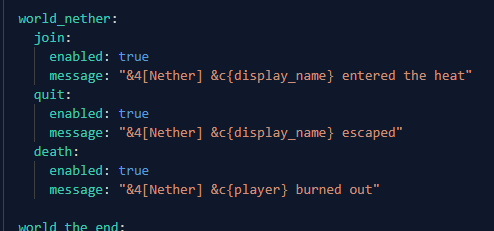
Use worlds in config.yml to override messages for one world. The plugin checks the player's current world first, then falls back to the active preset.
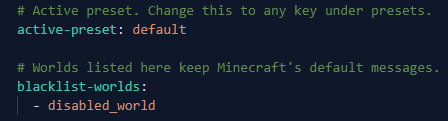
blacklist-worlds:
  - disabled_world

worlds:
  world_nether:
    join:
      enabled: true
      message: "&4[Nether] &c{display_name} entered the heat"
Worlds listed in blacklist-worlds keep the server's default messages.
- Edition: Minecraft Java
- File type: .jar
- Minecraft versions listed: 1.0, 1.1, 1.2.1
- How to install: Install the matching mod loader (Forge, Fabric or NeoForge) for your Minecraft version. → Download the .jar. → Put it in the .minecraft/mods folder and launch that loader profile.
- Where to get it: Opens on Modrinth — not every file is mirrored on our own servers.
Install steps are the general flow for this file type — How to install Minecraft Java mods & modpacks walks through it step by step.
- Ships as UnitedFormats-1.0.0.jar — drop this file into the mods folder
- Download size: 11 KB
- Download link checked 4 Oct 2026 — working
These come from our own check of the pack file, not from the source page.