
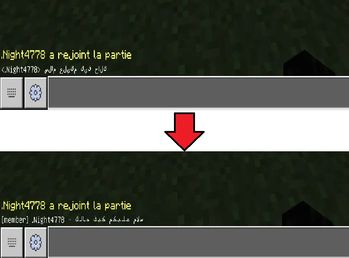
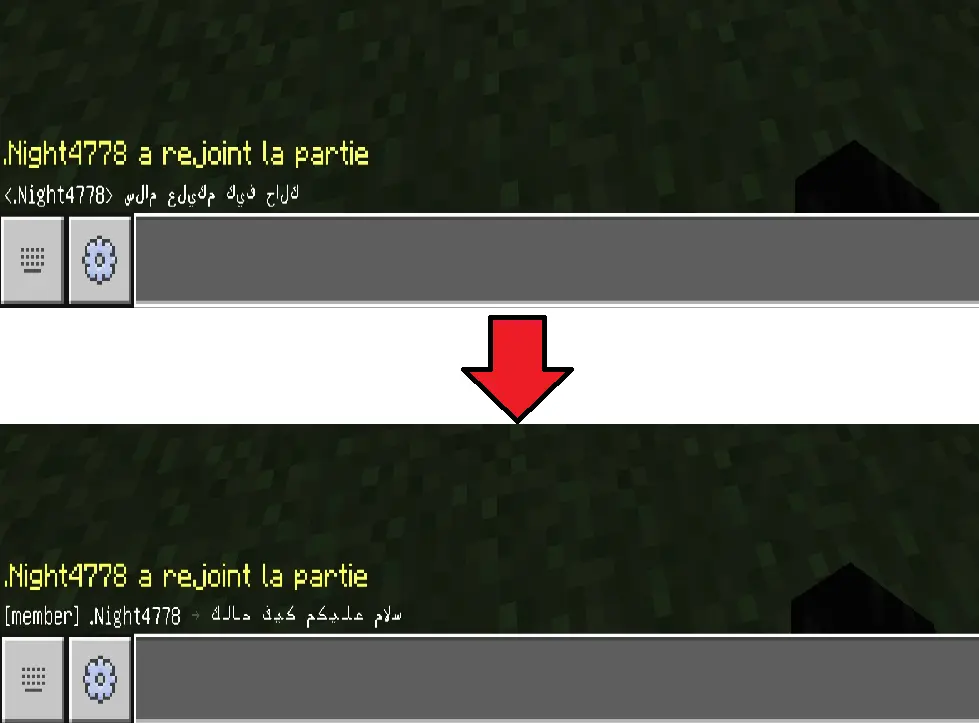
ArabicFix - The Ultimate Arabic Text Solution for Minecraft Bedrock & Java Crossplay : ArabicFix reshapes and reverses Arabic text so it reads correctly across both Bedrock and Java players, in chat. It solves the common problem of Arabic letters appearing disconnected or in the wrong reading order on cross-platform servers.
It supports LuckPerms prefixes and DiscordSRV chat relay, so formatted text stays readable wherever it's displayed.
What the plugin do exactly:
- Turn this "ﻚﻟﺎﺣ ﻒﻴﻛ ﻢﻜﻴﻠﻋ مﻼﺴﻟﺍ" in to this "السلام عليكم كيف حالك".
Key Features:
- Fixes Arabic text display between Bedrock & Java editions
- Customizable chat formatting with LuckPerms prefix support
- Advanced Arabic character processing (proper letter shaping & Harakat support)
- Lightweight & efficient - No performance impact on your server
- Integrated DiscordSRV support
Perfect For:
- Arabic Minecraft communities
- Servers with Bedrock-Java crossplay
Tested MC Versions: [1.21 - 26.2].
Chat Format Configuration Options:
# Chat format configuration
# Available placeholders:
# <prefix> - Player prefix (from LuckPerms or default)
# <player> - Player display name
# <message> - The chat message
chat-format: "<prefix><player> &8→ &f<message>"
- For more of my plugins check: Joutar0U plugins
- you can also download the plugin on: SpigotMC
- Edition: Minecraft Java
- File type: .jar
- Minecraft versions listed: 1.21, 1.21.1, 1.21.2
- How to install: Install the matching mod loader (Forge, Fabric or NeoForge) for your Minecraft version. → Download the .jar. → Put it in the .minecraft/mods folder and launch that loader profile.
- Where to get it: Opens on Modrinth — not every file is mirrored on our own servers.
Install steps are the general flow for this file type — How to install Minecraft Java mods & modpacks walks through it step by step.
- Ships as arabicfix.jar — drop this file into the mods folder
- Download size: 16 KB
- Download link checked 24 Aug 2026 — working
These come from our own check of the pack file, not from the source page.