ModsJava
Cloud Ender Chest
CloudEnderChest – A lightweight plugin that gives each player a UUID‑bound Ender Eye. Right‑click the eye to open a private, multi‑page cloud ender chest…
⬇ Download on Modrinth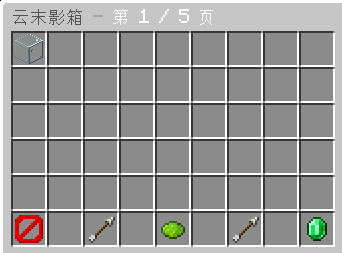
Cloud Ender Chest
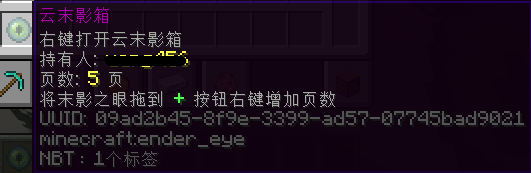
A lightweight plugin that gives each player a UUID‑bound Ender Eye. Right‑click the eye to open a private, multi‑page cloud ender chest.
Currently in development – more Minecraft versions will be supported in the future.
✨ Features
- Player‑bound Ender Eye – Each player receives an Ender Eye uniquely bound to their UUID. It cannot be used by other players.
- Multi‑page storage – Each cloud chest can have up to 64 pages, giving players plenty of space.
- Admin commands – Easily give, view, rename, or reset any player's cloud chest.
- Lightweight & reliable – Built for performance with a clean database backend (SQLite/MySQL ready).
🔧 Commands
| Command | Permission | Description |
|---|---|---|
/ymyx give <player> [pages] |
cloudechest.give |
Give a bound Ender Eye to a player |
/ymyx look <player> |
cloudechest.look |
View another player's cloud chest |
/ymyx rename <player> <new name> |
cloudechest.admin |
Rename the Ender Eye item |
/ymyx reset <player> |
cloudechest.admin |
Clear a player's entire cloud chest data |
📦 How to Use
- Give a player their Ender Eye using
/ymyx give <player> - Right‑click the Ender Eye to open their personal cloud chest
- Drag items in and out freely
- Click the
+button to add more pages (requires permission) - Admins can view and manage any player's chest using the commands above
🛡️ Permissions
| Permission | Description |
|---|---|
cloudechest.use |
Open your own cloud chest |
cloudechest.give |
Give Ender Eyes to players |
cloudechest.look |
View other players' chests |
cloudechest.admin |
All admin commands (rename, reset, etc.) |
📋 Requirements
- Server Core: Spigot / Paper / Purpur
- Java: 17 or higher
- Database: SQLite (built‑in) or MySQL (optional)
📌 Notes
- This plugin is actively developing – more features and version support are on the way.
- If you encounter any issues, please report them on the issue tracker.
📄 License
[GPL-3.0 license]
Icon based on Minecraft Wiki assets (CC BY-NC-SA 3.0)
Quick facts
- Edition: Minecraft Java
- File type: .jar
- Minecraft versions listed: 1.13, 1.13.1, 1.13.2
- How to install: Install the matching mod loader (Forge, Fabric or NeoForge) for your Minecraft version. → Download the .jar. → Put it in the .minecraft/mods folder and launch that loader profile.
- Where to get it: Opens on Modrinth — not every file is mirrored on our own servers.
Install steps are the general flow for this file type — How to install Minecraft Java mods & modpacks walks through it step by step.
Verified by MCModsHub
- Ships as 1-1.0.0.jar — drop this file into the mods folder
- Download size: 21 KB
- Download link checked 24 Aug 2026 — working
These come from our own check of the pack file, not from the source page.