
Easy Crate Manager
an easy and intuitive way to add crates to your server. Free Minecraft Java mod for 1.21, 1.21.1, 1.21.2.
⬇ Download on Modrinth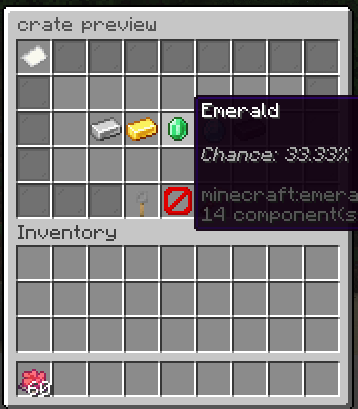
CrateManager is designed to make creating and managing crates simple. No complicated configuration files, no lengthy setup process, just add rewards, and you're ready to go.
Most crate plugins require editing configuration files or running multiple setup commands, Easy Crate Manager keeps everything in-game, making crate creation quick and intuitive.
Features
- Easy in-game crate creation
- Configurable reward weights
- Automatic percentage display
- Crate preview menu
- Custom crate names
- really easy to use
- opening effect including particles and sounds
How to use the plugin
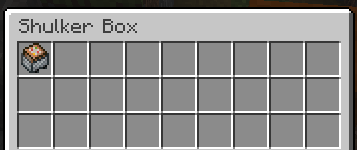
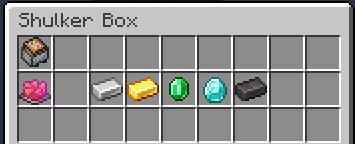
1. to create a crate first place down a shulker of any colour and put a command block minecart in the top-left slot of the inventory. This acts as a safeguard so that only players with access to Creative mode can create crates.
2. Place the items you want players to be able to win into the shulker box excluding the first and last slots per row, they will show up in the preveiw the same way you placed them. An item automatically has a weight of 1 by default, to change this hold your item and run the command: /setweight
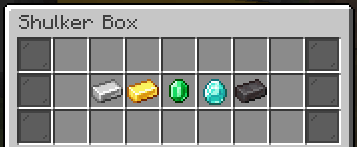
When you're finished, close the inventory. The shulker box will automatically be converted into a crate and you will be able to punch it to open the preview gui for the crate and operators will see an edit button at the bottom of the preview menu, clicking it reopens the original shulker so you can edit it
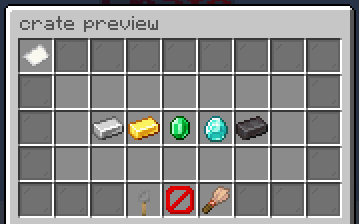
3. To add a custom key to a crate, hold the item you want to use for your crate and run the command /setcratekey then place the item directly below the command block minecart in the edit menu, Players will now need a matching item in order to open the crate. there will be a button for operators to give themselves a stack of that crate key in the preveiw
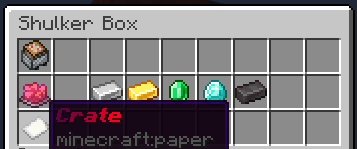
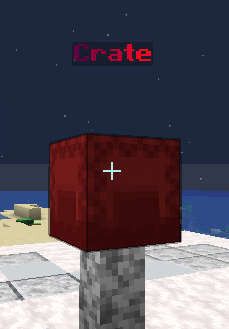
4. To give your crate a custom name, rename a piece of paper in an anvil and place it directly below the key slot. The paper's name will be used as the crate's display name and will appear above the crate after it has been interacted with.
FAQ
does this plugin impact performance? - no it has little to no impact on performance, you probably wont notice any lag using this.
do you have plans to improve this in the future? - yes I do, I plan to add more customization in terms of the crate menus, the opening animations and diffrent crate types like an option to let people select the reward rather than it be random.
will this plugin support newer versions? - Ill try my best to keep this plugin up to date and working, although I might be alittle slow sometimes
other things to keep in mind
- This plugin is still has a long way to go before Im finished with it
- I might be slow to update
- you can message me on discord if you have any problems with this plugin or suggestions @lucaart
what you are and are not allowed to do
you may:
- Use this plugin on your own Minecraft servers.
- make money from this plugin aslong as its not through selling the actual code, including the source or jar, even if edited.
You may not:
- Redistribute the plugin.
- Sell the plugin.
- Modify and redistribute the plugin.
- Claim the plugin as your own.
- Ships as easycratemanager0.1.0.jar — drop this file into the mods folder
- Download size: 1.8 MB
- Download link checked 23 Aug 2026 — working
These come from our own check of the pack file, not from the source page.