
Creative Tab Layouts
A lightweight API for creating page-based Creative Tabs with sections, headers, banner pages, and animated visuals.
⬇ Download on Modrinth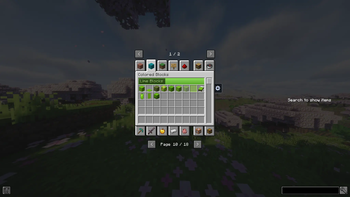
[EN] Description in English first
[ES] Descripción en español más abajo
Creative Tab Layouts
Creative Tab Layouts, or CTL, is a Minecraft modding utility for organizing creative mode tabs through structured and extensible layouts.
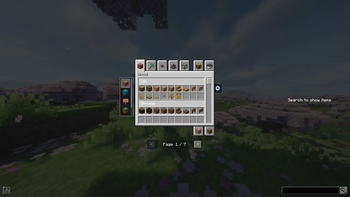
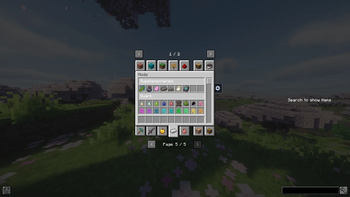
CTL does not replace Minecraft's creative tab registration system. The original tabs continue to exist. Instead, CTL controls how items are displayed inside selected tabs by rebuilding their visible content with pages, subtabs, sections, headers, banners, addon pages, and fallback pages.
It is designed for mod developers, addon developers, and modpack authors who need cleaner creative inventory organization, especially when large amounts of content are placed inside the same tab.
Features
- Page-based creative tab organization
- Subtab navigation with a scrollable side panel
- Collapsible item sections
- Visual headers for sections
- Visual banners for overview pages
- JSON-driven visuals
- Optional sprite animations
- Addon pages and sections for compatibility integrations
- Fallback pages for items added by external mods
- Priority-based ordering
- Public API for mods and addons
- Resolved layout snapshots for external integrations
- Reusable CTL headers and banners in external interfaces
- Datagen support for CTL visuals
- Built-in vanilla tab layouts
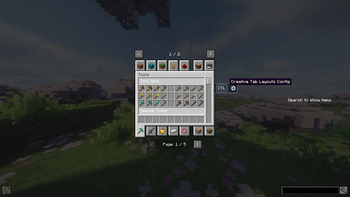
- In-game configuration screen
- Developer visual debug tools in development environments
For players and modpacks
Creative Tab Layouts can be installed as a dependency when required by another mod or modpack.
When its built-in vanilla layouts are enabled, CTL can also reorganize selected vanilla creative tabs into cleaner pages, subtabs, and sections.
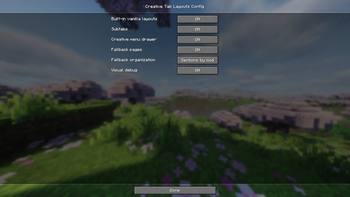
Available behavior can be adjusted through the in-game configuration screen, including built-in vanilla layouts, subtabs, fallback pages, and other client-side presentation options.
For developers
Developers can use CTL to create structured layouts for creative tabs, register pages and subtabs, define sections, contribute content to existing layouts, create JSON-driven visuals, and generate visual configuration files through datagen.
CTL also provides a public integration API for querying resolved layouts and reusing its headers and banners in external interfaces without depending on internal implementation details.
Extended documentation, API references, and examples are available in the project repository.
Links
Creative Tab Layouts
Creative Tab Layouts, o CTL, es un mod/utilidad para Minecraft que permite organizar las pestañas del inventario creativo mediante layouts estructurados y extensibles.
CTL no reemplaza el sistema de registro de creative tabs de Minecraft. Las pestañas originales siguen existiendo. En su lugar, CTL controla cómo se muestran los items dentro de pestañas seleccionadas, reconstruyendo su contenido visible mediante páginas, subtabs, secciones, headers, banners, addon pages y fallback pages.
Está pensado para desarrolladores de mods, desarrolladores de addons y autores de modpacks que necesitan una organización más clara del inventario creativo, especialmente cuando una gran cantidad de contenido termina dentro de una misma pestaña.
Características
- Organización de creative tabs por páginas
- Navegación mediante subtabs con panel lateral desplazable
- Secciones de items colapsables
- Headers visuales para secciones
- Banners visuales para overview pages
- Visuales definidos mediante JSON
- Soporte opcional para animaciones por sprites
- Addon pages y addon sections para integraciones de compatibilidad
- Fallback pages para items añadidos por mods externos
- Ordenamiento por prioridad
- API pública para mods y addons
- Snapshots de layouts resueltos para integraciones externas
- Reutilización de headers y banners de CTL en interfaces externas
- Soporte de datagen para visuales de CTL
- Layouts vanilla integrados
- Pantalla de configuración dentro del juego
- Herramientas de debug visual en entornos de desarrollo
Para jugadores y modpacks
Creative Tab Layouts puede instalarse como dependencia cuando otro mod o modpack lo requiera.
Cuando sus layouts vanilla integrados están activados, CTL también puede reorganizar pestañas vanilla seleccionadas mediante páginas, subtabs y secciones más claras.
El comportamiento disponible puede ajustarse desde la pantalla de configuración dentro del juego, incluyendo los layouts vanilla integrados, las subtabs, las fallback pages y otras opciones visuales del cliente.
Para desarrolladores
Los desarrolladores pueden usar CTL para crear layouts estructurados para creative tabs, registrar páginas y subtabs, definir secciones, contribuir contenido a layouts existentes, crear visuales definidos mediante JSON y generar archivos de configuración visual mediante datagen.
CTL también proporciona una API pública de integración para consultar layouts resueltos y reutilizar sus headers y banners en interfaces externas sin depender de detalles internos de implementación.
La documentación extendida, la referencia de la API y los ejemplos están disponibles en el repositorio del proyecto.
Enlaces
- Edition: Minecraft Java
- File type: .jar
- Minecraft version listed: 1.21.1
- How to install: Install the matching mod loader (Forge, Fabric or NeoForge) for your Minecraft version. → Download the .jar. → Put it in the .minecraft/mods folder and launch that loader profile.
- Where to get it: Opens on Modrinth — not every file is mirrored on our own servers.
Install steps are the general flow for this file type — How to install Minecraft Java mods & modpacks walks through it step by step.
- Ships as tab_layouts-1.2.1.jar — drop this file into the mods folder
- Download size: 268 KB
- Download link checked 24 Aug 2026 — working
These come from our own check of the pack file, not from the source page.