
WEScreens
Meet WEScreens — a mod that lets you build functional menus right inside the game, without knowing how to code.
⬇ Download on Modrinth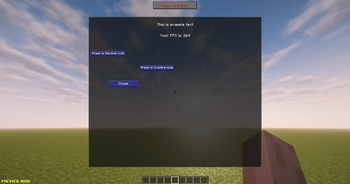
WEScreens
Create fully customizable in-game GUI screens for Minecraft Forge - without writing Java code.
WEScreens is a visual GUI editor that lets you design interfaces directly inside Minecraft. Create menus, dialogs, shops, quest windows, server information screens, and much more using an intuitive drag-and-drop editor. Save your screens to the world and open them instantly with commands.
⚠️ Beta Status
WEScreens is currently in Beta stage.
This means the mod is still under active development and may contain bugs, unfinished features, or unexpected behavior.
Please keep in mind:
- Some features may change or be reworked in future updates
- Bugs or crashes may occur in certain cases
- World data compatibility may not be guaranteed between versions
- Performance and stability improvements are ongoing
Feedback and bug reports are appreciated and help improve the mod.
✨ Features
- 🎨 Visual in-game GUI editor
- 🖱️ Drag & drop interface editing
- 📏 Move and resize elements freely
- 🔒 Lock elements to prevent accidental movement
- 📑 Multi-tab interfaces
- 📂 Nested containers with independent tabs
- 📝 Rich text with colors, alignment, and custom scaling
- 🖼️ Display any Minecraft texture
- ⚡ Execute commands with buttons
- 📦 Screens are automatically saved in world data
- 👥 Open screens for specific players using commands
- 🔄 Edit existing screens at any time
🧩 Available Components
- Text
- Images
- Close Buttons
- Command Buttons
- Tab Buttons
- Tab Containers
- Containers
🛠️ Commands
WEScreens provides two simple commands for creating and managing your custom interfaces.
/createscreen <name>Creates a new screen and opens it in the visual editor./screen <name> <action> [new_name]Manage an existing screen.Available actions:
open— Open the screen.edit— Open the screen in the editor.rename— Rename the screen (requiresnew_name).delete— Delete the screen permanently.
Example:
/screen MainMenu rename LobbyMenu
🔥 Dynamic Placeholders
Display real-time information inside your interfaces.
Examples:
%playername%%displayname%%health%%food%%xp%%level%%coords%%biome%%dimension%%time%%totalplayers%
...and many more.
📚 Perfect For
- Rules screens
- Quest systems
- Tutorials
- Shops
- Admin panels
- Command hubs
- Factions & clans
🚀 Why WEScreens?
Unlike traditional GUI mods, WEScreens doesn't require creating a new GUI in code every time you need a menu.
Design, edit, and update interfaces directly in-game with a powerful visual editor, making iteration fast and simple while supporting everything from basic menus to complex multi-tab layouts.
Whether you're creating a modpack or adventure map, WEScreens provides a flexible and efficient way to build beautiful Minecraft interfaces.
- Edition: Minecraft Java
- File type: .jar
- Minecraft version listed: 1.20.1
- How to install: Install the matching mod loader (Forge, Fabric or NeoForge) for your Minecraft version. → Download the .jar. → Put it in the .minecraft/mods folder and launch that loader profile.
- Where to get it: Opens on Modrinth — not every file is mirrored on our own servers.
Install steps are the general flow for this file type — How to install Minecraft Java mods & modpacks walks through it step by step.
- Ships as wescreens-1.0.1.jar — drop this file into the mods folder
- Download size: 96 KB
- Download link checked 24 Aug 2026 — working
These come from our own check of the pack file, not from the source page.