
⚡ SparkTPA
A sleek, DonutSMP-inspired TPA plugin for Paper/Purpur servers! 🍩✨



📖 About
SparkTPA is a lightweight, modern, and feature-packed teleport request plugin for Minecraft 1.21.x servers. Inspired by the iconic DonutSMP style — it features a sleek auto-opening accept/deny GUI, clean black glass layouts, player head info cards, emoji-rich messages, and smooth sound & particle effects. ⚡✨
✨ Features
- 🍩 DonutSMP-Style GUI — Clean black glass layout with player heads, green/red wool buttons
- 🔔 Auto-Opening Popup — Accept/deny GUI pops up automatically when you receive a TPA request
- 🧑 Player Info Cards — See requester's world, health, and TPA type in the GUI
- 🚀 TPA & TPA Here — Send and receive teleport requests
- 📡 TPA Here All — Send TPA Here to every online player at once
- ✅ Accept / Deny / Accept All / Deny All — Full control over requests via GUI or commands
- 🔕 Toggle TPA — Disable/enable incoming requests anytime
- 🚫 Block Players — Block specific players from sending TPA
- 📋 Request List — View all pending requests in a styled chat list
- ⏱️ Configurable Countdown — Customizable teleport delay with action bar timer
- 🚶 Cancel on Move/Damage — Prevents teleportation abuse
- 🎵 Sound Effects — Satisfying sounds on every action
- ✨ Particle Effects — End rod particles on teleport
- 🎨 Colorful Messages — Beautiful emoji-rich chat messages
- 📝 Fully Customizable — All messages in
messages.yml, all settings inconfig.yml - 🔧 Easy Config — Simple and clean out-of-the-box configuration
- 📑 Tab Completion — Auto-complete player names in all commands
🍩 GUI Preview
Accept/Deny Popup (auto-opens on request)
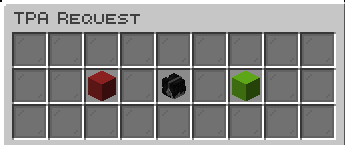
- 🧑 Player head in center with name, world, health & TPA type
- 🟩 Green wool = Accept (left-click)
- 🟥 Red wool = Deny (right-click)
- ⬛ Black glass background — clean & minimal
Multi-Request Popup
When you have multiple pending requests, a 5-row menu opens with all player heads. Left-click to accept, right-click to deny. Includes Accept All 🟩 and Deny All 🟥 buttons.
🎮 Commands
| Command | Description | Permission |
|---|---|---|
/tpa <player> |
🚀 Send a teleport request to a player | sparktpa.tpa |
/tpa gui |
🖥️ Open the TPA GUI menu | sparktpa.tpa |
/tpahere <player> |
📍 Request a player to come to you | sparktpa.tpahere |
/tpahereall |
📡 Send TPA Here to ALL online players | sparktpa.tpahereall |
/tpaccept [player] |
✅ Accept a TPA request (latest if no name) | sparktpa.tpaccept |
/tpaccept all |
✅ Accept all pending requests | sparktpa.tpaccept |
/tpaccept gui |
🍩 Open Donut-style request popup | sparktpa.tpaccept |
/tpadeny [player] |
❌ Deny a TPA request (latest if no name) | sparktpa.tpadeny |
/tpadeny all |
❌ Deny all pending requests | sparktpa.tpadeny |
/tpacancel [player] |
🔄 Cancel your sent request | sparktpa.tpacancel |
/tpatoggle |
🔕 Toggle TPA on/off | sparktpa.tpatoggle |
/tpalist |
📋 List pending requests in chat | sparktpa.tpalist |
/tpablock <player> |
🚫 Block a player from TPA | sparktpa.tpablock |
/tpaunblock <player> |
✅ Unblock a player | sparktpa.tpaunblock |
/sparktpa help |
❓ View all commands | (everyone) |
/sparktpa reload |
🔧 Reload configs | sparktpa.admin |
🔑 Permissions
| Permission | Default | Description |
|---|---|---|
sparktpa.tpa |
✅ Everyone | Use /tpa command |
sparktpa.tpahere |
✅ Everyone | Use /tpahere command |
sparktpa.tpahereall |
✅ Everyone | Use /tpahereall command |
sparktpa.tpaccept |
✅ Everyone | Accept TPA requests |
sparktpa.tpadeny |
✅ Everyone | Deny TPA requests |
sparktpa.tpacancel |
✅ Everyone | Cancel sent requests |
sparktpa.tpatoggle |
✅ Everyone | Toggle TPA on/off |
sparktpa.tpalist |
✅ Everyone | List pending requests |
sparktpa.tpablock |
✅ Everyone | Block players |
sparktpa.tpaunblock |
✅ Everyone | Unblock players |
sparktpa.admin |
🔑 OP only | Reload & admin commands |
sparktpa.bypass.block |
🔑 OP only | Bypass player blocks |
sparktpa.bypass.delay |
🔑 OP only | Skip teleport delay |
sparktpa.bypass.cooldown |
🔑 OP only | Bypass cooldowns |
⚙️ Configuration
config.yml
settings:
  request-timeout: 60        # ⏱️ Seconds before request expires
  teleport-delay: 5          # ⏳ Seconds before teleport (0 = instant)
  cancel-on-move: true       # 🚶 Cancel teleport if player moves
  cancel-on-damage: true     # 💥 Cancel teleport if player takes damage
  max-pending-requests: 5    # 📋 Max requests per player
  enable-sounds: true        # 🎵 Play sounds on actions
  enable-particles: true     # ✨ Show particles on teleport
  enable-gui: true           # 🍩 Enable Donut-style GUI (auto-popup)
  block-bypass-permission: true # 🔑 Allow bypass permission
messages.yml
All messages are fully customizable with color codes (&), hex colors (&#RRGGBB), and emoji support! ✨
📦 Installation
- ⬇️ Download the latest
SparkTPA-x.x.x.jar - 📂 Place it in your server's
plugins/folder - 🔄 Restart or reload your server
- ✅ Done! TPA requests will auto-open the Donut-style GUI ⚡
💡 Usage Tips
- 🍩 When someone sends you a TPA, the accept/deny popup opens automatically!
- 📡 Use
/tpahereallto send TPA Here to everyone online at once - 🖥️ Type
/tpa guito open the main SparkTPA menu - 📋 Use
/tpalistto see all pending requests in a styled list - ✅ Use
/tpacceptwithout arguments to accept the latest request - ❌ Use
/tpadeny allto quickly deny all pending requests - 🔕 Use
/tpatogglewhen you don't want to be disturbed - 🚫 Use
/tpablockto stop specific players from sending requests
🛠️ Requirements
📝 License
This project is licensed under the MIT License.
Made with ❤️ by PavitraXD
⚡ SparkTPA — Lightning-fast teleportation for your server! ⚡
- Edition: Minecraft Java
- File type: .jar
- Minecraft versions listed: 1.21, 1.21.1, 1.21.2
- How to install: Install the matching mod loader (Forge, Fabric or NeoForge) for your Minecraft version. → Download the .jar. → Put it in the .minecraft/mods folder and launch that loader profile.
- Where to get it: Opens on Modrinth — not every file is mirrored on our own servers.
Install steps are the general flow for this file type — How to install Minecraft Java mods & modpacks walks through it step by step.
- Ships as SparkTPA-1.2.0.jar — drop this file into the mods folder
- Download size: 60 KB
- Download link checked 24 Aug 2026 — working
These come from our own check of the pack file, not from the source page.