HeatProtect
Java mod listed for Minecraft 26.x. Downloads from the MC Java Mods app on Android.
HeatProtect is an advanced land-protection system where claims aren't boxes you place but organic territory that grows from where you actually build…
I don't know my version or loader
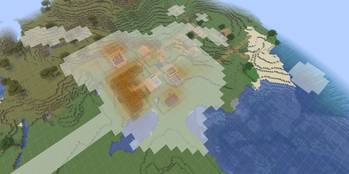
HeatProtect
An advanced land-protection system where claims aren't boxes you place — they're organic territory that grows from where you actually build. Dense, lived-in areas lock in automatically; scattered junk never claims land nobody uses. Fully automatic, self-adjusting, and visualized live both in-world, on Dynmap, and on BlueMap
How it works
Traditional claim plugins make you place rigid rectangles. HeatProtect doesn't. Your territory forms from your real building history — the more you build in an area, the stronger your claim, with smooth organic boundaries instead of hard-edged boxes. Build more and your land grows naturally. Leave scattered blocks in the wild and they'll never lock up terrain you're not using.
No commands to memorize a claim grid. No wasted land. Just build, and the world recognizes what's yours.
🖥️ Server Plugin
The core system. Runs on Spigot, derives claims from your existing block history, and enforces protection.
- Organic, density-based claims — territory emerges from where players actually build, not manual regions
- Self-maintaining — claims recalculate automatically on a schedule; nothing to manage by hand
- Microsecond protection checks — every block place and break is validated instantly with zero lag on the server thread
- Tunable aggressiveness — configure exactly how much building it takes to claim land
- Base sharing — add trusted players to build alongside you in your claim
- Dynmap integration — a live server-wide territory layer showing every claim
- Built on your existing data — reads block ownership from CoreProtect; no migration, no new tracking
Player commands
/heatprotect show— outline your claim with particles/heatprotect addmember <player>— let someone build in your base/heatprotect delmember <player>— remove a member/heatprotect members— list your base members/heatprotect info— show the claim and its strength where you're standing
🎨 Client Mod
An optional companion mod that renders claims directly in the world.
- Live in-world heatmap — see your territory's real shape as you move
- Per-tile intensity — view how strong a claim is, not just where it is
- Clear boundaries — know exactly where you can and can't build
- Read-only — displays server data, never modifies anything
The client mod is optional. The server plugin works fully on its own, and non-modded players still get protection plus the Dynmap layer. The mod simply adds a richer in-world view for those who install it.
Requirements
- Server: Spigot, with CoreProtect installed
- Client mod: requires a server running the HeatProtect plugin — it does nothing standalone
- Edition: Minecraft Java
- File type: .jar
- Minecraft versions listed: 26.1, 26.1.1, 26.1.2
- How to install: Install the matching mod loader (Forge, Fabric or NeoForge) for your Minecraft version. → Download the .jar. → Put it in the .minecraft/mods folder and launch that loader profile.
- Where to get it: Opens on Modrinth — not every file is mirrored on our own servers.
Install steps are the general flow for this file type — How to install Minecraft Java mods & modpacks walks through it step by step.
- Ships as heatprotect-1.0.0-26.1.2.jar — drop this file into the mods folder
- Download size: 75 KB
- Download link checked 25 Oct 2026 — working
These come from our own check of the pack file, not from the source page.