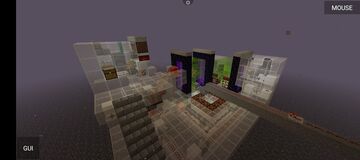
This was made for those who cant download litematica or dont know how to use it.
The world is made by me and cubicmetre created the schematic and i pasted it into the world for people who dont know, dont have or cant run the litematica mod. you should subscribe to cubicmetre on youtube for making this cool tnt cannon.
tutorial
----SETTING UP-----paste the orbital strike cannon v4.3 schematic anywhere you want
recommended 4000 ~ 4000 coordinates
ALWAYS make sure the red square is aligned with the chunk border
click the note block next to the force shutdown switch and then turn the force shutdown switch off
go to the nether portal with 2 rails and remove the portal once you get to the nether
if your coordinates are 4000 ~ 4000 tp to 500 200 500
paste the nether schematic at 500 135 500
turn off auto fire
place a dropper and put any item inside of it and place it next to the portal with green glass
wire it with redstone and build up 2 blocks high and go atleast 2 or 3 chunks away from the schematic you can view the chunks by pressing: f3 + g then build up 2 blocks high and put a pressure plate on the first block and a redstone torch on the same block as the pressure plate
wire that redstone torch and connect it to the dropper
make a portal next to the redstone torch and go to it
there you can put a target as long as the cannon is unrendered
go back to the nether schematic and turn on chunkloading
-----FIRING PROCEDURE-----
once you have put your target go to the cannon spreadsheet and put its origin of coordinates and the target coordinates
then put your payload:Stab= small but deep hole
Nuke= destroy the entire area within a 50 block radius
Now go back to the nether schematic and put the X trim and Z trim in the chest where theres random colored blocks X is the concrete blocks and Z is the glass blocks X trim is at the end Z trim is also at the end
choose the payload by using the lanterns at the end beside the Z and X trim
after that put the X and Z blocks into the cannon minecart chest and click the load cannon settings then start firing
sequence
NOTE: this can take up to 10 minutes
Stab charge=2-3 minutes long
Nuke charge=4-10 minutes long
once the lights at the bottom stop circling that means the cannon is ready to fire
NEVER go near or even render the cannon at this part
get a fishing rod and fish the pressure plate do not let go of it and go through the portal of where your target is
once your at the target click the fishing rod and it should release the payload.
you will know that the payload is release if the game lags a lot
MADE FOR 1.19.4 AND ABOVE!1!!1!1
have fun with demolition! ^_^
spreadsheet:docs.google.com/spreadsheets/d/1tUJvgIzkGWio30LGL3W8S6VM-AIquWbP/edit?usp=drivesdk&ouid=115937475506368953889&rtpof=true&sd=true
The world is made by me and cubicmetre created the schematic and i pasted it into the world for people who dont know, dont have or cant run the litematica mod. you should subscribe to cubicmetre on youtube for making this cool tnt cannon.
tutorial
----SETTING UP-----paste the orbital strike cannon v4.3 schematic anywhere you want
recommended 4000 ~ 4000 coordinates
ALWAYS make sure the red square is aligned with the chunk border
click the note block next to the force shutdown switch and then turn the force shutdown switch off
go to the nether portal with 2 rails and remove the portal once you get to the nether
if your coordinates are 4000 ~ 4000 tp to 500 200 500
paste the nether schematic at 500 135 500
turn off auto fire
place a dropper and put any item inside of it and place it next to the portal with green glass
wire it with redstone and build up 2 blocks high and go atleast 2 or 3 chunks away from the schematic you can view the chunks by pressing: f3 + g then build up 2 blocks high and put a pressure plate on the first block and a redstone torch on the same block as the pressure plate
wire that redstone torch and connect it to the dropper
make a portal next to the redstone torch and go to it
there you can put a target as long as the cannon is unrendered
go back to the nether schematic and turn on chunkloading
-----FIRING PROCEDURE-----
once you have put your target go to the cannon spreadsheet and put its origin of coordinates and the target coordinates
then put your payload:Stab= small but deep hole
Nuke= destroy the entire area within a 50 block radius
Now go back to the nether schematic and put the X trim and Z trim in the chest where theres random colored blocks X is the concrete blocks and Z is the glass blocks X trim is at the end Z trim is also at the end
choose the payload by using the lanterns at the end beside the Z and X trim
after that put the X and Z blocks into the cannon minecart chest and click the load cannon settings then start firing
sequence
NOTE: this can take up to 10 minutes
Stab charge=2-3 minutes long
Nuke charge=4-10 minutes long
once the lights at the bottom stop circling that means the cannon is ready to fire
NEVER go near or even render the cannon at this part
get a fishing rod and fish the pressure plate do not let go of it and go through the portal of where your target is
once your at the target click the fishing rod and it should release the payload.
you will know that the payload is release if the game lags a lot
MADE FOR 1.19.4 AND ABOVE!1!!1!1
have fun with demolition! ^_^
spreadsheet:docs.google.com/spreadsheets/d/1tUJvgIzkGWio30LGL3W8S6VM-AIquWbP/edit?usp=drivesdk&ouid=115937475506368953889&rtpof=true&sd=true
Quick facts
- Edition: Minecraft Java
- File type: .zip (world save)
- How to install: Download the .zip world. → Unzip it. → Move the folder into .minecraft/saves.
- Where to get it: In MC Java Mods, or directly above on this page.
Install steps are the general flow for this file type — How to install Minecraft Java maps & worlds walks through it step by step.
Verified by MCModsHub
- Downloads as 328318.zip
- Download size: 7.6 MB
- Download link checked 25 Aug 2026 — working
- Mirrored on our own servers — the download does not depend on the original host
These come from our own check of the pack file, not from the source page.