
Flashbatch
Java mod listed for Minecraft 26.x. Downloads from the MC Java Mods app on Android.
Queue and render every scene of a Flashback replay at once, with full control over naming, export settings, and time ranges — instead of adding scenes to…
⬇ Download on Modrinth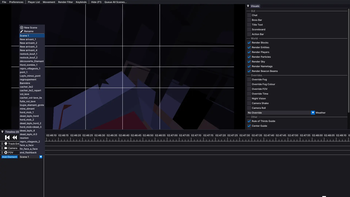
FlashBatch
FlashBatch is a companion mod for Flashback that lets you queue and render every scene of the same replay at once, instead of adding each scene to the export queue one by one.
What it does
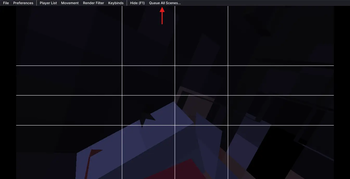
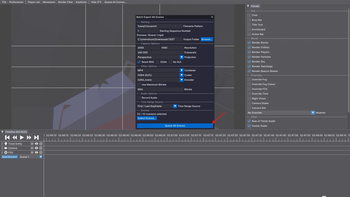
FlashBatch adds a Queue All Scenes... entry to Flashback's main menu bar. Clicking it opens a batch export window, styled to match Flashback's own editor UI, where you can configure exactly how every scene gets exported before queuing them all in one click.
Features
- Custom filename patterns - use Flashback's own placeholders (
%seq%,%scene%,%date%,%time%,%replay%) with a live preview of the resolved name. Set a custom starting number for%seq%whenever you need one. - Full export options - resolution, framerate, projection, container/codec/encoder, bitrate, transparency, SSAA, audio settings... the same options Flashback's own export window offers, kept independent from your saved Preferences so batch exports never overwrite your usual defaults.
- Custom output folder per batch, with a folder picker.
- Time range selector - choose whether each scene exports using its In/Out points, its first/last keyframe, or the full recorded footage, with automatic fallback if the chosen source is empty for a given scene.
- Per-scene selection - all scenes are included by default, with an optional checklist to exclude specific ones.
- Settings are remembered between game sessions.
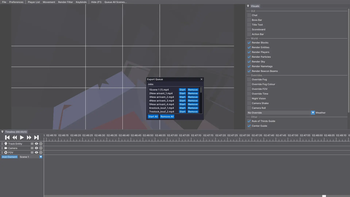
Nothing renders automatically: FlashBatch only queues the jobs into Flashback's own render queue, exactly as if you had clicked "Add to Queue" on every scene yourself.
Requirements
Source
Source code: https://github.com/louisjnrt1-hash/Flashbatch
- Edition: Minecraft Java
- File type: .jar
- Minecraft version listed: 26.2
- How to install: Install the matching mod loader (Forge, Fabric or NeoForge) for your Minecraft version. → Download the .jar. → Put it in the .minecraft/mods folder and launch that loader profile.
- Where to get it: Opens on Modrinth — not every file is mirrored on our own servers.
Install steps are the general flow for this file type — How to install Minecraft Java mods & modpacks walks through it step by step.
- Ships as flashbatch-26.2-1.0.0.jar — drop this file into the mods folder
- Download size: 47 KB
- Download link checked 22 Oct 2026 — working
These come from our own check of the pack file, not from the source page.
Related Java mods

Shulkercraft's - Essentially Enhanced
Stack Shulkers Data Pack (1.20.5, 1.19.4) – Experience The Convenience And Efficiency!

Shulker / Ender Chest tooltip

Flashback Studio

Craftable Elytra \Shulker box
