
TitleMenuFix
Java mod listed for Minecraft 26.x. Downloads from the MC Java Mods app on Android.
A modern improvement for Minecraft's title screen. Replaces sprite buttons with animated, expand-on-hover alternatives. Features Realms management…
⬇ Download on Modrinth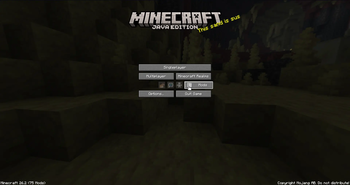
Title Menu Fix
A client-side Fabric mod for Minecraft that reimagines the title screen icon row. Sprite buttons (Friends, Language, Accessibility) become smooth expand-on-hover widgets with animated text reveal. Includes full Realms button management and deep configuration via ModMenu + YACL.
Features
- Animated Icon Buttons – Hover over an icon to watch it glide open, revealing the button label with a smooth opacity fade. Non-hovered buttons dim gracefully, keeping focus on your target.
- Realms Management – Group Realms on the same row as Multiplayer, or hide it entirely. Options and Quit shift automatically to fill the gap.
- Per-Button Visibility – Independently hide Friends, Language, or Accessibility buttons through the config screen.
- ModMenu & YACL Integration – Full graphical configuration with categorized options (Icon Buttons, Realms). No manual JSON editing required.
- Mod Compatibility – Custom mod buttons that extend
SpriteIconButtonorFriendsButtonare automatically detected and receive the same animated treatment. - Zero Overrides – Uses
@Injectmixins only. Original button classes are never modified.
Dependencies
| Dependency | Version | Required |
|---|---|---|
| Fabric Loader | ≥0.19.3 | ✓ |
| Minecraft | ~26.2 | ✓ |
| Java | ≥25 | ✓ |
| Fabric API | * | ✓ |
| Fabric Language Kotlin | ≥1.13.12+kotlin.2.4.0 | ✓ |
| ModMenu | * | ✓ (suggested) |
| YetAnotherConfigLib | ≥3.9.4+26.2 | ✓ (suggested) |
Configuration
Accessible via ModMenu → Title Menu Fix Config.
Icon Buttons
| Option | Default | Description |
|---|---|---|
| Hide Friends Button | Off | Remove the friends button from the title screen |
| Hide Language Button | Off | Remove the language button |
| Hide Accessibility Button | Off | Remove the accessibility button |
| Disable Hover Animation | Off | Buttons stay as static icons without text expansion |
Realms
| Option | Default | Description |
|---|---|---|
| Hide Realms Button | Off | Completely remove the Realms button |
| Group Realms with Multiplayer | On | Place Realms on the same row as Multiplayer |
Building
./gradlew build
The compiled JAR is placed at build/libs/title-menu-fix-*.jar.
Development
This project targets Minecraft 26.2 with Mojang official mappings and Fabric Loom 1.17. All source code is written in Kotlin — no Java source files (except Loom-generated artifacts).
License
MIT
- Edition: Minecraft Java
- File type: .jar
- Minecraft version listed: 26.2
- How to install: Install the matching mod loader (Forge, Fabric or NeoForge) for your Minecraft version. → Download the .jar. → Put it in the .minecraft/mods folder and launch that loader profile.
- Where to get it: Opens on Modrinth — not every file is mirrored on our own servers.
Install steps are the general flow for this file type — How to install Minecraft Java mods & modpacks walks through it step by step.
- Ships as title-menu-fix-1.0.0.jar — drop this file into the mods folder
- Download size: 685 KB
- Download link checked 24 Oct 2026 — working
These come from our own check of the pack file, not from the source page.