
ModsJava
Player Workstation
Java mod listed for Minecraft 26.x. Downloads from the MC Java Mods app on Android.
A Minecraft mod that allows you to access calculator, notepad, crafting list and tools that you can create your own rule.
⬇ Download on Modrinth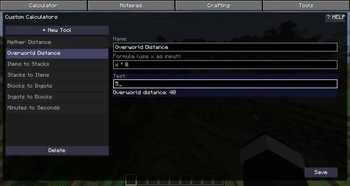
Player Workspace
An all-in-one workspace mod for Minecraft. Press P to open a fast, in-game overlay with four tools.
Features
Calculator
- Expression evaluation with parentheses and operators (
+,-,*,/) - On-screen buttons for quick input
- History of past calculations (persistent across sessions)
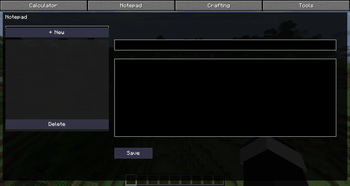
Notepad
- Create, edit, and delete notes in-game
- Titles and content are saved automatically
- Configurable max notes and note length (via ModMenu)
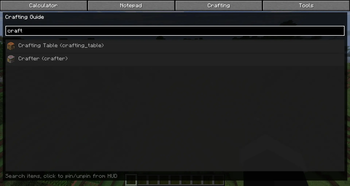
Crafting Guide
- Search any item by name or ID
- Pin items to your HUD for quick reference
- Multiple pinned items shown stacked on-screen
- Configurable pin position (via ModMenu)
Tools
- Custom calculation tools using formulas with
xas input - Built-in examples: Nether/Overworld distance, stack size calculator, block/ingot conversion, minutes to seconds
- Test formulas live before saving
- Wiki with usage instructions
Requirements
- Minecraft 26.2
- Fabric Loader 0.19.0+
- Fabric API (any version for 26.2)
- ModMenu (optional, for settings screen)
Installation
- Install Fabric Loader for Minecraft 26.2
- Download Fabric API for 26.2 and place it in your
modsfolder - Download Player Workspace and place it in your
modsfolder - (Optional) Download ModMenu for the settings GUI
Configuration
Settings can be changed in-game via ModMenu, or directly in
.minecraft/config/playerworkspace.json:
pinX/pinY: HUD pinned items positionmaxNotes: Maximum number of notesmaxNoteLength: Maximum characters per note
Key Bindings
| Key | Action |
|---|---|
| P | Open workspace overlay |
Quick facts
- Edition: Minecraft Java
- File type: .jar
- Minecraft version listed: 26.2
- How to install: Install the matching mod loader (Forge, Fabric or NeoForge) for your Minecraft version. → Download the .jar. → Put it in the .minecraft/mods folder and launch that loader profile.
- Where to get it: Opens on Modrinth — not every file is mirrored on our own servers.
Install steps are the general flow for this file type — How to install Minecraft Java mods & modpacks walks through it step by step.
File checked by MCModsHub
- Ships as playerworkspace-1.0.0.jar — drop this file into the mods folder
- Download size: 3.7 MB
- Download link checked 25 Oct 2026 — working
These come from our own check of the pack file, not from the source page.