
Blocks Is Sulfur Cubes
Java mod listed for Minecraft 26.x. Downloads from the MC Java Mods app on Android.
⬇ Download on Modrinth
Everything Is Sulfur Cube
Server-side Fabric mod for Minecraft Java 26.2.
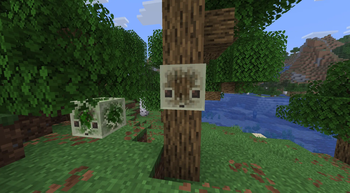
When a player tries to break a block, the block is replaced with a real minecraft:sulfur_cube carrying that block in its body slot. Right-click block placement is not changed.
Players do not need to install this mod on their clients when joining a server that has it installed.
Features
- Converts left-clicked blocks into block-sized Sulfur Cubes.
- Stores the interacted block item in the cube's body equipment slot.
- Prevents the original block item from dropping during conversion.
- Keeps empty Sulfur Cubes visible and unmanaged.
- Supports per-player Sulfur Cube shell visibility for cubes carrying blocks.
- Sends no command feedback to player chat; changes are logged to the server console.
Commands
Player commands:
/eiscubes visible
/eiscubes invisible
/eiscubes reset
Admin commands:
/eiscubes default visible
/eiscubes default invisible
/eiscubes players allow
/eiscubes players deny
/eiscubes players deny prevents non-admin players from changing their personal visibility mode. Admins can always change their own mode and the default mode.
Config
The config file is created at:
config/everything_is_sulfur_cube.properties
Important keys:
defaultInvisible=false
allowPlayerVisibilityChanges=true
Player-specific preferences are saved by UUID.
Requirements
- Minecraft Java 26.2
- Fabric Loader 0.19.3 or newer
- Fabric API
Notes
The mod uses a server-side mixin to send different vanilla entity metadata to different players. No custom client networking is required.
- Edition: Minecraft Java
- File type: .jar
- Minecraft version listed: 26.2
- How to install: Install the matching mod loader (Forge, Fabric or NeoForge) for your Minecraft version. → Download the .jar. → Put it in the .minecraft/mods folder and launch that loader profile.
- Where to get it: Opens on Modrinth — not every file is mirrored on our own servers.
Install steps are the general flow for this file type — How to install Minecraft Java mods & modpacks walks through it step by step.
- Ships as everything-is-sulfur-cube-1.2.0+26.2.jar — drop this file into the mods folder
- Download size: 12 KB
- Download link checked 4 Oct 2026 — working
These come from our own check of the pack file, not from the source page.