
GEsc
GEsc gives the pause and options menus a sleek dark-glass makeover with glowing cyan accents. Every button, slider, and checkbox is redesigned with smooth…
I don't know my version or loader
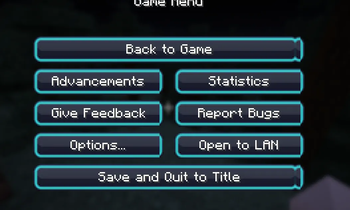
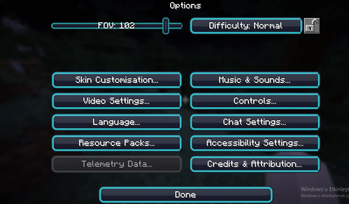
Tired of Minecraft's flat, gray pause screen? GEsc reimagines the vanilla UI with a sleek, dark glass-panel aesthetic and glowing cyan accents, giving your Escape menu and Options screens a modern, polished look — without touching gameplay, blocks, or textures anywhere else. What's included:
Buttons — Redesigned with a dark navy glass finish, subtle inner sheen, and a soft cyan border. Hovering lights them up with a brighter glow, while disabled buttons fade into a muted gray glass style. Sliders — Volume, FOV, render distance, and every other slider now use a slim pill-shaped track with a glowing cyan-outlined handle instead of the old blocky bar. Checkboxes — Toggle options get a clean rounded box with a crisp cyan checkmark when enabled, plus matching hover states. Pack Icon — A custom-branded icon to match the theme.
Compatibility: Built and tested for Minecraft 1.21.4. Since it only replaces GUI sprite textures, it's lightweight, has zero performance impact, and works alongside any texture pack that doesn't already override GUI widgets. Installation: Drop the .zip file directly into your resourcepacks folder (no need to extract it) and enable it from Options → Resource Packs.
- Edition: Minecraft Java
- File type: .zip (resource pack)
- Minecraft versions listed: 1.21.5, 1.21.6, 1.21.7
- How to install: Download the .zip resource pack — do not unzip it. → Put it in .minecraft/resourcepacks. → Enable it in Options → Resource Packs.
- Where to get it: Opens on Modrinth — not every file is mirrored on our own servers.
Install steps are the general flow for this file type — How to install Minecraft Java resource packs walks through it step by step.
- Downloads as GEsc.zip
- Download size: 21 KB
- Download link checked 24 Aug 2026 — working
These come from our own check of the pack file, not from the source page.