Minigames With Friends
Java mod listed for Minecraft 1.21–26.x. Downloads from the MC Java Mods app on Android.
⬇ Download on Modrinth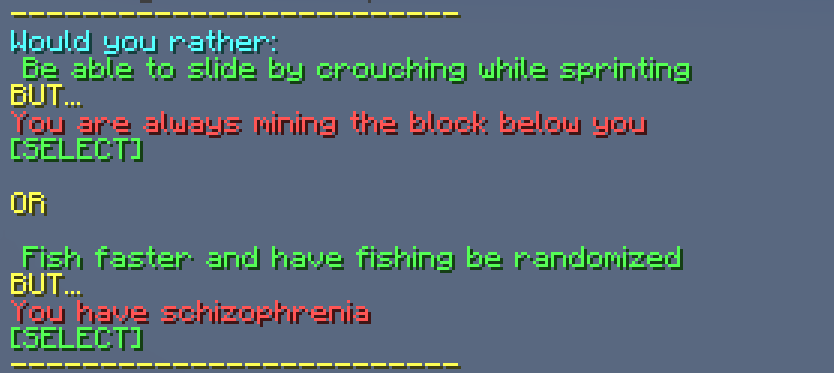

Minigames With Friends!
Minigames With Friends is a unique minecraft plugin that bundles together 5 different fun minigames plus a set of game-altering modifiers, that you can play either separately, or mixed together for an even better experience!
Minigames/Gamemodes included:
Blockshuffle: All players will be assigned a block randomly, and stepping on that block before time runs out awards players points.
Demohttps://github.com/user-attachments/assets/4b4525df-74df-47bd-adb1-67ac1b4c1d2b
DeathSwap: Every x minutes players will swap locations with eachother. Players earn points by killing the person who swapped with them, for example, by having them fall to their death.
DeathMatch: Every x minutes, players will duke it out to the death in an arena, preserving their inventory on death. Last player standing earns a point.
DimensionSwap: A totally new, never seen before gamemode! Every x minutes players will change the dimension they're in, into any custom minecraft map from a preconfigured pool. Every x swaps, players will have a deathmatch, with the last player surviving earning a point. [Additional setup required]
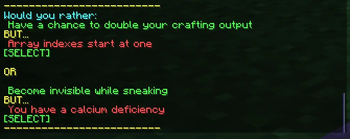
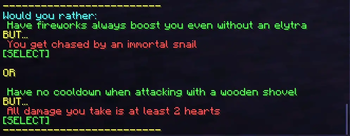
Would You Rather: A unique minigame heavily inspired by EightSidedSquare's WouldYouRather mod. Every x minutes players will be prompted to choose between 2 options, with both options containing a good and a bad effect. Players attempt to create a build that is most benefical to them, to eventually help them win the other minigames. [No points are gained from this gamemode] Also available as a standalone plugin, due to its size and complexity.
Demohttps://github.com/user-attachments/assets/9c9fb934-8adc-4bb1-a74a-8bfeba48b617
Example Prompt #1
Example Prompt #2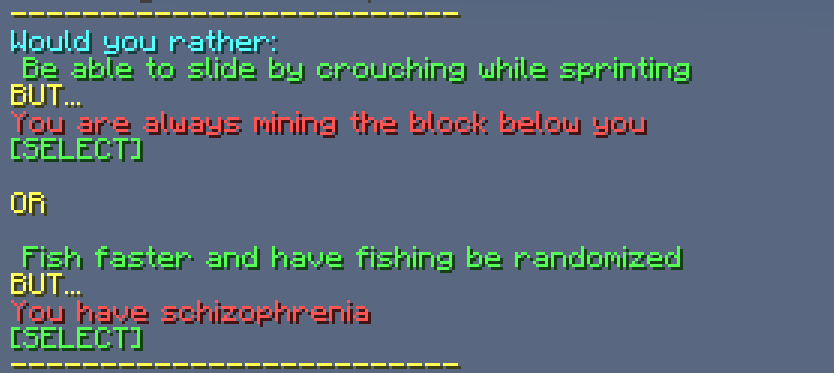
Example Prompt #3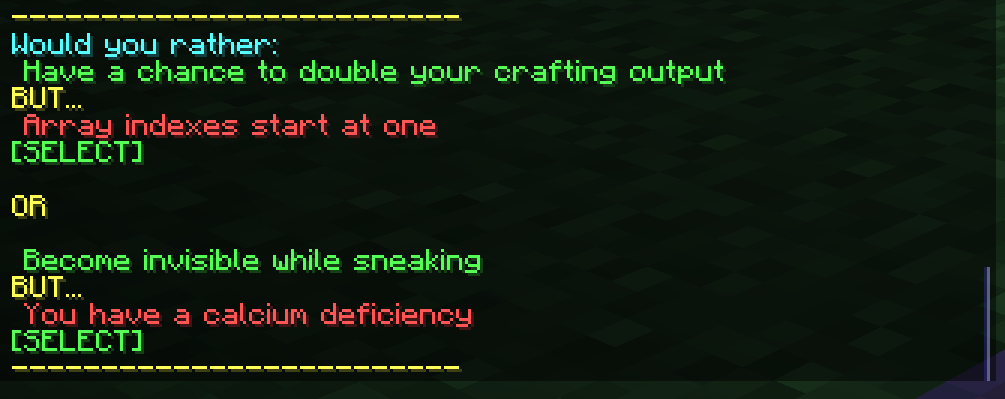
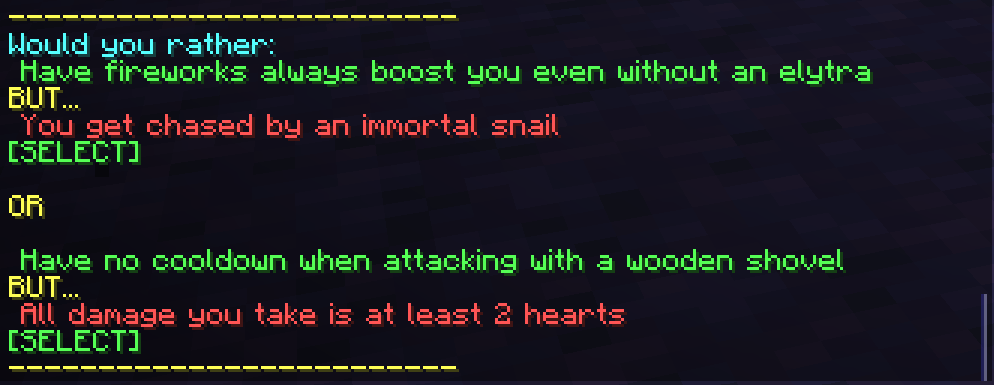
Modifiers included:
Modifiers add complexity and fundamentally change how the vanilla game works, and thus do not award any points. Because of this, they are designed to be mixed into whatever gamemodes you're already playing.
Randomizer: All blocks now drop a random but consistent other item instead of what they normally drop. Players must now attempt to find out how to get good gear with this restriction.
Demohttps://github.com/user-attachments/assets/c69ab889-85bf-4577-a80c-cb71b246696c
AllBlocksHaveGravity: Every block near a player is subject to gravity, meaning all blocks around the players functions like sand or gravel would.
BreakingABlockBreaksWholeColumn: Breaking any block also breaks the whole vertical column above and/or below it, with optional fancy animations.
Getting Started
To get Minigames With Friends up and running, here and the steps you need to follow.
- Install the plugin on your server
- (Optional) Configure the settings for each gamemode and modifier. This is done with
/mg ConfigGamemode <gamemode name> [config key] [config value],/mg ConfigModifier <modifier name> [config key] [config value], or/mg ConfigMainGame [config key] [config value]for settings that apply to the whole game. The tab completions will be quite helpful in showing you the avaible options. For more about plugin configuration, look at the configuration guide HERE - Choose and enable what gamemodes you want to play, with
/mg EnableGamemode <gamemode name>. If a game is not currently in progress, enabling a gamemode will not start it immediately, but rather queue it up for when the game does start. It's also totally supported (and intended) that you enable multiple gamemodes at the same time, and while any combination will work with eachother, you can find a list of recommended combinations HERE. - (Optional) Add any modifiers you want on top, with
/mg EnableModifier <modifier name>. Modifiers stack freely with each other and with any gamemodes. Use/mg DisableModifier <modifier name>to remove one. - Start the game by doing
/mg start. This will start the game, will all enabled gamemodes and modifiers now going into effect.
Need Support?
There are many more features and complexities of the plugin that can hardly be described in one page. For additional setup information, help with configuration, or more info about each gamemode, you should refer to GitHub wiki hosted HERE
Additionally, if you need help with anything related to the plugin, if you found a bug that you want to report, or if you have a suggestion of a feature that you want added, please refer the following. You can report issues and make suggestions on the Github issue tracker. Alternatively, if you want support, or another place for bug reports and suggestions, feel free to join my discord server!
Acknowledgements
I want to give a huge shout out to Matistan for inspiring the whole idea of this plugin. I was very inspired by how high quality his blockshuffle and deathswap plugins were, and I will fully admit that there are parallels in the design between his plugins and mine.
I also need to massively shout out EightSidedSquare for coming up with the idea of the WouldYouRather gamemode. I loved watching his showcase of his WouldYouRather mod, and I thought it would be a perfect addition to have a similar concept implemented in this plugin.
- Edition: Minecraft Java
- File type: .jar
- Minecraft versions listed: 1.21, 1.21.1, 1.21.2
- How to install: Install the matching mod loader (Forge, Fabric or NeoForge) for your Minecraft version. → Download the .jar. → Put it in the .minecraft/mods folder and launch that loader profile.
- Where to get it: Opens on Modrinth — not every file is mirrored on our own servers.
Install steps are the general flow for this file type — How to install Minecraft Java mods & modpacks walks through it step by step.
- Ships as MinigamesWithFriends-1.2.3.jar — drop this file into the mods folder
- Download size: 985 KB
- Download link checked 25 Oct 2026 — working
These come from our own check of the pack file, not from the source page.