Essential Permissions Mod adds permission checks into vanilla, to allow for full permission customization.
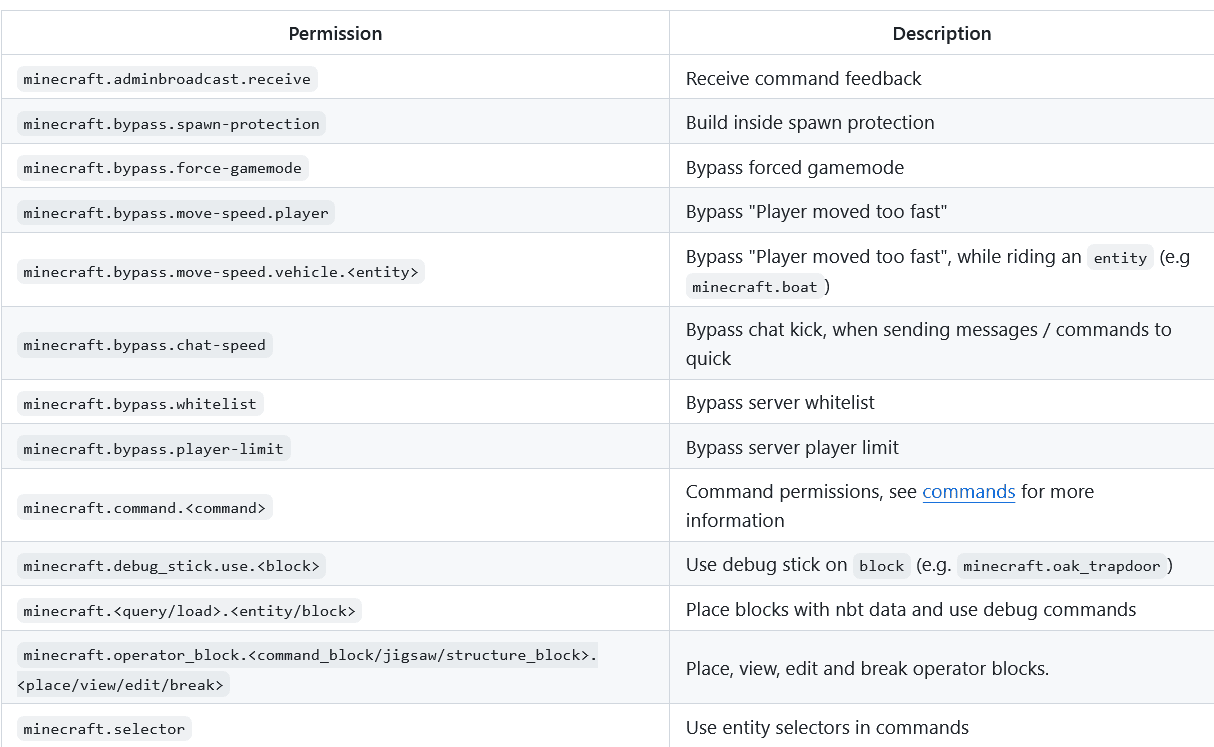
Permissions:
Commands:
Command permissions use the node system of brigadier. Each node has its own permission, e.g. to get access to the /gamemode survival command minecraft.command.gamemode permission is required for access to the /gamemode command node, and minecraft.command.gamemode.survival is required to be able to run /gamemode survival. If you wish to grant full access to a command you need to give access to all child nodes, e.g. minecraft.command.gamemode.*.
Quality of Life:
Server Side:
If the mod is installed server-side, it will make clients think they’re OP. This allows players with appropriate permissions to place operator blocks and access the gamemode switcher menu.
Execute Command:
- Includes another condition: /execute if permission to allow datapacks to check permissions (e.g. /execute if permission @s group.admin run say I am an admin)
Modifiers:
- The feedback modifier /execute feedback [silent | console] or /execute feedback entity is used to silence, or redirect command feedback (e.g. /execute feedback silent run gamemode creative)
- The oplevel modifier /execute oplevel or /execute oplevel can be used to reduce the op permission level of the command source context, this can be useful if you want to run a command as a user (from functions or console), but want bypass permissions to work (e.g. /execute as DrexHD oplevel entity @s run rtp, this will use the op level of the player DrexHD instead of the actual command executor for checking permissions like rtp.bypass)
Client Side:
- If the mod is installed on the client, the gamemode switcher can also be accessed, if the player has access to the command, but isn’t OP (useful for spigot-based servers).
Essential Permissions Mod Download Links
Other Version:
Show More- Edition: Minecraft Java
- File type: .jar
- Minecraft version listed: 1.20.1
- How to install: Install the matching mod loader (Forge, Fabric or NeoForge) for your Minecraft version. → Download the .jar. → Put it in the .minecraft/mods folder and launch that loader profile.
- Where to get it: In MC Java Mods, or directly above on this page.
Install steps are the general flow for this file type — How to install Minecraft Java mods & modpacks walks through it step by step.
- Downloads as 33537.mcaddon
- Download size: 97 KB
- Download link checked 25 Sept 2026 — working
- Mirrored on our own servers — the download does not depend on the original host
These come from our own check of the pack file, not from the source page.